



For online stores, prioritize transactional long-tail keywords mapped to product and collection pages, then scale the pattern across your catalog. These phrases convert faster because they capture a shopper who already knows what they want. The keyword types that matter for ecommerce break down into five buckets:
- Transactional long-tail (“buy waterproof hiking boots size 11”)
- Product-specific (exact model or SKU names)
- Category-level (broader collection terms)
- Commercial investigation (comparison and review searches)
- Informational (how-to and buying-guide queries)
If you only have an afternoon, spend it here: build a seed list from your own catalog and site search data, then run a three-minute validation pass in a keyword tool before you write a single page. Everything else in this framework builds on that first move.
Key Takeaways
Transactional long-tail keywords mapped to product and collection pages produce the fastest revenue impact, and every other keyword type should support that core.
| Point | Details |
|---|---|
| Start with transactional long-tail | Map these to product and collection pages first for the fastest revenue return. |
| Group by buyer job, not product name | This prevents cannibalization and builds pages that match how customers actually search. |
| One primary keyword per page | Add three to five secondary variations to avoid competing against your own pages. |
| Mine first-party data before tools | Site search, support tickets, and reviews reveal buyer language external tools miss. |
| Use MartechAI for continuous tracking | Its SEO audits and keyword tracking flag ranking drift before it costs traffic. |
Table of Contents
- The 7 Types of Keyword Research for Online Stores
- Matching Search Intent to the Right Page Type
- A Step-by-Step Workflow for Ecommerce Keyword Research
- Which Tools Actually Validate Each Keyword Type
- Scaling Keyword Research Across a Growing Catalog
- Where Ecommerce Keyword Research Goes Wrong
- Planning for Seasonality and Search Trends
- Turning Customer Behavior into Keyword Opportunities
- Reading Competitor Keyword Strategy the Right Way
- What I’d Do Differently If I Were Starting Today
- How MartechAI Turns This Framework Into Daily Practice
- Sources
- FAQ
The 7 Types of Keyword Research for Online Stores
Not every keyword deserves the same page, the same content format, or the same amount of your team’s attention. Ecommerce marketers who treat all keywords the same way end up with product pages trying to rank for informational terms, or blog posts competing against their own category pages. Here’s the breakdown that actually maps to how stores make money.
1. Short-tail keywords
Short-tail terms are one or two words: “running shoes,” “coffee maker.” They carry the highest search volume and the highest competition, and they rarely convert on their own. These belong on your top-level category pages, where the goal is visibility and internal link distribution, not immediate conversion. Expect a slow climb and a long payoff horizon.
2. Long-tail keywords
Long-tail phrases run four words or more and describe a specific need: “best coffee maker for small kitchen under $100.” Long-tail keywords convert better for small and mid-sized stores because they capture narrowly defined buyer intent, even though each individual term pulls modest volume. Target these on product pages and detailed buying guides. A single long-tail phrase might bring 40 monthly visits, but the conversion rate often runs several times higher than a short-tail equivalent.
3. Product-specific keywords
These include exact model numbers, brand names paired with product types, or precise attribute combinations: “Ninja Foodi 8-in-1.” Product-specific searches signal a shopper deep in the funnel, often just comparing price and stock availability. They belong exclusively on the product detail page. Competition is usually low unless you’re competing with the manufacturer’s own listing or a marketplace reseller.
4. Category-level keywords
Category terms sit between short-tail and long-tail: “men’s waterproof hiking boots” or “organic baby formula.” These map directly to your collection pages and carry moderate volume with moderate competition. They’re the backbone of your site architecture, and getting the page structure right here prevents the cannibalization problems that plague larger catalogs.
5. Problem/solution keywords
Shoppers searching “how to stop dog from chewing furniture” or “fix squeaky door hinge without oil” are naming a problem, not a product. These queries fit buying guides and blog content that link out to relevant products. They rarely convert on the first visit, but they build the topical authority that supports your commercial pages later.
6. Branded keywords
Searches that include your store name or a specific brand you carry (“Patagonia fleece [Your Store]”) show strong purchase intent and low competition, assuming you rank for your own name. These belong on branded landing pages or brand-specific collection pages.
7. Occasion and value-driven keywords
Gift guides, seasonal terms (“Mother’s Day gifts under $50”), and values-based searches (“sustainable phone cases”) cluster here. They spike hard around specific calendars and work best as dedicated landing pages refreshed each year rather than evergreen product pages.
Pro Tip: Mine your product attributes for hidden long-tail signals. If your product data includes fields like “material,” “use case,” or “fit,” each combination is a potential buyer-job keyword. A boot listed as “waterproof, size 11, wide fit” is really three long-tail keywords stacked into one product.
Matching Search Intent to the Right Page Type
Every ecommerce keyword falls into one of four intent categories, and sending traffic to the wrong page type is the single most common way stores waste organic visibility. Get the mapping wrong and you’ll rank for a term that never converts, or worse, confuse Google about what your page is actually for.
Informational intent (“how to choose a mattress firmness”) wants an answer, not a sales pitch. Route these to blog posts or buying guides, then link contextually to relevant category pages.
Commercial investigation intent (“best mattress for side sleepers,” “Casper vs Purple mattress”) signals a shopper comparing options before buying. This intent fits comparison pages, detailed buying guides, or category pages with strong filtering and review content.
Transactional intent (“buy Purple mattress queen size,” “mattress free shipping”) means the shopper is ready to purchase now. Send this traffic straight to the product or collection page, no detours.
Navigational intent (“Purple mattress official site”) means the shopper already knows the brand and wants to find it fast. This traffic should land on your homepage or a branded landing page.
Reading the SERP itself tells you which intent Google has already decided for a term. If the results page is stacked with “best of” list articles and comparison tables, that’s commercial investigation, and a bare product page won’t compete. If you see shopping ads and product carousels dominating, that’s transactional, and a blog post has no chance.
- Informational → blog post or buying guide
- Commercial investigation → comparison page or filtered category page
- Transactional → product or collection page
- Navigational → homepage or branded landing page
Different keyword patterns map to different page types with distinct ROI profiles, and transactional patterns deliver the fastest revenue impact, which is exactly why they deserve first claim on your team’s time.
A Step-by-Step Workflow for Ecommerce Keyword Research
Here’s the operational sequence, in order, that turns a blank spreadsheet into a prioritized keyword set mapped to your catalog.
- Seed generation. Pull terms from four sources: your product catalog attributes, Google Search Console’s existing query data, your site’s internal search bar, and direct customer questions from support tickets or reviews.
- Expansion. Feed each seed into a keyword tool to surface variations, questions, and related searches. Free options like Google’s own autocomplete and the “People also ask” boxes work for a quick pass; paid tools go deeper on volume and difficulty.
- Filtering. Score every keyword using conversion proximity, product fit, and ranking feasibility. A term can have solid volume and still fail this test if you don’t actually stock a product that satisfies it.
- Grouping. Cluster keywords by buyer job rather than by product name. Grouping by the underlying problem or constraint prevents you from building five near-duplicate pages that split your own ranking power.
- Mapping. Assign one primary keyword to each page, with three to five secondary variations woven into the copy and metadata.
- Monitoring. Track ranking movement and actual sales data monthly through Search Console and your analytics platform, then reallocate effort toward what’s working.
A simple scoring formula keeps step three honest: multiply conversion proximity by product fit by feasibility, on a 1 to 5 scale each. A keyword scoring 5 on conversion proximity but 1 on feasibility (because three major retailers already dominate page one) isn’t worth chasing yet.
- Seed sources: catalog data, GSC, site search, customer questions
- Expansion tools: autocomplete, “People also ask,” paid keyword databases
- Filter criteria: conversion proximity × product fit × feasibility
- Grouping unit: buyer job, not product SKU
- Monitoring cadence: monthly, tied to actual sales
This workflow also solves a problem most stores don’t see coming: as your catalog grows, keyword sprawl grows faster. A documented content workflow keeps new product launches from creating duplicate keyword targets nobody assigned on purpose.
Which Tools Actually Validate Each Keyword Type
Your own store data beats generic search volume every time, because it reflects real buyers, not aggregate search behavior. Site search logs show you what shoppers can’t find. Support tickets show you the language customers use for problems they don’t know how to name. Mine those before opening any external tool.
For free validation, Google’s autocomplete and “People also ask” boxes reveal real query variations at no cost, and Search Console shows you which terms are already sending impressions your way, even at low positions. That’s often enough for a small catalog.
For paid tools, use Google Keyword Planner for volume validation and a platform like Ahrefs or SEMrush for competitor gap analysis and SERP-feature tracking. Pull three specific metrics: keyword difficulty score, estimated monthly traffic to the top-ranking page, and which SERP features (shopping ads, featured snippets, video carousels) currently occupy the results.
Two less obvious techniques round out the toolkit: scan marketplace listings like Amazon or Etsy for the exact phrasing sellers use in titles, since that language often mirrors buyer search terms directly, and run a small paid ad test on a candidate keyword before committing content resources to it.
Pro Tip: Run a three-minute validation before writing any page: search the exact keyword, note which SERP features appear, check the top three ranking pages’ word count and format, then decide if your store can realistically compete within 90 days.

Scaling Keyword Research Across a Growing Catalog
A framework that works for 50 products falls apart at 5,000 unless you build it around repeatable patterns instead of one-off research for every SKU. The fix is a keyword-to-page mapping matrix: define your recurring patterns (category + attribute, problem + product type, brand + model) once, then apply that pattern to every new product as it enters the catalog.
The anti-cannibalization rule that matters most: one primary keyword per page, with three to five secondary variations baked into the copy. Skip this and you’ll eventually have four category pages all fighting Google for the same query.
As you validate new patterns, check them against AI Overviews and other AI-generated answers, not just classic search results. Validating keywords against AI search surfaces catches visibility gaps before they cost you traffic in 2026’s increasingly AI-mediated search results. Structured data and clean technical SEO foundations help your product data get pulled into those AI answers correctly.
Inside MartechAI, this looks like running keyword tracking against a defined pattern library, then letting SEO audits flag pages that drift from their assigned primary keyword before cannibalization sets in. The campaign studio ties that mapping directly to the content calendar, so a new product launch already has its keyword assignment before the page goes live.
A quarterly audit should check four things:
- Which pages have drifted from their assigned primary keyword
- Which patterns are underperforming against their traffic estimate
- Which new products haven’t been mapped to a pattern yet
- Which AI Overview results now show competitors where your brand used to appear
Where Ecommerce Keyword Research Goes Wrong
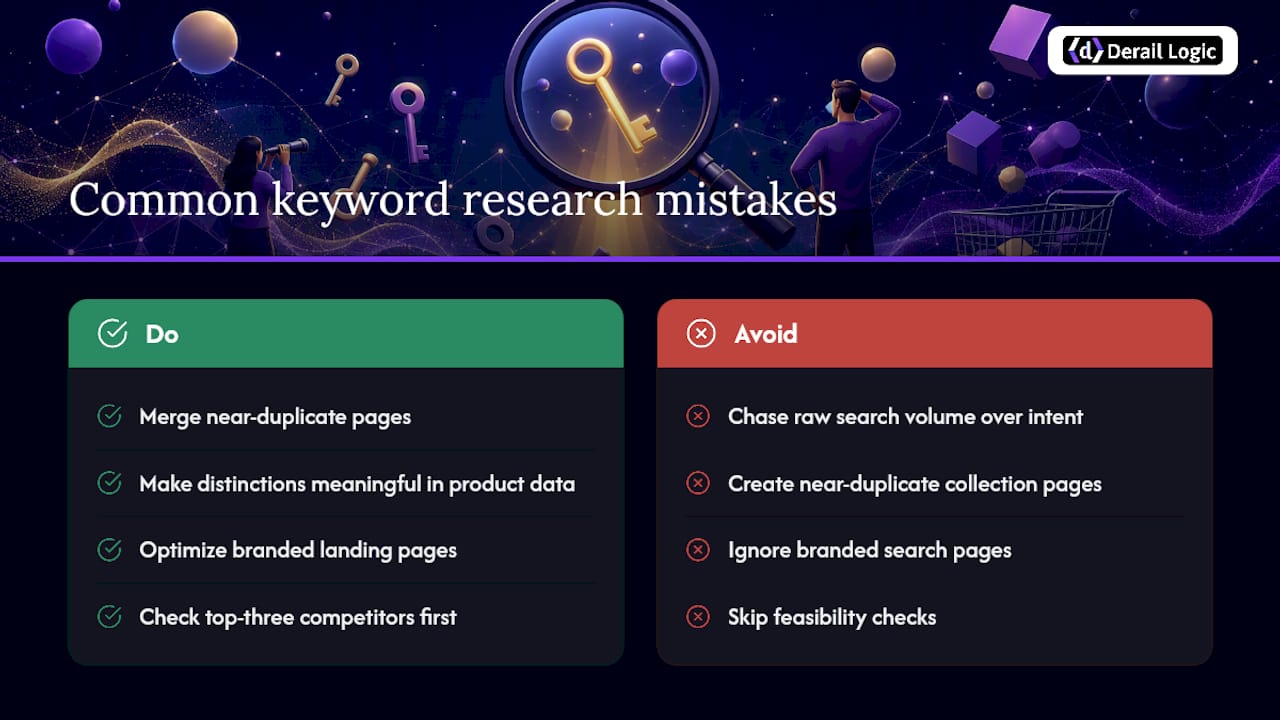
The most expensive mistake is chasing volume over intent. A category term with 10,000 monthly searches looks impressive in a spreadsheet, but if the SERP is dominated by informational content and you’re pointing a product page at it, you’ll never rank and never convert.
A close second: building near-duplicate pages for near-duplicate keywords. Two collection pages targeting “waterproof jacket” and “water resistant jacket” separately split your authority instead of combining it. Merge them, or make the distinction genuinely meaningful in the product data.
Ignoring branded search is another common gap. Stores assume they’ll automatically rank for their own name and skip optimizing branded landing pages, then lose that traffic to marketplace listings or review sites that outrank them for their own brand terms.
Static keyword lists cause slow decay. A keyword set built once and never revisited misses new competitors entering a category, shifting seasonal demand, and changing SERP features. What ranked with a plain product page last year might now need comparison content to compete against a “best of” listicle that didn’t exist before.
Finally, plenty of stores skip the feasibility check entirely. They target a keyword because it converts well in theory, without checking whether three entrenched competitors already own page one. Ambition without a feasibility score wastes months of content effort on pages that never break into the top ten.
Planning for Seasonality and Search Trends
Ecommerce search demand isn’t flat, and treating it that way leaves revenue on the table twice a year. Gift-occasion terms spike hard around fixed calendar points: Mother’s Day, back to school, the winter holidays. Build dedicated landing pages for these terms months in advance, since Google needs time to index and rank a page before the demand window opens.
Trend-driven keywords behave differently from occasion keywords. A sudden spike in “cold plunge tub” searches or a fitness trend cycling through social media can create a short window of high-volume, low-competition opportunity. Catching these early requires watching search trend data regularly, not just during your quarterly planning cycle.
The practical split that works for most catalogs: dedicate the bulk of your keyword research budget to evergreen, low-competition long-tail terms that convert steadily all year, and treat seasonal or trend spikes as a smaller, faster-moving side project with its own short production timeline. Evergreen terms build the foundation; seasonal pages capture the spikes on top of it.
One overlooked detail: seasonal pages from last year still carry ranking equity if you update rather than delete them. Refreshing a “Mother’s Day gift guide 2025” into a 2026 version keeps the accumulated backlinks and ranking history instead of starting from zero every twelve months.
Turning Customer Behavior into Keyword Opportunities
Your site search bar is a keyword research tool that most stores never open. Every query typed into it is a shopper telling you, in their own words, what they couldn’t find through your navigation or existing content. Export that data monthly and cross-reference it against your current page mapping.
Product reviews and support tickets carry similar signal. If customers repeatedly describe a product using a phrase your listing doesn’t include (“great for small apartments,” “quiet enough for a nursery”), that phrase is a validated buyer-job keyword you didn’t have to guess at. Weave it into the product copy and you’re now targeting language your actual customers use, not language a keyword tool guessed at.
Post-purchase surveys and abandoned cart follow-ups reveal a different layer: the objections and comparisons shoppers made before buying or before leaving. If several respondents mention comparing your product to a specific competitor, that comparison query belongs on your radar for a dedicated comparison page.
None of this replaces external keyword data, but it adds a layer of behavioral evidence external tools can’t provide since it reflects people who already engaged with your actual store, not a generalized search population.
Reading Competitor Keyword Strategy the Right Way
Start with the pages competitors rank for that you don’t. A gap analysis in a paid keyword tool will show you the terms sending them organic traffic where your store has no equivalent page at all. That gap list is usually more useful than trying to reverse-engineer their entire keyword strategy.
Pay close attention to the page type they used for each keyword, not just the keyword itself. If a competitor ranks a detailed buying guide for a term you’d assumed belonged on a product page, that’s a signal about what Google actually wants to serve for that query, and copying their format matters more than copying their word choice.
Watch their category and collection page structure for naming patterns. A competitor splitting “running shoes” into “trail running shoes,” “road running shoes,” and “running shoes for flat feet” has already done audience segmentation work you can validate against your own catalog before building matching pages.
Don’t stop at direct competitors. Marketplace listings on Amazon or Etsy for products similar to yours often reveal keyword phrasing that smaller competitor sites haven’t picked up on yet, giving you a lead on emerging language before it becomes commonplace.
What I’d Do Differently If I Were Starting Today
Most keyword research advice treats every keyword type as equally worth chasing, and that’s the wrong lens for a store with limited hours and a real product catalog to maintain. I’d start narrower than feels comfortable: pick the ten highest-margin products, map their transactional long-tail terms, and get those pages right before touching a single blog post. The buying-guide content and informational keywords matter, but they’re a multiplier on a foundation that has to exist first. If you’re deploying this framework for the first time, the product page optimization checklist is a solid next stop, and the MartechAI blog covers the pattern-based scaling approach in more depth for catalogs beyond a few hundred SKUs.
How MartechAI Turns This Framework Into Daily Practice
Running this workflow by hand across a growing catalog eats a full day every month, split between three or four disconnected tools that don’t talk to each other. Derail Logic’s platform closes that gap by putting keyword tracking, SEO audits, and campaign planning inside one workspace, so a keyword mapped in the research phase flows directly into the content calendar without a manual handoff.

The visual campaign studio lets you assign a primary keyword to a page the moment it’s planned, not after it’s published, and the built-in SEO audits flag drift the moment a page’s ranking keyword starts sliding away from its assigned target. Keyword tracking runs continuously in the background instead of requiring a manual pull every few weeks, which means the quarterly audit checklist above becomes a standing report instead of a recurring task someone has to remember to run.
If your catalog has outgrown a spreadsheet, start with the marketing automation platform to see how keyword mapping, content planning, and performance tracking work together inside one workflow.
Sources
For readers who want to go deeper on any single piece of this framework, these sources cover the specifics in more detail:
- Ecommerce keyword research guide — Digital Commerce
- Keyword research for eCommerce — SEMrush
- Ecommerce keyword research framework — SEOBRO
FAQ
What are the main types of keywords used in SEO?
Search marketers generally group keywords into categories covering intent (informational, commercial, transactional, navigational), length (short-tail, long-tail), and specificity (branded, product-specific, category-level, problem/solution).
What are some good keywords for an ecommerce store?
The strongest starting point is transactional long-tail phrases that combine a product type with a specific attribute, like size, material, or use case, since these convert at a higher rate than broad category terms.
What are the four types of SEO?
The four commonly recognized types are on-page SEO, off-page SEO, technical SEO, and local SEO, each addressing a different layer of how a site earns visibility. A technical SEO foundation matters especially for ecommerce catalogs with thousands of product pages.
How do I know which page type a keyword belongs on?
Read the current search results for that term: if list articles and comparisons dominate, it’s commercial investigation intent suited to a buying guide; if shopping ads and product listings dominate, it’s transactional and belongs on a product or collection page.
How often should I revisit my ecommerce keyword research?
Run a full audit quarterly, checking for ranking drift, new competitor entries, and shifting seasonal demand, and use continuous tracking tools like MartechAI’s keyword tracking to catch changes between audits.


