



Technical SEO for online stores is the site configuration and performance work that lets search engines discover, render, and index your product and category pages reliably. It’s the plumbing behind the storefront: crawl access, page speed, structured data, and clean URLs. Without it, even a beautifully merchandised catalog stays invisible to the shoppers searching for it.
If you manage an ecommerce site and only have an hour this week, work through this in order:
- Check indexation first. Open Google Search Console and look at the Index Coverage report for pages marked “Excluded” or “Crawled, currently not indexed.”
- Fix canonical conflicts. Confirm your top 100 revenue-generating products have a single, correct canonical URL, not five competing variants.
- Add Product schema. Implement JSON-LD markup with price, availability, and brand on every product page that doesn’t have it yet.
- Address Core Web Vitals on money pages. Run your top category and product templates through PageSpeed Insights and fix whatever’s dragging Largest Contentful Paint past 2.5 seconds.
- Confirm HTTPS and sitemap health. Every URL in your sitemap should return a 200 status and match your canonical tags exactly.
Pro Tip: Roughly 68% of online shopping journeys start with a search engine, which is exactly why crawl and index problems cost more on a store than almost any other site type. A blog post that doesn’t rank loses traffic. A product page that doesn’t rank loses a sale.
That’s the short version. The rest of this guide breaks down each layer, from site architecture down to server infrastructure, with the tools and checklists you need to fix it yourself.
Key Takeaways
Technical SEO for online stores works when crawl control, structured data, and page speed are fixed on revenue-driving pages before any broader content investment.
| Point | Details |
|---|---|
| Clean up crawl and index issues first | Audit parameter URLs and faceted navigation before any other technical work. |
| Fix Core Web Vitals on top pages | Prioritize the product and category templates that drive the most organic revenue. |
| Implement complete Product schema | Include offers, availability, and identifiers on your top 100 SKUs first. |
| Keep sitemaps and redirects clean | Split sitemaps by type and eliminate redirect chains after every migration. |
| Match fixes to platform reality | Shopify, WooCommerce, and Magento each carry different default risks worth auditing separately. |
| Track results in one place | MartechAI’s ecommerce analytics tie technical fixes to organic revenue without manual spreadsheet work. |
Where to Go for Deeper Reference
Keep a short reference list handy for ongoing audits rather than relying on memory:
- Google Search Central’s ecommerce developer guides for the canonical word on URL structure, pagination, and indexation.
- Schema for the authoritative definitions of every structured data type and property, including Product and Offer.
- Google Search Console for indexation status, Core Web Vitals field data, and crawl statistics.
- PageSpeed Insights or Lighthouse for lab-based performance measurement on individual page templates.
- Screaming Frog for full-site crawls that surface duplicate content, broken links, and canonical mismatches at scale.
- The Babylove Growth guide on measuring technical SEO’s business impact for tying fixes back to growth metrics.
Consult schema.org when you’re unsure about a specific property name, Search Console when you need to know how Google currently sees a page, and a crawler like Screaming Frog when you need to find every instance of a problem across thousands of URLs at once.
Table of Contents
- How Should You Structure Categories and URLs for a Large Catalog?
- What Controls Crawl Budget and Indexation on a Large Store?
- How Do You Handle Duplicate Product Pages and Canonical Tags?
- What Should You Prioritize for Page Speed and Core Web Vitals?
- Why Does Mobile Usability Matter So Much for Ecommerce?
- How Do You Implement Structured Data for Products?
- What’s the Right Approach to Sitemaps, Redirects, and Broken Links?
- How Should You Optimize Images and Media on Product Pages?
- How Does Your Ecommerce Platform Affect Technical SEO?
- What Does a Full Technical SEO Audit Actually Look Like?
- How Do You Measure Whether Technical SEO Is Actually Working?
- Why Crawl Budget and Schema Are the Higher-Impact Levers Right Now
- What Should You Actually Fix First?
- How MartechAI Fits Into Your Technical SEO Workflow
- Sources
- FAQ
How Should You Structure Categories and URLs for a Large Catalog?
A scalable ecommerce architecture follows a simple rule: homepage, category, subcategory, product, with no page buried more than three or four clicks deep. Google’s own ecommerce developer documentation recommends designing URL structure and navigation specifically to help crawlers understand which pages matter most. When your best-selling products sit six clicks from the homepage behind three layers of filters, you’re telling search engines those pages aren’t a priority, even if they generate half your revenue.

Clean URLs matter more on ecommerce sites than almost anywhere else because catalogs generate URL variations fast. A product available in four colors and three sizes can spawn a dozen parameter combinations if your platform isn’t configured carefully. Aim for URLs like /category/product-name rather than /category.php?id=4471&color=blue&ref=nav. Keyword-relevant slugs help both users and crawlers understand page content at a glance, and they’re far easier to audit later.
Taxonomy decisions ripple into analytics and internal linking too. If “Men’s Running Shoes” and “Running Shoes for Men” exist as separate category pages, you’re splitting link equity and reporting data across two URLs that should be one. A flat, hierarchical architecture with important pages close to the homepage keeps crawlers from ignoring deep inventory and gives you a cleaner signal in Google Analytics.
Not every filter combination deserves its own indexable page. A dedicated landing page makes sense for a category with meaningful search demand, like “waterproof hiking boots.” A filter combination like “size 9, blue, under $50” almost never does, and treating it like a landing page just multiplies your indexation problem.
Run this quick architecture review on your own site:
- Map click depth from the homepage to your top 50 revenue pages.
- List every category and subcategory URL and flag near-duplicates.
- Identify which filter combinations currently generate indexable URLs.
- Check whether your main navigation links to the pages you actually want ranked.
- Confirm breadcrumb markup matches your actual site hierarchy.
Pro Tip: Treat brand facets (Nike, Adidas, Patagonia) differently from attribute facets (size, color, price range). Brand pages often have real search volume and deserve their own indexable, linked URLs. Size and color filters almost never do, and should usually be handled with parameter rules or noindex rather than built out as full landing pages.
What Controls Crawl Budget and Indexation on a Large Store?
Crawl budget is the number of pages Googlebot is willing and able to crawl on your site within a given timeframe, and on large catalogs it gets burned fast by faceted URLs, tracking parameters, and orphan pages nobody links to anymore. Uncontrolled faceted navigation is one of the most damaging hidden pitfalls in ecommerce SEO, because every filter combination can generate a technically unique URL that Google has to decide whether to crawl.
Robots.txt, meta robots noindex, and canonical tags solve different problems, and mixing them up is one of the most common mistakes store owners make. Robots.txt blocks crawling entirely, which means Google won’t see a canonical tag or noindex directive on that page either. Meta robots noindex lets Google crawl the page but keeps it out of the index. Canonical tags tell Google which version of similar content should count as the “real” one. For most faceted navigation, canonical tags pointing to the main category page work better than blanket robots.txt blocks, because you still want link equity to flow.
Sitemap hygiene matters more as catalogs grow. Split large sitemaps by content type (products, categories, blog) rather than dumping everything into one file, and keep them fresh so newly published or discontinued products reflect quickly. Only include canonical, indexable URLs. A sitemap full of redirected or noindexed pages actively confuses crawlers about what you want indexed.
Here’s how to map the most common crawl problems to the tool that reveals them and the fix that resolves them:
| Problem | How to Detect It | How to Fix It |
|---|---|---|
| Crawl budget wasted on parameters | Search Console Crawl Stats report | Canonical tags or parameter handling to consolidate variants |
| Faceted navigation index bloat | Screaming Frog crawl of filtered URLs | Noindex low-value combinations; canonicalize to category page |
| Orphan product pages | Screaming Frog “Orphan Pages” report cross-referenced with sitemap | Add internal links from category and related-product modules |
| Slow or blocked crawling | Server log analysis | Remove unnecessary redirects; fix robots.txt overreach |
Screaming Frog’s crawl reports and raw server log files tell you what’s actually happening, while Search Console tells you how Google is interpreting it. Use both. A crawl might look clean in Screaming Frog but reveal a Googlebot stuck hitting the same 200 parameter URLs in your server logs.
How Do You Handle Duplicate Product Pages and Canonical Tags?
Duplicate URLs from product variants, sort orders, and tracking parameters dilute link equity and confuse search engines about which version deserves to rank. A single SKU available in six colors can easily generate six separate URLs if your platform isn’t configured to consolidate them, and each one competes with the others for the same search queries instead of combining their signals into one strong page.
The canonicalization rules that matter most for stores:
- If color and size variants live on separate URLs, pick one canonical version (usually the default or best-selling variant) and canonicalize the others to it.
- Paginated category pages should canonicalize to themselves, not back to page one. Canonicalizing page 2 and beyond to the homepage of a category hides products from the index entirely, which is one of the more damaging mistakes stores make without realizing it.
- Sort and filter parameters (
?sort=price_asc,?view=grid) should canonicalize to the clean, unparameterized URL. - Use Search Console’s URL parameter tools sparingly, and only as a supplement to canonical tags, not a replacement.
- Reserve noindex for pages with genuinely no search value, like internal search results or thank-you pages, rather than for variant management.
A common scenario: a store sells one t-shirt design in five colors, each with its own URL. The fix isn’t to noindex four of them. It’s to choose the most-searched or best-selling color as the canonical version, let the others exist for user navigation and inventory purposes, and canonicalize them to that primary URL so all the ranking signal consolidates in one place.
Run a quick audit for the mistakes that show up most often: check whether paginated pages self-canonicalize, confirm sort parameters don’t create indexable duplicates, and spot-check whether variant pages canonicalize to a single consistent target instead of pointing at each other in a loop.
What Should You Prioritize for Page Speed and Core Web Vitals?
Core Web Vitals affect both rankings and conversion rate on ecommerce sites, and product pages tend to be the worst offenders because they’re loaded with high-resolution images, third-party review widgets, and marketing scripts. The current benchmarks worth targeting: keep Largest Contentful Paint under roughly 2.5 seconds on critical pages, minimize Cumulative Layout Shift caused by late-loading banners or ads, and reduce Interaction to Next Paint by trimming unnecessary third-party code.
The usual culprits on stores are predictable: unoptimized product photography, a heavy theme with more JavaScript than the page needs, a stack of marketing pixels and chat widgets loading synchronously, and hosting that wasn’t built for catalog-scale traffic. Fixing all four at once isn’t realistic for most teams, so prioritize by what moves the needle fastest against what it costs to implement.
| Fix | SEO Impact | Implementation Effort | Priority for Large Catalogs |
|---|---|---|---|
| Compress and resize product images | High | Low | Do first |
| Remove or defer unused third-party scripts | High | Medium | Do first |
| Switch to WebP/AVIF with responsive srcset | Medium to High | Medium | Do second |
| Improve hosting/server response time | High | High | Do third (bigger project) |
| Rebuild theme to reduce JS bloat | Medium | High | Do last unless severe |
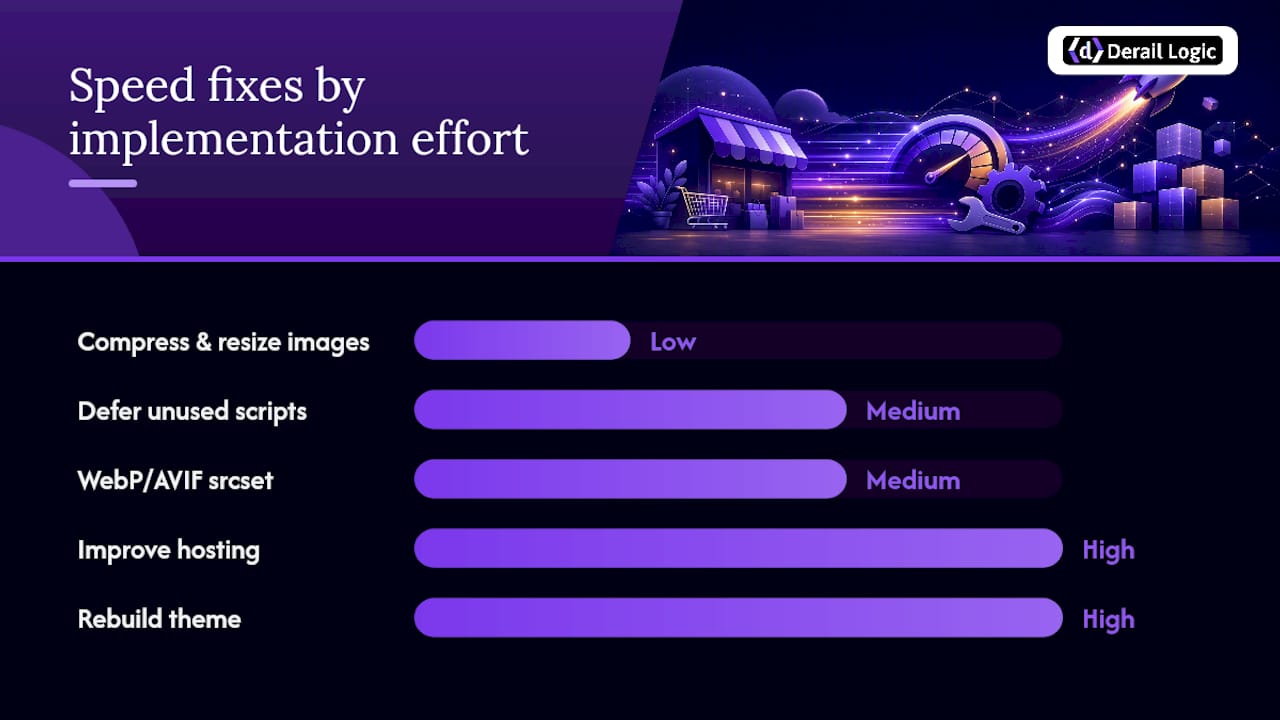
Practical fixes worth prioritizing: serve responsive images with a proper srcset, extract critical CSS so above-the-fold content renders without waiting on the full stylesheet, defer non-critical JavaScript, and audit every third-party tag on your site to see which ones are actually earning their keep. Reviews widgets, live chat, and retargeting pixels are common speed drains that marketing teams add without checking the performance cost.
Measure with PageSpeed Insights or Lighthouse for lab data, and pair it with real-world field data from the Chrome User Experience Report inside Search Console. Core Web Vitals should be measured per page template rather than as a site-wide average, because a slow product template can drag down conversions even while your homepage scores perfectly.
Why Does Mobile Usability Matter So Much for Ecommerce?
Google indexes and ranks the mobile version of your site, which means a product page that looks fine on desktop but breaks on mobile effectively doesn’t exist for ranking purposes. This matters more for stores than for most content sites because checkout and product-detail pages are where mobile usability problems translate directly into abandoned carts.
Run through this mobile checklist on your top templates:
- Confirm tap targets (buttons, size selectors, add-to-cart) are large enough to hit accurately with a thumb.
- Check font sizes render legibly without requiring a pinch-zoom.
- Verify your viewport meta tag is configured correctly across templates.
- Eliminate intrusive interstitials, especially popups that cover the add-to-cart button on load.
- Test checkout specifically on mobile, since form fields and payment buttons are where friction costs you the sale.
- Confirm mobile page speed separately from desktop, since mobile networks and devices are slower by default.
Mobile-specific speed tactics differ slightly from general Core Web Vitals work: serve smaller image variants to mobile viewports rather than scaling down desktop images client-side, load scripts conditionally so mobile users aren’t downloading desktop-only functionality, and consider adaptive loading that detects connection speed before deciding how much to load upfront.
Pro Tip: Test mobile usability on the specific templates that touch revenue most directly. A slow blog post costs you a little traffic. A checkout page that lags on mobile, where roughly 68% of shopping journeys begin with a search engine and a growing share of those searches happen on a phone, costs you completed orders.
Google’s own Mobile-Friendly Test is a decent first pass, but it’s not a substitute for testing on an actual device. Emulation in Chrome DevTools can miss real-world issues like touch target overlap or font rendering quirks specific to certain Android browsers, so spot-check your top templates on a real phone before calling mobile usability “done.”
How Do You Implement Structured Data for Products?
Structured data is the machine-readable layer that tells search engines and AI shopping tools exactly what a product is, what it costs, and whether it’s in stock, and it matters more now than it did a few years ago because AI shopping assistants increasingly rely on explicit schema rather than parsing page text to understand what you’re selling.
At minimum, your Product schema markup should include:
name,image, anddescriptionfor the product itselfbrandto identify the manufacturer or your store’s own labelsku, plusgtinormpnwhen you have them, for unambiguous product identificationofferswithprice,priceCurrency, andavailabilityso search engines know current stock statusurlpointing to the canonical product pageaggregateRatingonly when you have genuine customer reviews to back it, never fabricated or estimated ratings
Complete schema should include offers and identifiers to be fully useful, not just the basic name and image fields. A product marked up with only a name and photo gives search engines almost nothing to work with compared to one that specifies price, currency, and real-time availability.
Implement this as JSON-LD, placed in the page’s <head> or before the closing </body> tag, rather than using Microdata or RDFa inline in your HTML. JSON-LD is easier to generate programmatically across thousands of SKUs and easier to audit later, since it lives in one clean block instead of being scattered through your markup.
The canonical reference for every schema type and required property is Schema itself. When in doubt about a field name or acceptable value, that’s the source to check before Google’s Rich Results Test flags an error.
Validate your implementation with Google’s Rich Results Test on a sample of pages, then monitor the Enhancements reports inside Search Console to catch errors at scale once you’ve rolled schema out across the full catalog.
What’s the Right Approach to Sitemaps, Redirects, and Broken Links?
Sitemaps, redirects, and broken links are the maintenance layer of technical SEO, and neglecting them for even a few months on a large catalog creates a mess that takes weeks to untangle. Split large sitemaps by content type and keep them limited to canonical, indexable URLs only. A sitemap padded with redirected or noindexed pages sends mixed signals about what actually deserves crawling.
Redirect strategy matters most during migrations, replatforming, or seasonal catalog changes. Use 301 redirects for anything permanent, and reserve 302s for genuinely temporary situations, like an out-of-stock item expected back in two weeks. Avoid redirect chains where URL A points to B, which points to C: each hop adds latency and risks losing link equity along the way.
For discontinued or seasonal products, you have three reasonable options depending on the situation:
- If the product is gone permanently with no close substitute, serve a 410 status rather than a soft 404 or a generic redirect, since it tells Google clearly and quickly that the page won’t return.
- If a similar product exists, redirect to that specific product page, not just the parent category.
- If the page still has search value (a discontinued item people still search for), consider repurposing it into a buying guide or “similar products” page rather than deleting it outright.
Broken-link detection is a recurring task, not a one-time project. Running quarterly crawls with a tool like Screaming Frog catches 404s and redirect chains before they accumulate, and cross-referencing crawl data against Search Console’s coverage reports catches issues a crawler alone might miss, like pages Google has indexed that no longer exist on your site at all.
Pro Tip: Keep a running redirects file, not just ad hoc rules added whenever someone remembers. After any bulk migration or catalog cleanup, re-crawl the full sitemap and confirm every redirect resolves in a single hop with no loops, and no old URLs quietly return a 404 instead of routing somewhere useful.
How Should You Optimize Images and Media on Product Pages?
Images are usually the single heaviest asset on a product page, and they’re also the visual element doing the most work to convert a browsing shopper into a buyer, which means the optimization has to preserve quality while cutting load time. Use modern formats like WebP or AVIF instead of legacy JPEG or PNG where browser support allows, paired with a responsive srcset so mobile users aren’t downloading a desktop-sized file.

Lazy-loading makes sense as a default for anything below the fold, product thumbnails in a grid, images further down a long product description, related-product carousels. The exception is your hero image or primary product photo, which should load eagerly since it’s likely contributing to your Largest Contentful Paint score, and lazy-loading it can actually hurt rather than help.
Alt text serves both accessibility and SEO, and the two goals rarely conflict. Describe what’s actually in the image (“women’s navy blue wool peacoat, front view”) rather than stuffing it with keywords. Purely decorative images, like a background texture with no informational value, should carry an empty alt attribute (alt="") rather than a forced, meaningless description.
For product videos, host on a platform built for it rather than self-hosting large video files directly, use a lazy-loaded poster image instead of auto-playing video on page load, and serve an appropriately compressed stream rather than the original raw upload.
Pro Tip: Audit your five heaviest product pages first, not a random sample. Run them through PageSpeed Insights, note which images are the biggest contributors to load time, and fix those before rolling any image optimization workflow across the entire catalog.
How Does Your Ecommerce Platform Affect Technical SEO?
Platform choice shapes what you get automatically and what you have to fix by hand, and understanding those defaults saves you from chasing problems your platform was supposed to solve for you.
| Platform | Handles Automatically | Common Pitfalls |
|---|---|---|
| Shopify | Basic sitemap, HTTPS, mobile responsiveness | Limited control over URL structure; app bloat slows pages |
| WooCommerce | Full flexibility via WordPress and plugins | Plugin conflicts, taxonomy sprawl, self-managed hosting quality |
| Magento | Enterprise-grade customization and scale | Complex setup; requires dedicated dev resources for performance |
| Wix | Simple setup, hosted infrastructure | Limited technical customization; harder to fix at scale |
Platform choice matters less than execution, but Shopify tends to be easier to keep technically clean, largely because it handles HTTPS, basic sitemaps, and mobile responsiveness out of the box. What Shopify merchants still need to fix themselves at scale: URL structure limitations (Shopify forces /collections/ and /products/ prefixes you can’t remove), app-driven script bloat that tanks Core Web Vitals, and duplicate content from collection sorting parameters.
WooCommerce gives you far more granular control since it’s built on WordPress, but that flexibility is exactly what causes problems. Every SEO plugin, page builder, and product-variant extension you add is another potential source of conflicting canonical tags, duplicate sitemaps, or taxonomy sprawl where “Shoes,” “Footwear,” and “shoes” all exist as separate, competing categories.
Magento (now Adobe Commerce) suits large catalogs that need serious customization, but that power comes with real infrastructure demands. Performance on Magento depends heavily on hosting quality and developer expertise, more so than on Shopify or WooCommerce, where a lot of the groundwork is already handled.
Wix and similar site builders offer the easiest setup for small catalogs, but their technical customization ceiling is lower. If you’re running into structural limitations you can’t work around no matter what plugin or setting you try, that’s usually the signal a platform migration is worth evaluating, not another workaround.
What Does a Full Technical SEO Audit Actually Look Like?
A technical SEO audit for an ecommerce store follows a specific order, because fixing page speed before you’ve resolved indexation problems means you’re optimizing pages Google might not even be crawling yet. Work through these steps in sequence: crawl the site, check indexation status, measure Core Web Vitals, validate structured data, audit redirects, review canonicalization, check image optimization, test mobile usability, and finally assess server and hosting performance.
Here’s which tool handles each step and what to do with what you find:
| Audit Step | Tool | Immediate Action |
|---|---|---|
| Full site crawl | Screaming Frog | Export URLs, status codes, and duplicate title/meta issues |
| Indexation check | Google Search Console | Review Index Coverage for excluded and error pages |
| Core Web Vitals | PageSpeed Insights / Lighthouse | Flag pages failing LCP, CLS, or INP thresholds |
| Structured data validation | Rich Results Test | Fix schema errors before scaling markup to full catalog |
| Redirects and broken links | Screaming Frog + server logs | Consolidate chains; fix or 410 dead pages |
| Mobile usability | Mobile-Friendly Test | Confirm tap targets and viewport across templates |
The order matters because ecommerce sites face unique technical challenges around faceted navigation and dynamic inventory that a generic content-site checklist won’t catch. Prioritize fixes by impact versus effort: crawl and indexation problems tend to be high impact and often surprisingly low effort to fix (a canonical tag correction, a robots.txt adjustment), while server infrastructure upgrades are high impact but higher effort, so they belong on a slightly longer timeline.
Running this audit quarterly catches regressions before they compound, especially after a platform update, a new app installation, or a bulk catalog import, all of which are common ecommerce events that quietly break technical SEO without anyone noticing until traffic drops.
How Do You Measure Whether Technical SEO Is Actually Working?
The clearest primary KPI is index coverage in Search Console: are your priority pages indexed, and is that number trending up or down over time? Pair that with organic sessions, organic conversions, and revenue attributed to organic traffic, segmented specifically by page template rather than lumped into one site-wide number.
Secondary signals worth tracking alongside the primary metrics: crawl rate and crawl frequency from the Crawl Stats report, the number of indexed parameter URLs (a rising count usually signals a faceted navigation problem creeping back), sitemap coverage percentage, and your server error rate over time.
Pro Tip: *Nearly 68% of shopping journeys start with a search engine, which makes organic revenue per template one of the highest-value numbers you can put in front of a stakeholder.
Segment your reporting by page template, homepage, category, product, rather than reporting site-wide averages that mask where the real gains or losses are happening.
To tie technical work to revenue directly, run before-and-after comparisons around specific changes: track organic conversion rate for two weeks before and after a Core Web Vitals fix on your top 20 product pages, for example. A few queries worth monitoring on a recurring basis: branded search volume, category-level non-branded queries, and any query where you’ve dropped out of the top 10 unexpectedly, since that’s often the first sign of a technical regression rather than a ranking algorithm shift.
Why Crawl Budget and Schema Are the Higher-Impact Levers Right Now
Two levers matter more in 2026 than they did even a couple of years ago: crawl budget discipline and structured data depth. The reasoning behind both is straightforward once you see the numbers behind it.
Nearly 68% of online shopping journeys begin with a search engine. If crawl budget is being wasted on internal search results, redundant filter combinations, and tracking-parameter duplicates, your best-converting pages are competing for crawl attention against pages that will never make you a dollar.
That’s the case for crawl budget control. The case for structured data is newer: AI shopping assistants and generative search surfaces increasingly rely on explicit schema markup to understand what a product is, what it costs, and whether it’s available, rather than parsing loosely-structured page text the way older crawlers did. A product page with thin or missing schema doesn’t just rank worse. It becomes functionally invisible to AI agents trying to answer a shopper’s question about price or availability.
The practical next step if you only have bandwidth for one project this quarter: audit your parameter URLs for crawl waste, and implement complete Product schema, not just name and image, across your top 100 revenue-generating pages. Both are more attainable than a full replatform or a site-wide content overhaul, and both compound over time as Google and AI systems build more confidence in your data.
What Should You Actually Fix First?
If your team has limited time and even more limited developer resources, here’s where the return on effort is highest, in order.
First, fix category-page indexation and canonicalization before touching anything else. Category pages carry more aggregate search volume than most individual product pages, and they’re also where faceted navigation causes the most crawl waste. Cleaning this up first means every subsequent fix compounds on a healthier foundation instead of layering improvements onto index bloat that’s still quietly burning crawl budget.
Second, get complete Product schema onto your highest-revenue SKUs before rolling it out catalog-wide. It’s tempting to treat schema as an all-or-nothing project, but partial, high-quality markup on the pages that actually make money beats thin, rushed markup spread across ten thousand products. Depth on the pages that matter beats breadth everywhere.
Third, resist the urge to solve technical problems with more content. Treating an ecommerce store like a blog is the mistake I see most often. A team notices flat organic traffic and responds by publishing buying guides, when the actual problem is that half their category pages aren’t indexed. Content can’t fix a crawl problem.
On timelines: canonical tag fixes and schema implementation tend to show measurable results within a few weeks, since they change how Google interprets pages it’s already crawling. Core Web Vitals improvements and architectural changes take longer, often two to three months, because they depend on Google recrawling and re-evaluating pages at scale before the ranking impact shows up in your reports.
How MartechAI Fits Into Your Technical SEO Workflow
Fixing technical SEO issues is one project. Proving they moved revenue is a different one, and it’s usually the part that gets skipped because the data lives in five different dashboards. MartechAI is built to close that gap for ecommerce teams specifically, connecting the analytics that show whether a Core Web Vitals fix actually lifted conversions with the content and reporting tools that keep the rest of your marketing stack pointed at the same numbers.

A few places it fits directly into the workflow described above:
- Audit-to-report tracking: once you’ve run a crawl and fixed indexation or schema issues, MartechAI’s analytics dashboards let you track organic revenue by page template over time instead of exporting spreadsheets from three separate tools.
- Content-to-page publishing: when a category page needs a rewrite alongside a technical fix, the Content Studio helps you generate and publish SEO-aware copy without bouncing between a CMS and a separate SEO tool.
- Revenue-tied reporting: for teams juggling technical SEO alongside broader campaign work, MartechAI’s marketing automation features tie organic performance data into the same reporting view as your other channels, so a Core Web Vitals win doesn’t get lost in a siloed SEO report nobody else on the team ever opens.
If you’re spending more time reconciling spreadsheets than actually fixing pages, a trial is worth fifteen minutes. Start with the ecommerce solution page to see how the reporting layer maps onto the exact KPIs covered above.
Sources
- Technical SEO for Ecommerce | Search Engine Journal
- Ecommerce developer guides | Google Search Central
- The Ultimate Ecommerce SEO Guide | ScreamingCAT
FAQ
How Do I Start Doing SEO as a Beginner Managing an Online Store?
Start with Google Search Console to see how your site currently appears in search, then work through indexation, Core Web Vitals, and basic Product schema before touching keyword research or content, since technical problems block everything built on top of them.
What’s the Difference Between SEO and Technical SEO?
SEO is the broad discipline of improving search visibility, including keyword research, content, and link building. Technical SEO is the subset focused on crawlability, indexation, site speed, and structured data, the infrastructure that determines whether search engines can even access and understand your content in the first place.
What Are the Four Main Types of SEO?
Most practitioners group SEO into technical SEO (crawlability, speed, structured data), on-page SEO (content and keyword targeting), off-page SEO (links and external signals), and local SEO (visibility for location-based searches).
What Is Technical SEO, Specifically?
Technical SEO is the set of site-level optimizations, crawl access, indexation control, page speed, mobile usability, and structured data, that let search engines discover, render, and rank a website’s pages accurately.
Which Tools Do I Need for Technical SEO on an Ecommerce Site?
At minimum, Google Search Console for indexation and Core Web Vitals data, PageSpeed Insights or Lighthouse for speed audits, and Screaming Frog for full-site crawls covering redirects, canonicals, and broken links. Platforms like Shopify and WooCommerce each add their own considerations on top of these core tools.