



A well-executed product page optimization checklist can lift organic traffic, add-to-cart rates, and revenue per visitor at the same time. Most product detail pages (PDPs) fail on a handful of fixable issues: unclear CTAs, missing structured data, slow mobile load times, and thin copy that neither ranks nor converts. Fix those first, then layer in the refinements below.
Your priority checklist — triage these now:
- Above-the-fold clarity — Confirm product name, price, and primary CTA are visible without scrolling on mobile. Impact: high. First step: test on a real device at 375px width.
- Add-to-cart prominence — Make the button visually dominant, sticky on mobile, and placed within 300px of the price. Impact: high. First step: check button contrast ratio.
- Hero image quality — Lead with a lifestyle image, then detail, scale, and user photos. Impact: high. First step: audit your top 20 SKUs for image count and ordering.
- Reviews visible near CTA — Surface star rating and review count directly below the product title. Impact: high. First step: check placement on your highest-traffic PDPs.
- Shipping and returns near CTA — Show estimated delivery date and return window in the buy box. Impact: medium-high. First step: add a one-line shipping summary above the CTA.
- Structured data (Product/Offer/Review schema) — Validate with Google’s Rich Results Test. Impact: high for organic. First step: run the test on three PDPs today.
- Mobile page speed — Target a Largest Contentful Paint (LCP) under 2.5 seconds. Impact: high. First step: run PageSpeed Insights on your top five PDPs.
- Variant availability — Show stock status per variant, not just at the product level. Impact: medium. First step: test each size/color selector on your best-seller.
Pro Tip: Start with items 1, 2, and 4. They require no developer time and typically move add-to-cart rate within days.
Key Takeaways
A prioritized product page optimization checklist, executed consistently, is one of the highest-ROI activities an ecommerce marketing team can run because it improves organic rankings and conversion rate at the same time.
Table of Contents
- What elements does every product page need?
- SEO and discoverability: your product page optimization checklist
- How should you optimize images and media on product pages?
- How do you write product descriptions that convert and rank?
- How do reviews and social proof affect product page conversions?
- How should you handle variants, inventory, and pricing?
- What technical performance issues hurt product pages most?
- How do breadcrumbs and internal links help product pages rank?
- How do you audit product pages and measure what’s working?
- Why UX and SEO must work together on product pages
- What should busy ecommerce teams prioritize first?
- Derail Logic keeps your product page work connected
- Sources
- FAQ
What elements does every product page need?
Baymard’s benchmark research identifies a clear hierarchy of must-have PDP elements, and the gaps between sites that get this right and those that don’t are striking. Think of it in three tiers.
Must-have (non-negotiable):
- Descriptive product title that matches the H1 and the SEO title tag (they serve different jobs: the H1 is for the reader; the title tag is for search engines and should include your primary keyword, brand, and a key attribute like size or material)
- Hero image plus at least four additional angles or context shots
- Price, displayed prominently, with any unit pricing where relevant
- Clear options selector (size, color, quantity) with visible availability per option
- Single, visually dominant add-to-cart CTA
- Star rating and review count near the title
- Shipping estimate and return policy summary in the buy box
Nice-to-have (adds measurable lift):
- Video demo or 360-degree view
- Size guide or fit tool
- “Frequently bought together” or related-product module
- Q&A section with answered questions
Fancy (test before committing):
- AR try-on
- Live inventory countdown
- AI-powered personalized recommendations
NN/g’s UX guidelines for ecommerce make a point worth internalizing: images and media often answer shopper questions more effectively than long text. Layer your content for scanning, not for reading.
Pro Tip: Every element you add above the fold competes for attention. If your CTA is buried under a badge, a promo banner, and a loyalty widget, the button loses. Audit your above-the-fold real estate quarterly.
SEO and discoverability: your product page optimization checklist
Getting a product page indexed and eligible for rich results requires a specific set of checks. Search Engine Land’s complete product-page SEO guide and Ahrefs’ 14-step product-page SEO checklist both converge on the same core actions.
Title tag and H1:
- Title tag template:
[Product Name] | [Key Attribute] | [Brand](under 60 characters) - H1: product name only, matching the URL slug
- Avoid duplicate title tags across variant pages
URL and canonicalization:
- Use clean, descriptive URLs:
/red-running-shoes-womens/not/product?id=4421 - Set canonical tags on variant URLs pointing to the primary product URL
- Block faceted navigation parameters in robots.txt or via
rel="nofollow"on filter links
Meta descriptions:
- Write unique meta descriptions for your top 20% of PDPs by traffic; let the platform generate the rest from a template
- Include a benefit and a soft CTA: “Free shipping on orders over $50. Shop now.”
Structured data to implement:
| Schema type | Key fields to include |
|---|---|
| Product | name, description, image, brand, sku |
| Offer | price, priceCurrency, availability, url |
| AggregateRating | ratingValue, reviewCount |
| Review | author, reviewBody, datePublished |
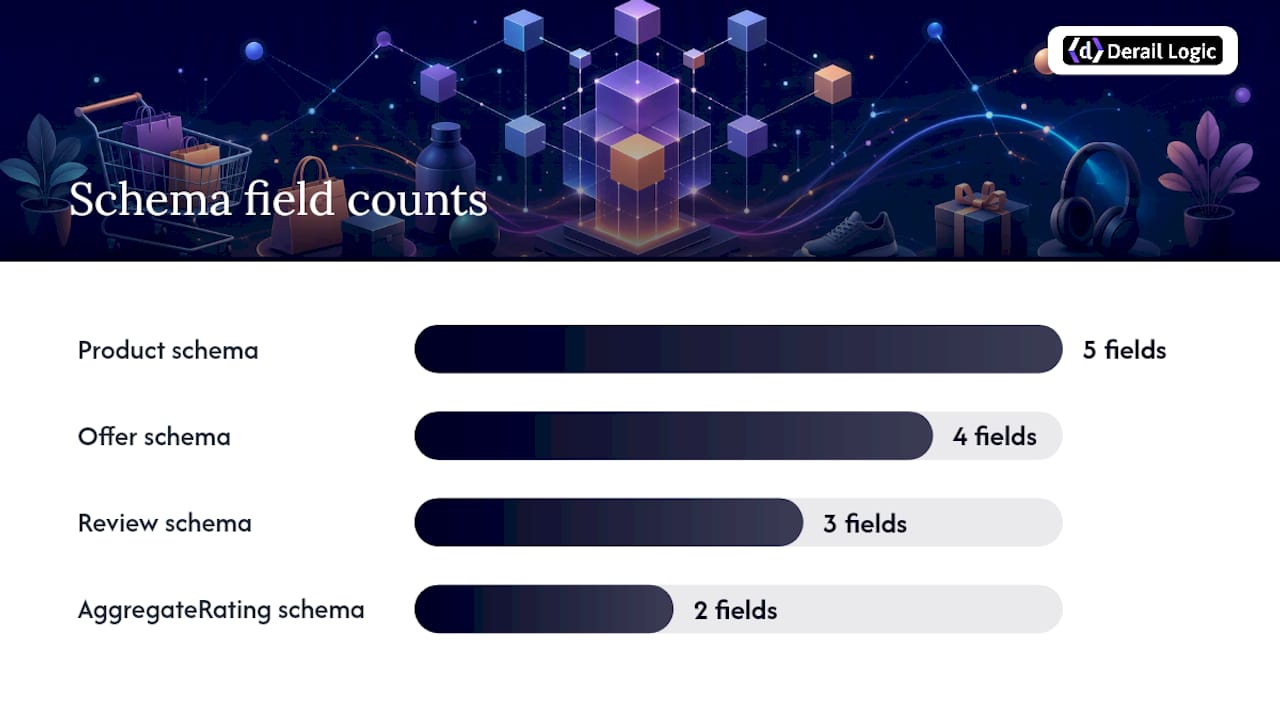
Validate all schema with Google’s Rich Results Test before deploying. For products sold through Google Shopping, connect your Google Merchant Center feed and confirm product data matches your on-page markup.
Indexing checks:
- Confirm PDPs are not accidentally blocked in
robots.txt - Remove
noindextags from live product pages - Include all canonical product URLs in your XML sitemap
- Use Google Search Console to verify coverage and spot crawl errors
Pro Tip: Run Ahrefs’ product-page SEO audit on your top 50 PDPs by organic traffic. Filter for pages with missing H1s, duplicate title tags, or missing alt text. Those three issues alone account for a disproportionate share of lost impressions.
How should you optimize images and media on product pages?
Product images are the primary purchase driver on most PDPs, according to ConversionStudio’s practitioner playbook. A minimum of 5–8 images per product, sequenced correctly, reduces abandonment and is often a high-ROI change that requires no developer time.
Recommended image sequence:
- Lifestyle hero (product in use, human model where relevant)
- Multiple detail angles (front, back, close-up of key features)
- Scale reference (product next to a common object or on a model with measurements noted)
- User-submitted photos (real-world context)
File and format best practices:
- File names: descriptive and keyword-relevant (
womens-red-running-shoe-side.webp, notIMG_4421.jpg) - Alt text: describe the image for accessibility and include the product name and key attribute (
Women's red running shoe, side view, size 8) - Use WebP or AVIF formats to reduce file size without visible quality loss
- Implement
srcsetso mobile devices load appropriately sized images
Video and interactive media:
- Keep demo videos under 60 seconds; place them third or fourth in the gallery, after the hero and detail shots
- Use a poster image so the video slot doesn’t cause layout shift before it loads
Performance:
- Lazy-load all images below the fold
- Serve images from a CDN
- Set explicit width and height attributes to prevent Cumulative Layout Shift (CLS)
Pro Tip: Compress images with a tool like Squoosh or Cloudinary before upload. A 200KB WebP image loads roughly four times faster than a 800KB JPEG, with no visible quality difference at typical screen sizes.
How do you write product descriptions that convert and rank?
Copy structure determines whether a shopper reads or bounces, and whether Google can match your page to long-tail queries. Pimberly’s SEO checklist for product pages and NN/g both emphasize layering content for different reader types.
Description structure:
- Line 1: One-sentence benefit statement directly under the product title (not a feature list, a benefit: “Runs 30% cooler than standard foam thanks to open-cell construction”)
- Bullets: 3–6 feature-to-benefit mappings, each under 15 words
- Specs table: dimensions, materials, weight, compatibility
- Long-form section: 150–300 words of natural-language copy targeting long-tail queries; this is where you answer “is this good for X?” questions
CTA and microcopy:
- One primary CTA per page; secondary actions (save, share, compare) should be visually subordinate
- Place the CTA within direct visual proximity to the price
- Microcopy examples that reduce friction: “Ships in 2 business days,” “Free returns within 30 days,” “Only 3 left in stock”
- On mobile, make the CTA sticky at the bottom of the viewport
Pro Tip: Mine your own reviews for the exact phrases customers use to describe the product’s value. If three reviewers say “perfect for narrow feet,” that phrase belongs in your bullets and your long-form copy. It’s the language your next buyer is already searching.
How do reviews and social proof affect product page conversions?
Trust signals are decision support, not decoration. Bazaarvoice’s field research shows that a PDP with verified ratings, visual UGC, and Q&A produces measurable lifts in consideration and purchase intent. The operational details matter as much as the presence of reviews.
Review placement and collection:
- Surface average rating and review count directly below the product title, not buried in a tab
- Show verified purchase badges to signal authenticity
- Prioritize review recency; a page with 200 reviews from three years ago reads as stale
- Respond to negative reviews within 24 hours where possible, per Bazaarvoice’s recommendation
Q&A best practices:
- Route unanswered questions to your product team within 48 hours
- Publish answered Q&As on the product page; they function as FAQ content for long-tail SEO
- Aim for at least 5 answered questions on your top 50 PDPs
Visual UGC:
- Display customer photos in a dedicated gallery section below the main image carousel
- Aim for 8–12 customer images per product on high-traffic pages
- Visual UGC closes the “imagination gap” between studio photography and real-world use
Additional trust signals:
- Security badges (SSL, payment logos) near the CTA
- “X people bought this in the last 24 hours” social proof counters, where data is real and accurate
- Third-party certification marks relevant to your product category
Automate review collection and post-purchase photo requests with marketing automation so the pipeline stays active without manual follow-up.
How should you handle variants, inventory, and pricing?
Variant handling is where many PDPs quietly lose conversions and accumulate duplicate-content problems simultaneously.
Variant UI:
- Use buttons for size and color selection, not dropdowns; buttons show all options at a glance and reduce selection errors, per Baymard’s guidance
- Gray out or visually distinguish unavailable variants rather than hiding them
- Show stock status per variant: “Only 2 left in size M” is more persuasive than a generic low-stock banner
Out-of-stock handling:
- Keep out-of-stock pages live with a waitlist or “notify me” option rather than returning a 404
- Show alternative products (“You might also like”) when the primary option is unavailable
- For discontinued products, 301-redirect to the closest category or replacement product
Price transparency:
- Show the total estimated order cost (product + shipping) before the CTA
- Display unit pricing where relevant (price per ounce, price per item in a bundle)
- Emphasize free shipping thresholds near the buy box
Pro Tip: If your platform creates a unique URL for every variant combination, set canonical tags on all variant URLs pointing to the primary product URL. This prevents index bloat and consolidates PageRank to the page that actually ranks.
What technical performance issues hurt product pages most?
Mobile accounts for the majority of ecommerce traffic in the US, and slow pages lose sales before a shopper ever reads the copy. Core Web Vitals are Google’s measurable proxy for page experience.
Target thresholds:
- LCP (Largest Contentful Paint): under 2.5 seconds
- INP (Interaction to Next Paint): under 200 milliseconds
- CLS (Cumulative Layout Shift): under 0.1
Quick-win audit flow:
- Run PageSpeed Insights on your five highest-traffic PDPs
- Note the LCP element (usually the hero image) and its load time
- Check for render-blocking scripts in the “Opportunities” section
- Run the same test on mobile, not just desktop
Technical fixes by effort:
- Low effort: Compress images, convert to WebP, add explicit image dimensions
- Medium effort: Defer non-critical JavaScript, inline critical CSS, enable browser caching
- Higher effort: Implement server-side rendering or hybrid rendering for product content; move to a CDN if not already using one
A technical SEO audit should also check for render-blocking resources and script management issues that inflate Time to First Byte.
Pro Tip: Add a sticky “Add to Cart” bar on mobile that appears after the user scrolls past the main CTA. This single change consistently recovers conversions from users who scroll deep into descriptions before deciding.
How do breadcrumbs and internal links help product pages rank?
Internal linking is PageRank plumbing. Done well, it connects your category authority to individual PDPs and keeps shoppers moving through your catalog.
Breadcrumbs:
- Implement breadcrumb navigation on every PDP: Home > Category > Subcategory > Product
- Mark up breadcrumbs with
BreadcrumbListschema so Google displays them in search results - Breadcrumbs orient users and reduce bounce rate from direct-landing traffic
Internal linking rules:
- Link from blog content and buying guides to relevant PDPs using descriptive anchor text
- Link from PDPs to parent category pages and related subcategories
- Avoid orphaned product pages; every PDP should be reachable within three clicks from the homepage
Related products:
- Place “Related products” and “Frequently bought together” modules below the main content
- Curated recommendations outperform purely algorithmic ones for niche catalogs; algorithm-driven works better at scale
- Track click-through rate on recommendation modules monthly; a module with under 2% CTR needs a layout or logic change
Sitemap inclusion:
- Confirm all canonical product URLs appear in your XML sitemap
- Exclude variant URLs and filtered navigation URLs from the sitemap
For teams managing large catalogs, the ecommerce content marketing SEO workflow guide covers how to scale internal linking and content templates across hundreds of SKUs.
How do you audit product pages and measure what’s working?
A 30-minute manual audit, run monthly on your top 20 PDPs by traffic, catches most regressions before they compound.
30-minute audit flow:
- Pull your top 20 PDPs by organic clicks from Google Search Console
- Check each for: title tag uniqueness, H1 presence, meta description, canonical tag, schema validation
- Run PageSpeed Insights on the top five
- Check Ahrefs for broken internal links pointing to these pages
- Verify structured data with Google’s Rich Results Test
Audit checks mapped to impact and effort:
| Audit check | Tool | Expected impact | Effort |
|---|---|---|---|
| Missing or duplicate title tags | Google Search Console / Ahrefs | High | Low |
| Missing Product/Offer schema | Rich Results Test | High | Low-Medium |
| LCP over 2.5s | PageSpeed Insights | High | Medium |
| Missing or generic alt text | Ahrefs / crawler | Medium | Low |
| No canonical on variant pages | Crawler (Screaming Frog) | Medium | Low-Medium |
| No reviews or stale reviews | Manual / Bazaarvoice | High | Medium |
| Orphaned product pages | Ahrefs / crawler | Medium | Low |
KPIs to track before and after changes:
- Add-to-cart rate (per PDP and by category)
- Cart-to-purchase rate
- Revenue per visitor (organic vs. paid vs. direct)
- Organic clicks and impressions per PDP (Google Search Console)
- Average position for target keywords (Ahrefs)
Teams managing multiple clients or large catalogs can use the agency campaign scaling guide to build a repeatable audit workflow across accounts.
Why UX and SEO must work together on product pages
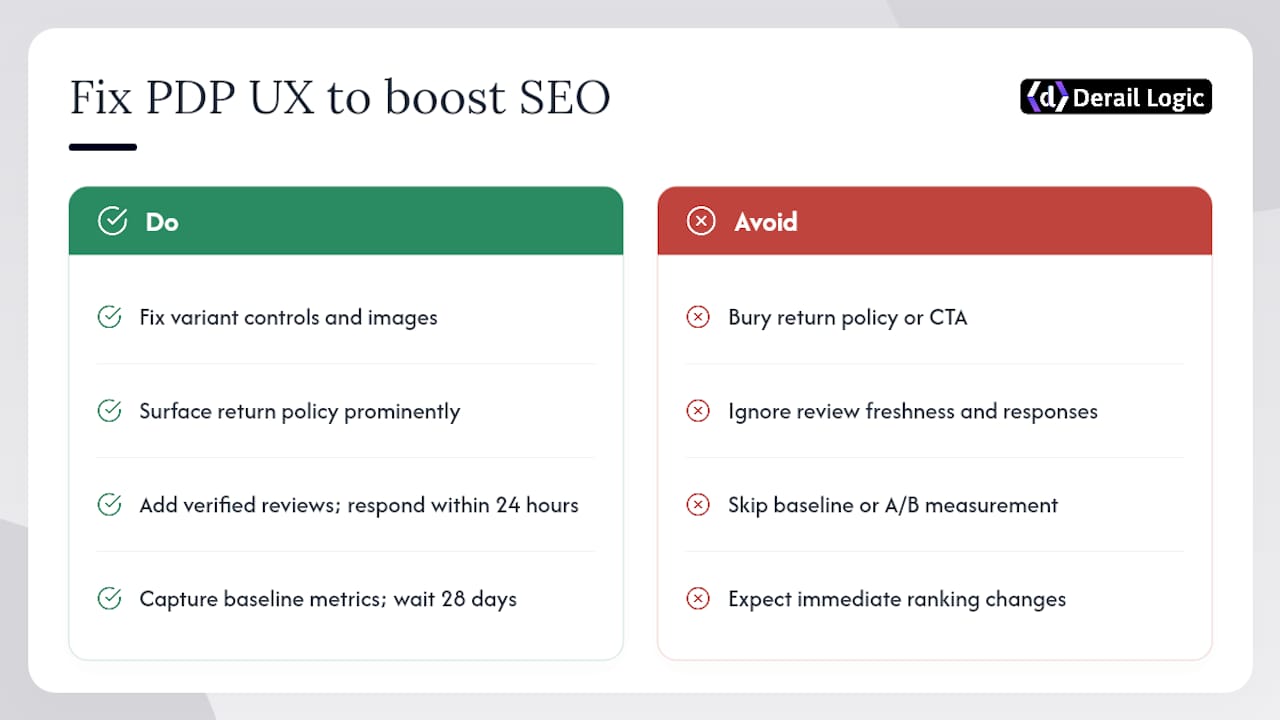
The evidence connecting UX quality to SEO performance is consistent across multiple research sources. Baymard’s 2026 benchmark finds that up to 62% of sites have mediocre or worse product-page UX, with specific failures around size-selection buttons, in-scale images, and return policy visibility. These are not cosmetic problems; they directly cause abandonment.
Bazaarvoice’s testing shows that a rich PDP with verified reviews and visual UGC produces measurable lifts in consideration and purchase intent. Review freshness and active response within 24 hours materially affect trust signals.
The connection to SEO runs through engagement metrics. A page where shoppers stay longer, scroll deeper, and click the CTA sends behavioral signals that correlate with ranking stability. Conversely, a fast-loading page with clear images and prominent reviews tends to earn more backlinks organically because it’s genuinely useful.
Key insight from Baymard and NN/g: Product page UX failures are not random. They cluster around the same fixable elements: unclear variant controls, insufficient images, buried return policies, and weak CTA placement. Fixing these simultaneously improves conversion rate and the engagement signals that support organic rankings.
Pro Tip: Before and after any major PDP redesign, capture a baseline of organic clicks, average position, and add-to-cart rate in Google Search Console and your analytics platform. Wait at least 28 days before drawing conclusions; Google’s ranking adjustments lag behind on-page changes.
For a broader look at how product page optimization trends are evolving in 2026, including AI-driven personalization and dynamic recommendations, the tactical landscape is shifting faster than most teams realize.
What should busy ecommerce teams prioritize first?
Most teams have more items on this checklist than they have hours in the sprint. The honest answer is to sort by traffic exposure multiplied by fix effort, not by what feels most exciting.
Next 30 days (marketing and copy, no developer needed):
- Rewrite title tags and meta descriptions on your top 20 PDPs by organic traffic
- Add or reorder images on your top 10 SKUs (lifestyle hero first, scale reference included)
- Surface reviews and star ratings near the product title on every high-traffic PDP
Next 90 days (requires some developer involvement):
- Implement Product/Offer/Review schema across all PDPs
- Add canonical tags to all variant URLs
- Deploy a sticky mobile add-to-cart bar
- Set up a monthly audit cadence using Google Search Console, Ahrefs, and PageSpeed Insights
The prioritization framework is simple: if a fix touches a page that gets 1,000+ organic visits per month and takes under two hours, do it this week. If it touches a low-traffic page and requires a sprint, schedule it for next quarter.
Marketing and copy teams can handle title tags, descriptions, image reordering, and review placement without touching code. Developer time is best reserved for schema implementation, canonical tag configuration, rendering changes, and Core Web Vitals fixes.
Derail Logic keeps your product page work connected
Fixing product pages one at a time is slow. Derail Logic’s unified marketing platform connects your SEO audit data, content workflows, and campaign analytics in a single workspace, so your team can track which PDP changes moved the needle and which ones didn’t.

The platform’s AI engine uses your actual product data to generate SEO-aware descriptions at scale, flag underperforming pages, and surface keyword gaps across your catalog. For ecommerce teams managing hundreds of SKUs, that’s the difference between a quarterly audit and a continuous improvement loop. Derail Logic also integrates review collection and post-purchase automation directly into your campaign workflows, keeping UGC fresh without manual follow-up.
Ready to run your first automated PDP audit? Explore Derail Logic’s ecommerce features or start with marketing automation to build your review and UGC pipeline today.
Sources
Quick reference for the tools and research cited throughout this checklist:
- Product Page UX Best Practices 2026 – Baymard Institute
- UX Guidelines for Ecommerce Product Pages – NN/G
- How to create the ‘perfect’ product detail page according to your shoppers | Bazaarvoice
- Product Page Optimization: 12 Changes That Increase Sales – ConversionStudio
Pro Tip: Bookmark the Google Search Console Coverage report and check it weekly. A single accidental noindex tag on a category page can silently remove hundreds of PDPs from Google’s index within days.
FAQ
What is the most important element on a product page?
The add-to-cart CTA, positioned near the price with a clear shipping summary, drives the most direct conversion impact. Baymard’s research identifies CTA prominence and above-the-fold clarity as the highest-priority fixes on most PDPs.
How often should you audit product pages?
Run a manual audit on your top 20 PDPs monthly using Google Search Console and PageSpeed Insights. A full catalog crawl with Ahrefs or a site crawler should happen quarterly.
Does structured data directly improve rankings?
Structured data (Product, Offer, Review schema) does not directly boost rankings, but it enables rich results in Google Search, which typically improves click-through rate and organic traffic to product pages.
How do you handle out-of-stock product pages for SEO?
Keep out-of-stock pages live with a “notify me” option rather than returning a 404. Add a related-products module and maintain the page’s internal links so it retains its crawl authority.
Can Derail Logic help manage product page optimization at scale?
Yes. Derail Logic’s platform connects SEO audit data, AI-assisted content generation, and marketing automation workflows so teams can monitor, update, and improve PDPs across large catalogs without switching between disconnected tools.


