



A correct multi-channel campaign tracking setup combines centralized server-side ingestion, a consistent UTM taxonomy, a unified event schema, bidirectional CRM sync, and multi-touch attribution in a single governed system. Before anything else, your team needs four pieces running: a documented UTM naming convention, client-side and server-side tags firing in parallel, a dataLayer schema with required fields, and a CRM passthrough that maps click IDs to contact records.
Your mandatory first move: draft your UTM convention document and run a paid-channel server-side ingestion test this week. Everything downstream depends on those two decisions being correct from day one.
The mandatory technical pieces to have in place before launch:
- UTM governance doc: defines allowed values for
utm_source,utm_medium,utm_campaign,utm_term, andutm_contentacross every channel and team member - Client + server tracking: browser-side tags (GTM) plus a server-side endpoint feeding conversion APIs directly to ad platforms
- Centralized
dataLayer: consistent event names, required fields, and schema version control - CRM passthrough: click IDs and UTM parameters captured in hidden form fields and written to contact records at the moment of lead creation
Practitioner audits show that missing parameter passthrough, incomplete click ID capture, and absent server-side event mapping commonly cause 20–30% attribution loss in complex funnels. That gap is recoverable, but only if you catch it before campaigns go live.
Key Takeaways
A correct multi-channel campaign tracking setup requires UTM governance, server-side conversion APIs, bidirectional CRM sync, and a unified attribution dashboard working together before any campaign goes live.
| Point | Details |
|---|---|
| UTM governance first | Document and enforce allowed UTM values before launching any channel; GA4 channel grouping depends on consistent utm_source and utm_medium. |
| Server-side APIs are non-negotiable | Deploy server-side conversion APIs for paid channels to recover the 20–30% of conversions that browser restrictions suppress. |
| CRM sync closes the revenue loop | Bidirectional CRM integration with offline conversion imports is what connects ad spend to closed revenue, not just leads. |
| QA before and after launch | Run GTM preview, network inspection, and CRM field verification pre-launch; monitor UTM coverage and conversion volume daily for the first seven days. |
| MartechAI unifies the stack | Derail Logic’s MartechAI platform connects campaign studio, CRM, server-side connectors, and attribution dashboards in one workspace to reduce reconciliation overhead. |
Table of Contents
- How do you set goals, KPIs, and an attribution model that fits your funnel?
- What tracking architecture and tools do you actually need?
- Step-by-step implementation checklist for end-to-end tracking
- How do you configure attribution and build dashboards that answer real questions?
- How do you QA and debug tracking before and after launch?
- What do privacy rules and a cookieless future mean for your tracking?
- What mistakes do teams make most often in multi-channel tracking?
- How MartechAI helps you orchestrate unified multi-channel tracking
- A practitioner’s perspective on what actually matters in these projects
- MartechAI gives you a faster path to unified campaign measurement
- Sources
- FAQ
How do you set goals, KPIs, and an attribution model that fits your funnel?
Start with business objectives, then work backward to three to six measurable KPIs. A B2B team running a 90-day sales cycle needs different signals than an e-commerce brand closing purchases in 20 minutes. Research on omnichannel shoppers confirms that customers who engage across channels deliver stronger outcomes, which is exactly why measuring each channel’s contribution accurately matters so much.
Common KPI set for a multi-channel program:
- Revenue by channel (normalized to a single attribution model)
- Cost per acquisition (CPA) by channel and campaign
- Customer lifetime value (LTV) segmented by acquisition source
- Assisted conversions and assisted revenue
- Return on ad spend (ROAS) with and without offline conversion imports
- Lead-to-close rate by channel (requires CRM sync)
Attribution model selection follows funnel length. For direct-response campaigns with short consideration windows, last-click or time-decay models give you a fast read on what closed the deal. For long B2B nurture funnels, data-driven or linear attribution surfaces the channels that warm prospects over weeks. First-touch attribution is most useful when you want to understand what generates net-new pipeline, not what closes it. Connecting ad platforms to your CRM with bidirectional data flow and offline conversion imports is what makes revenue-level attribution possible at all.
For campaign planning that connects goals to organic and paid channels, the discipline is the same: define the conversion event before you build the campaign, not after.
KPI ownership checklist:
- Assign one owner per KPI (not a team, a person)
- Set a weekly reconciliation cadence for paid channels, monthly for organic and email
- Define acceptance criteria for data quality: UTM coverage rate above 95%, click ID capture rate above 90%, CRM sync lag under 24 hours
What tracking architecture and tools do you actually need?
The data flow runs in one direction: user touch point → channel → landing page → client-side tag manager → server-side collector → analytics and attribution system → CRM or data warehouse. Every tool in your stack maps to one of those nodes.
Tool categories and their roles:
- Google Tag Manager (GTM): manages client-side tag firing,
dataLayerreads, and trigger logic without requiring code deploys - Google Analytics 4 (GA4): event-based analytics platform; GA4’s channel grouping depends on standardized
utm_sourceandutm_mediumvalues, so your UTM taxonomy directly controls how GA4 classifies traffic - Server-side tagging / conversion APIs: a server-side GTM container or a dedicated endpoint that sends events directly to Meta’s Conversions API, Google’s Enhanced Conversions, and other platform APIs, bypassing browser restrictions
- Meta (Facebook) Pixel + Conversions API: the Pixel handles browser-side signals; the Conversions API sends server-side events to fill the gaps left by ad blockers and iOS restrictions
- Call tracking (e.g., CallRail) / vanity numbers: assigns unique phone numbers or trackable URLs to each channel so offline conversions tie back to the originating campaign
- CRM: the system of record for lead and revenue data; feeds offline conversion imports back to ad platforms
- MartechAI (Derail Logic): unified dashboard layer that connects campaign studio, CRM integrations, and analytics into one workspace
dataLayer schema — required fields for every event:
{
  "event": "purchase",
  "event_id": "unique-dedup-id",
  "user_id": "hashed-email-or-crm-id",
  "transaction_id": "order-123",
  "value": 299.00,
  "currency": "USD",
  "utm_source": "google",
  "utm_medium": "cpc",
  "utm_campaign": "spring-launch-2026",
  "gclid": "captured-click-id"
}
Schema governance means every team that fires events uses the same field names, the same value formats, and the same event naming convention. Cross-channel analytics requires a unified customer view and an identity-resolution strategy, whether that is email-based matching, first-party IDs, or a CDP.
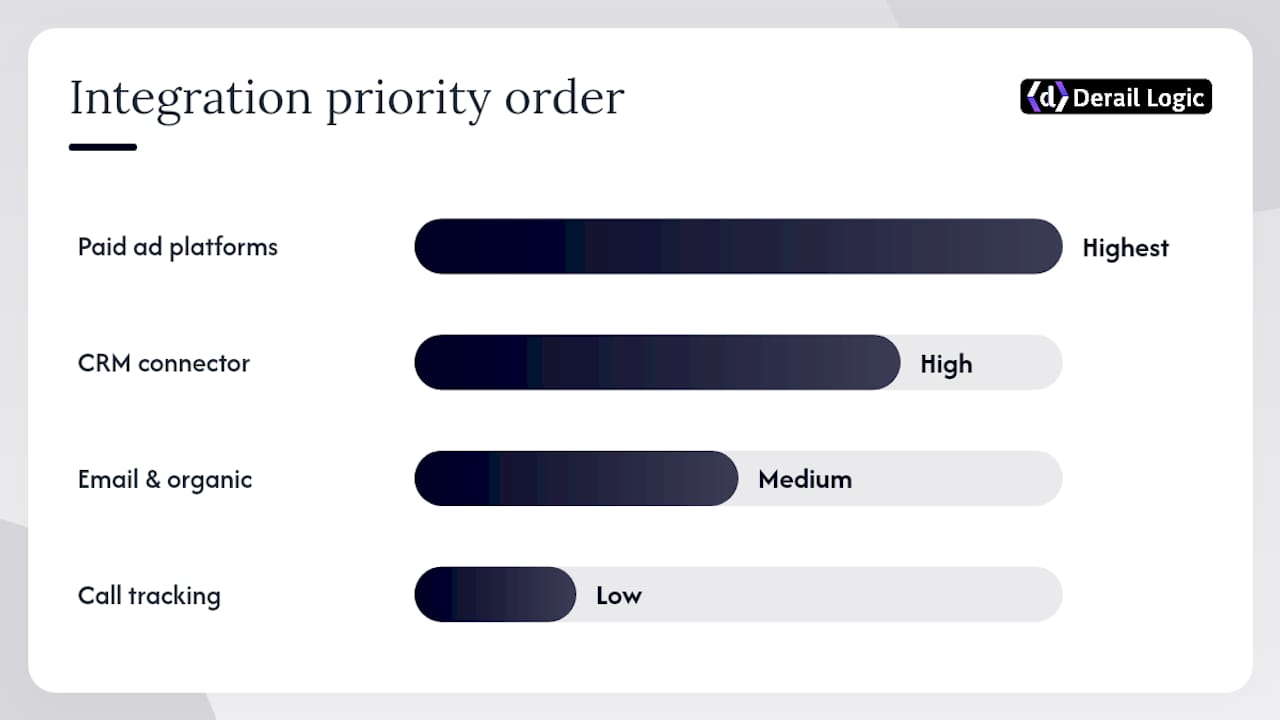
Integration priority order:
- Paid ad platforms (Google Ads, Meta) — highest signal volume, easiest to validate
- CRM connector (bidirectional, with offline conversion import)
- Email platform and organic channels
- Call tracking and offline touchpoints
Pro Tip: For SMB teams assembling their first integrated marketing stack, start with GTM and GA4, add server-side tagging for your top paid channel, then layer in CRM sync. Trying to connect everything at once is the fastest way to end up with a broken setup you cannot debug.
Step-by-step implementation checklist for end-to-end tracking
Follow this sequence. Skipping steps creates gaps that are expensive to diagnose after launch.
Pre-launch tasks
- Inventory every channel you plan to run: paid search, paid social, email, organic, display, offline.
- Define conversion events for each stage: form submit, phone call, demo booked, purchase, offline close.
- Assign a RACI for tag implementation, QA, and ongoing governance.
- Author the UTM convention document. Define allowed values for each parameter. Platform documentation recommends unique tracking URLs per medium and enabling conversion tracking in each platform as a baseline.
- Design the event schema. Map every conversion event to its
dataLayerobject, platform event name, and CRM field.
Technical implementation steps
- Install GTM on all pages. Confirm the container fires on every URL including thank-you pages and subdomains.
- Implement
dataLayerpushes at each conversion point. Use the schema from step 5. - Configure GTM triggers and tags for GA4, Meta Pixel, Google Ads conversion tracking, and any other platform pixels.
- Deploy the server-side GTM container (or equivalent endpoint). Route GA4, Meta CAPI, and Google Enhanced Conversions through it.
- Capture click IDs (
gclid,fbclid,ttclid) on landing page load and persist them tosessionStorageor a first-party cookie. - Add hidden form fields for UTM parameters and click IDs so they write to your CRM on form submission.
- Configure offline conversion imports in Google Ads and Meta using CRM deal-stage data.
- Set up call tracking (CallRail or equivalent). Assign unique numbers per channel. Map call events to your CRM and ad platforms.
Sample tracking tag map:
| Event name | GA4 event | Meta CAPI event | CRM field |
|---|---|---|---|
form_submit |
generate_lead |
Lead |
lead_source |
demo_booked |
schedule |
Schedule |
opportunity_stage |
purchase |
purchase |
Purchase |
closed_won_revenue |
Practical tracking methods including CRM capture, call tracking, ad network conversion tracking, unique URLs, and a KPI dashboard are the baseline; the tag map above is how you connect them.
Pro Tip: Server-side tracking and conversion APIs are foundational for accurate cross-channel attribution. Inconsistent UTM naming is a leading cause of attribution failure. Enforce UTM case consistency (always lowercase) and run a UTM linter in your campaign deployment process to eliminate human error before it reaches your reports.
Three implementation slip-ups to avoid:
- UTM case inconsistency:
Googleandgooglecreate two separate channels in GA4. Enforce lowercase everywhere. - Cross-domain passthrough failure: if your checkout or booking tool lives on a subdomain or third-party domain, configure GTM’s cross-domain measurement or you will lose the session.
- Missing deduplication IDs: send a unique
event_idwith every server-side event to prevent the same conversion from being counted by both the browser pixel and the CAPI.
How do you configure attribution and build dashboards that answer real questions?
Attribution configuration starts with a decision: what question does this report need to answer? “What should I scale?” points to data-driven or multi-touch linear attribution. “What closed the deal?” points to last-click or CRM-sourced attribution. Running both in parallel and comparing them is more useful than picking one and treating it as truth.
Attribution window guidelines by campaign type:
- Direct response / e-commerce: 7-day click, 1-day view; last-click or time-decay
- B2B lead gen (30–60 day cycle): 30-day click; linear or position-based
- Long-cycle B2B (90+ days): 90-day click; data-driven or custom weighted
Required dashboard widgets for integrated marketing reporting:
- Spend, impressions, CTR, CPL, CPA, ROAS by channel
- Assisted conversions and assisted revenue by channel
- Conversion path length and time-lag distribution
- Revenue by channel using normalized attribution
- Funnel reconciliation: leads → opportunities → closed deals
Attribution model tradeoffs:
| Model | Best for | Key limitation |
|---|---|---|
| Last-click | Short-cycle direct response | Ignores all upper-funnel touchpoints |
| First-click | Pipeline source analysis | Ignores what actually closes deals |
| Linear | Long B2B nurture | Treats all touchpoints as equally valuable |
| Time-decay | Campaigns with clear close events | Undervalues early awareness channels |
| Data-driven | High-volume accounts with sufficient conversion data | Requires volume; black-box logic |
Reconciling platform-reported conversions with your unified attribution model will always surface gaps. Expect Google Ads to report more conversions than GA4 because of different attribution windows and cross-device matching. The CRM is your ground truth. Analytics-driven marketing closes that gap by connecting ad spend to actual revenue, not just platform-reported events.
How do you QA and debug tracking before and after launch?
Validation is not optional. A tracking setup that has never been tested is a tracking setup that is probably broken somewhere.
Pre-launch validation steps
- Open GTM Preview mode and walk through every conversion path. Confirm each trigger fires, each tag sends, and each
dataLayerpush contains the correct fields. - Use browser DevTools (Network tab) to inspect outbound requests. Verify GA4 hits, Meta Pixel fires, and Google Ads conversion tags are sending with the right parameters.
- Check server-side endpoint logs to confirm events are arriving and forwarding correctly to each platform.
- Send test events to Google Ads, Meta, and any other platform using their respective test-event tools. Confirm they appear in the platform’s event manager.
- Submit a test lead and verify that UTM parameters and click IDs appear in the CRM contact record.
Post-launch monitoring
- Duplicate event detection: query your GA4 or warehouse for
event_idcollisions daily for the first week. - Match rate monitoring: check Enhanced Conversions and Meta CAPI match rates in each platform’s diagnostics. A match rate below 60% signals an identity-resolution problem.
- UTM coverage audit: pull a weekly report of sessions with no UTM parameters. A rate above 5% means traffic is arriving untagged.
- Funnel reconciliation: compare CRM lead counts to GA4 form submission events weekly. Gaps above 10% indicate a tag firing or passthrough issue.
Debugging three common failures:
- Missing conversions: check server-side logs first, then GTM trigger conditions, then
dataLayerpush timing. Most missing conversions trace to a trigger firing before thedataLayerpush completes. - Duplicate events: confirm
event_iddeduplication is active in both the browser pixel and the CAPI. If both fire on the same event without a shared ID, the platform counts it twice. - UTM-to-CRM mismatch: verify hidden form fields are populated before form submission fires. Test with a slow connection to catch race conditions between the UTM capture script and the form submit handler.
Real-time alerting for campaign performance catches regressions the day they happen rather than at the next weekly review.
What do privacy rules and a cookieless future mean for your tracking?
US privacy law is not uniform. California’s CCPA gives consumers the right to opt out of the sale or sharing of personal data, which affects how you use third-party pixels and behavioral data. Several other states have enacted similar frameworks. Your tracking setup needs to account for this now, not when a regulator asks.
Consent and compliance checklist:
- Deploy a consent management platform (CMP) that captures and stores opt-in or opt-out states per user
- Log consent decisions alongside events in your
dataLayerso downstream platforms receive consent status - Block third-party tags from firing until consent is granted (GTM’s built-in consent mode supports this)
- For CCPA, implement a “Do Not Sell or Share My Personal Information” mechanism and honor opt-outs in your ad platform audiences
Server-side tagging is your most practical resilience tool. Server-side tracking advantages include improved match rates, direct control over what data is shared with third parties, and the ability to strip PII before forwarding events. A server-side collector can enrich events with hashed identifiers, remove raw email addresses before they leave your infrastructure, and maintain a single canonical event stream to multiple destinations.
Cookieless resilience steps:
- Assign a persistent first-party identifier at login or email capture and store it in a first-party cookie or your own database
- Use hashed email matching for Google Enhanced Conversions and Meta’s Advanced Matching
- Capture click IDs server-side on the first page load so they survive browser restrictions
- Build your identity graph around email as the primary key, with phone as a secondary
Pro Tip: Record the consent state as a field in every event object, not just as a CMP log. When you send events to ad platforms via CAPI, include the consent signal so the platform can apply the correct data-use restrictions automatically. This protects you and improves match quality.
What mistakes do teams make most often in multi-channel tracking?
Most tracking failures are not technical mysteries. They are the same five mistakes, repeated across teams and industries.
Top mistakes and their fixes:
- Inconsistent UTM naming:
utm_source=Googleandutm_source=googleare different channels in GA4. Fix: enforce a UTM linter in your campaign build process and maintain a single shared naming document. - Not persisting click IDs:
gclidandfbcliddisappear when a user navigates to a new page unless you capture them tosessionStorageor a first-party cookie on the first page load. Fix: add a universal parameter capture script that runs before any other tag. - Relying solely on client-side pixels: browser restrictions and ad blockers can suppress 20–30% of conversion events. Fix: deploy server-side conversion APIs for every paid channel.
- Missing CRM sync: without bidirectional CRM integration, you can optimize for leads but not for revenue. Fix: connect your CRM to ad platforms with offline conversion imports so closed deals feed back to campaign optimization.
- Not testing cross-domain passthrough: if your funnel crosses domains or subdomains, sessions break and UTMs are lost. Fix: configure GTM cross-domain measurement and test it with a real user flow before launch.
When to rebuild versus patch: if UTM coverage is below 80%, click ID capture is below 70%, or CRM sync has been broken for more than two weeks, patching is not worth the effort. Rebuild the parameter capture layer and re-import historical data. For smaller gaps, a targeted fix with a 48-hour validation window is faster.
Monitoring rules that catch regressions early:
- Alert when daily conversion volume drops more than 20% from the 7-day average
- Alert when UTM coverage falls below 95% on paid channels
- Alert when CRM sync lag exceeds 24 hours
- Review server-side endpoint error rates every morning for the first 30 days after launch
Aligning marketing and sales data in a shared CRM view is what turns these monitoring rules from abstract checks into decisions about budget and headcount.
How MartechAI helps you orchestrate unified multi-channel tracking
Managing a multi-channel tracking setup across disconnected tools creates the “invisible waste” this guide is designed to prevent: time spent reconciling data, fixing broken tags, and explaining discrepancies to stakeholders. MartechAI, Derail Logic’s unified marketing platform, is built to reduce that overhead by connecting the pieces described in this guide into a single workspace.
Platform capabilities mapped to tracking requirements:
- Visual campaign studio: plan campaigns with UTM parameters built into the workflow, so tags are consistent before launch rather than corrected after
- Intelligent CRM integrations: bidirectional sync with CRM systems maps conversion events to contact records and feeds offline conversion imports back to ad platforms
- Server-side connectors: native integrations with GTM, GA4, and ad platform conversion APIs reduce the engineering effort of deploying server-side tagging
- Event schema management: centralized event naming and field governance so every team fires events consistently
- Unified dashboards: integrated analytics that surface spend, CPA, ROAS, assisted conversions, and funnel reconciliation in one view
Use cases where MartechAI reduces implementation effort:
- Multi-client agencies managing separate UTM taxonomies and attribution models per client
- B2B teams with 90+ day sales cycles that need CRM-connected attribution and call-tracking reconciliation
- E-commerce brands running paid, email, and organic simultaneously who need a single source of truth for ROAS
Supported integrations: GTM, GA4, Google Ads Enhanced Conversions, Meta Conversions API, CRM connectors, call-tracking webhooks (compatible with CallRail and similar providers), and email platform event passthrough.
For teams managing complex attribution and long sales cycles, MartechAI’s enterprise solution connects every layer of the architecture described in this guide.
A practitioner’s perspective on what actually matters in these projects
The sequencing question trips up more teams than the technical complexity does. Most tracking projects fail not because the tools are wrong but because the team tried to connect everything at once, validated nothing, and launched into a data mess they spent months cleaning up.
Three priorities I apply to every implementation:
- Start with paid channels. They generate the highest volume of deterministic signals and are the easiest to validate against platform-reported numbers. Get Google Ads and Meta right first, then layer in everything else.
- Enforce a UTM linter before deployment. A UTM naming convention document is only as good as the enforcement mechanism behind it. Automated linting in your campaign build process catches errors before they reach your reports, not after.
- Run daily tracking sanity checks for the first seven days after launch. Check conversion volume, UTM coverage, and CRM sync lag every morning. The first week is when regressions surface, and catching them on day two is far cheaper than catching them on day 14.
The teams that get this right treat tracking governance as a product, not a one-time project. That means version-controlled schemas, documented naming conventions, and a clear owner for each data stream.
MartechAI gives you a faster path to unified campaign measurement
Fragmented tracking across disconnected tools costs marketing teams hours every week in reconciliation work and budget decisions made on incomplete data. MartechAI, Derail Logic’s platform, gives you a single workspace where campaign planning, UTM governance, server-side connectors, CRM sync, and attribution dashboards operate together from day one.

The practical difference: instead of stitching together GTM, a separate analytics tool, a CRM integration, and a BI layer manually, MartechAI connects those layers with pre-built integrations and a visual campaign studio that enforces UTM conventions at the source. Deployment is faster, QA is simpler, and your dashboards reflect actual revenue rather than platform-reported proxies.
Ready to see it in action? Start a free trial of MartechAI’s marketing automation platform and connect your first paid channel in under an hour.
Sources
These references support the technical implementation work described in this guide:
- The 2026 UTM Tagging Guide: A Complete, Dated Reference for Marketing Teams – Terminus Blog
- Cross Channel Tracking Implementation: Complete Guide 2026
- Cross-Channel Analytics: Complete Implementation Guide – AnalyticsApi
- Create multi-channel campaigns
- Track marketing campaigns (How to track marketing campaigns) — Indeed Career Advice
- A study of 46,000 shoppers shows that omnichannel retailing works — Harvard Business Review
- Hyros + Multi-Channel Attribution Setup Guide (2026) | Luc Flynn
FAQ
What is the first step in a multi-channel campaign tracking setup?
Draft a UTM naming convention document that defines allowed values for utm_source, utm_medium, utm_campaign, utm_term, and utm_content, then validate server-side ingestion for your top paid channel. GA4’s channel grouping depends entirely on consistent UTM values, so this decision controls everything downstream.
Why does server-side tagging matter for campaign tracking?
Browser restrictions and ad blockers suppress a meaningful share of conversion events on the client side. Server-side tagging sends events directly from your server to ad platforms via conversion APIs, recovering those lost signals and giving you more accurate attribution data.
How do you connect campaign tracking to CRM revenue data?
Capture UTM parameters and click IDs in hidden form fields at lead submission so they write to the CRM contact record. Then configure offline conversion imports in Google Ads and Meta to send deal-stage and closed-revenue data back to the ad platforms for revenue-level attribution.

How does MartechAI help with multi-channel tracking?
MartechAI (Derail Logic) connects campaign planning, UTM governance, server-side connectors, CRM integrations, and attribution dashboards in one workspace, reducing the manual reconciliation work that fragmented tools create. It supports GTM, GA4, Meta CAPI, Google Enhanced Conversions, and CRM connectors natively.
What attribution model should you use for a long B2B sales cycle?
For sales cycles of 90 days or more, data-driven or linear attribution surfaces the channels that contribute across the full funnel rather than crediting only the last touchpoint. Pair this with CRM-sourced offline conversion imports so the model reflects actual closed revenue, not just platform-reported leads.


