



Five templates cover almost every planning gap a marketing team runs into: a social calendar, an editorial calendar, an email calendar, a campaign/event calendar, and an annual/monthly master calendar. Each one below comes with the essential columns to copy, a sample use case, and a fast customization path so you can start filling in real dates today. You’ll also find quick guidance on picking a format and connecting each calendar to the metrics that tell you whether it’s working.
TL;DR:
- Small teams can effectively use simple spreadsheets for scheduling, but coordinating five or more channels requires project tools with dependencies and notifications.
- Setting up a 12-month calendar of holidays, events, and awareness days helps prevent last-minute content scramble and ensures strategic planning across all channels.
- Connecting calendar data to real performance metrics via UTM links and KPI tracking is essential for making the calendar a dynamic decision-making tool.
- Most teams stop updating their calendars after launch; ongoing KPI feedback and performance review are crucial to maintaining useful planning workflows.
- A unified platform that integrates campaign planning, CRM, and analytics streamlines management and reduces manual reconciliation across multiple tools.
Table of Contents
- What Are the Main Types of Marketing Calendar Templates?
- Building a Social Media Calendar Template That Actually Gets Used
- Structuring an Editorial Calendar for SEO and Publishing Workflow
- Setting Up an Email Marketing Calendar Template
- Managing Launches With a Campaign and Event Calendar Template
- Why Your Annual Marketing Calendar Should Start With 12 Months of Dates
- Choosing a Format: Sheets, Excel, Notion, or a Content Platform
- How to Pick, Customize, and Roll Out Your Template
- Turning Your Calendar Into a Living, Analytics-Linked Planning Tool
- Why Most Teams Treat Their Calendar as a Finish Line, Not a Starting Point
- Plan and Track Every Campaign Without Switching Tools
- Sources
- FAQ
What Are the Main Types of Marketing Calendar Templates?
Every team eventually needs more than one calendar, because a social post, a blog launch, and a product webinar don’t move on the same clock. Here’s the quick map of which template fits which job.
- Social media calendar: run by social leads and community managers, tracking daily or weekly posts across platforms. Best format: a spreadsheet or a scheduling tool’s calendar view.
- Editorial/content calendar: owned by content managers and SEO leads, mapping topics, keywords, and publish dates. Best format: a shared sheet or a content board with status columns.
- Email marketing calendar: managed by email or lifecycle marketers, coordinating sends, segments, and offers. Best format: a spreadsheet linked to your email platform’s send calendar.
- Campaign/event calendar: run by campaign managers, tracking launches, webinars, and integrated pushes with hard deadlines. Best format: a timeline or Gantt view inside a project tool.
- Annual/monthly calendar: owned by whoever sets overall marketing strategy, holding the yearly hub that every other calendar plugs into. Best format: a master sheet or dashboard.
A simple spreadsheet works fine for small teams running one or two channels. Once you’re coordinating five or more people across overlapping campaigns, a project tool with dependencies and notifications earns its keep. Recommended columns across almost every version, according to widely used marketing calendar templates, include campaign name, channel, owner, status, deadline, and a KPI field. Build that skeleton once and every template below becomes a variation on it.
Building a Social Media Calendar Template That Actually Gets Used

A social calendar only earns its place if someone can glance at it and know exactly what’s due, on which channel, in whose hands. The essential columns: date, channel, copy, creative asset link, call to action, owner, status, post ID, tracking link, and expected KPI (reach, clicks, or engagement rate).
Cadence depends on team size. A solo marketer might post three times a week across two channels; a five-person social team often runs a daily post per channel plus stories or short-form video. Neither needs to be complicated to be effective.
- Create: draft copy and attach the asset link in the same row.
- Schedule: lock the date and channel, then move status to “queued.”
- Monitor: check performance within 24 to 48 hours of posting.
- Report: log the actual KPI result against the expected one at week’s end.
That single column turns your calendar into a running list of proven content instead of a one-time schedule.*
Structuring an Editorial Calendar for SEO and Publishing Workflow
An editorial calendar earns its keep when it stops being a list of blog titles and starts tracking intent, ownership, and outcome. Build it around these fields:
- Title
- Target keyword
- Search intent (informational, commercial, transactional)
- Author
- Status (draft, in review, scheduled, published)
- Publish date
- Distribution plan (email, social, newsletter)
- KPI (organic traffic, leads, time on page)
Batch by theme rather than by random topic. If your product touches “campaign planning” and “analytics,” dedicate one week per month to each theme so internal links and keyword clusters build naturally instead of scattering across 30 unrelated posts a year. A common cadence is four to six pieces a month: two evergreen guides, one seasonal or news-driven piece, and one or two supporting posts that link back to a cornerstone article. This partner guide on planning a content calendar for marketing success breaks down a similar batching approach for teams just getting started.
Setting Up an Email Marketing Calendar Template
Email calendars fail for one reason more than any other: too many people editing the same send date with no single source of truth. Fix that with these columns:
- Send date
- Audience segment
- Subject line
- Template used
- Goal/KPI (open rate, click rate, conversions)
- Landing page URL
- Owner
- Test variable (subject line, send time, CTA)
Most teams run a weekly newsletter plus two to four promotional sends a month, with volume climbing around seasonal peaks like Black Friday or back-to-school. Build in deliverability checks before every campaign, not after complaints start.
Pro Tip: Reserve one send slot a month purely for A/B testing subject lines or send times. Random testing gets ignored under deadline pressure; a scheduled slot doesn’t.
Managing Launches With a Campaign and Event Calendar Template
Campaigns and events fail when dependencies get discovered too late, not because the idea was bad. A timeline template solves this by forcing every milestone, budget checkpoint, required asset, and approver onto the same view before launch day arrives.
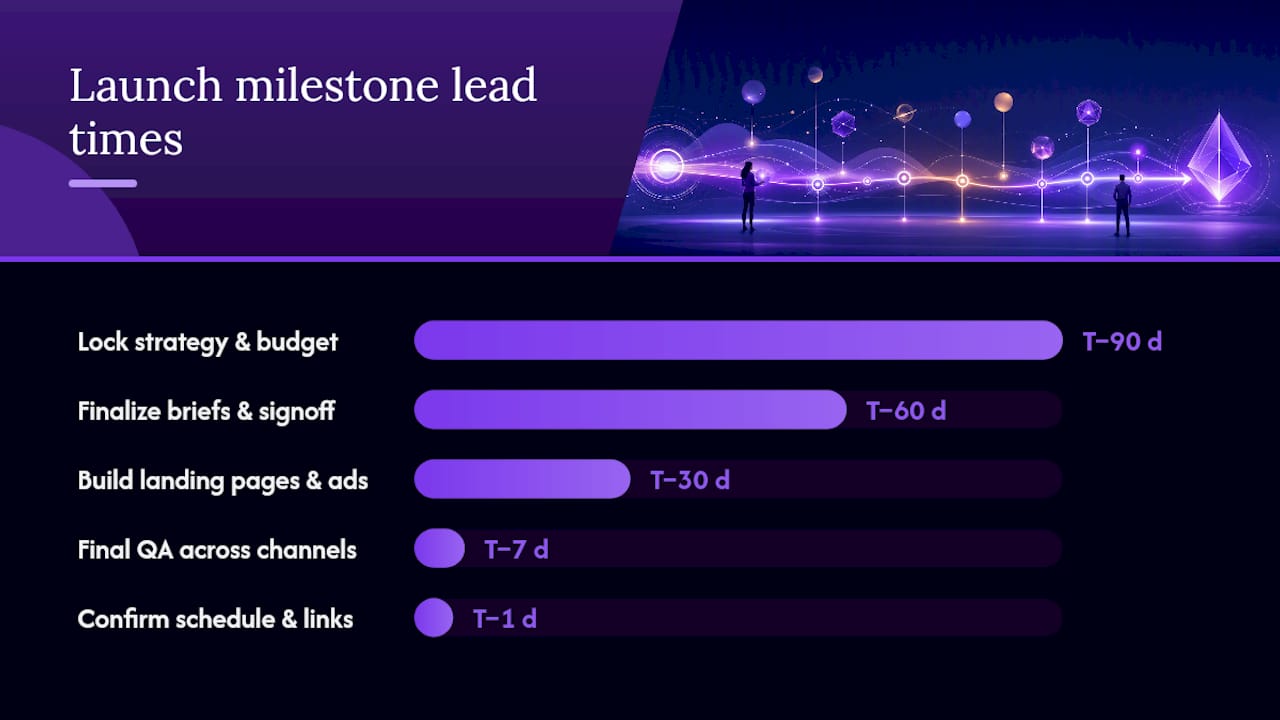
A T-minus structure works well for most product launches or major events:
- T minus 90 days: lock strategy, budget, and audience segments.
- T minus 60 days: finalize creative briefs and get stakeholder sign-off.
- T minus 30 days: build landing pages, email sequences, and ad creative.
- T minus 7 days: run final QA across every channel and asset.
- T minus 1 day: confirm scheduling, tracking links, and team availability.
Some template platforms, including Wrike’s marketing calendar, ship with timeline, calendar, and list views built in, so a campaign manager can flip perspective depending on whether they need a bird’s eye view or a daily task list. Watch for cross-channel saturation, too: if email, paid social, and organic posts all hit the same audience the same week, engagement per channel tends to drop even as total volume goes up.
Why Your Annual Marketing Calendar Should Start With 12 Months of Dates
Before a single campaign gets planned, fill in a full year of holidays, sporting events, and awareness days. Skipping this step is the single biggest reason teams end up scrambling for content ideas in week two of a busy month. Industry guidance on holiday marketing calendars recommends at least 12 months of dates as a planning backbone, built before any tactical campaign work begins.
Once that baseline exists, organize it as a hub and spoke:
- The hub is your annual overview: every major date, campaign window, and product milestone in one master view.
- The spokes are channel-specific monthly calendars (social, email, content) that pull their deadlines from the hub.
- Tag high-priority events (your biggest sale period, a major product launch) differently from minor observances so nobody confuses a nice-to-have date with a must-hit one.
This structure is what keeps five people planning five channels from accidentally scheduling three unrelated campaigns into the same overloaded week.
Choosing a Format: Sheets, Excel, Notion, or a Content Platform
The right file format depends less on personal preference and more on how your team already works. Google Sheets wins for real-time collaboration across departments with no software cost. Excel suits teams already living in Microsoft’s ecosystem with strict version control needs. Notion and similar boards handle workflow and dependencies better than any spreadsheet, especially when content moves through multiple review stages. Adobe Express and dedicated template platforms offer free, downloadable marketing calendar templates in several formats for teams that want a visual starting point rather than a blank grid.
- Spreadsheets: fast to set up, easy to share, weak on task dependencies.
- Project/content tools: strong on workflow and notifications, steeper learning curve.
- Template marketplaces: many offer files editable online and exportable as PNG, PDF, or PPT, useful when a calendar needs to travel outside your core team.
A genuinely useful downloadable template arrives pre-filled with sample entries, not a blank grid. Templates with a completed sample month already built in get adopted faster because teams can see the finished product instead of guessing what belongs in each column.
How to Pick, Customize, and Roll Out Your Template
Most teams overthink the selection process and underthink adoption. Here’s the shorter path:
- Map your needs: list every channel and campaign type you actually run, not the ones you wish you ran.
- Choose the layout: spreadsheet for collaboration speed, project board for dependency tracking.
- Add your KPIs: pick two or three metrics per calendar type and add them as columns from day one.
- Pilot for one month: run it with a real team before rolling it out company-wide.
- Iterate: drop unused columns, add ones people kept asking for.
Every team needs the same minimum fields regardless of calendar type: date, owner, status, and a KPI. Everything else is optional until proven necessary. For stakeholder buy-in, assign one person as calendar owner responsible for keeping the hub current. Without that single point of accountability, even the best marketing calendar best practices fall apart within a quarter.
Pro Tip: Don’t customize before piloting. Teams that tweak a template heavily before anyone has used it tend to build in complexity nobody needed. Run it plain for 30 days, then fix what’s actually broken.
Turning Your Calendar Into a Living, Analytics-Linked Planning Tool
A calendar that just lists what’s scheduled is half a tool. The other half is knowing what worked, and that only happens when calendar rows connect directly to performance data instead of living in a separate report nobody opens.
The hub-and-spoke model applies here too: your annual hub shows the big picture, while each spoke calendar rolls up its own channel metrics. Practical ways to make that connection real:
- Add a KPI column to every row and fill in actual results weekly, not quarterly.
- Use UTM parameters on every tracking link so traffic and conversions auto-aggregate into your dashboard instead of requiring manual copy-paste.
- Tag campaign rows with the metric type they should move (traffic, leads, revenue) so reporting stays consistent across the team.
- Review the calendar monthly against your marketing analytics dashboard, not just at year-end.
Teams that skip this step often can’t say which campaigns actually drove results. Search Engine Journal’s analysis of holiday and campaign planning found that treating the calendar as a living document, one tied to real performance data rather than a static schedule, is what lets teams reallocate budget toward themes that consistently deliver. A platform like Derail Logic’s campaign studio can pull those metrics automatically so the calendar updates itself instead of waiting on someone’s Friday afternoon report, and pairing it with a clear view of your marketing analytics metrics makes the whole system easier to audit at a glance.
Why Most Teams Treat Their Calendar as a Finish Line, Not a Starting Point
The biggest mistake I see in how teams use marketing calendar templates isn’t picking the wrong one. It’s treating the finished calendar as the deliverable, when the calendar is only the setup work.
The harder 80% is what happens after launch: did that email send actually outperform last month’s, did the campaign around a major awareness day move any real numbers, did anyone go back and mark which social posts deserve a repeat run. Most teams that abandon their calendar within a quarter didn’t abandon it because the template was bad. They stopped because nobody built in the habit of feeding results back into it.
If you take one thing from this guide, prioritize the KPI column over the pretty layout. A plain spreadsheet with honest, weekly-updated performance data beats a beautifully designed board that nobody updates past week three. Pick the simplest format your team will actually maintain, then spend your real effort on the feedback loop, not the color coding.
— Zachary
Plan and Track Every Campaign Without Switching Tools
Templates get you organized. They don’t automatically tell you which campaign to run next or connect your social calendar to what your email list actually converted on. That’s the gap Derail Logic closes: a unified workspace where your campaign calendar, CRM, and analytics live in the same place instead of three separate tabs you have to reconcile by hand.

Inside Derail Logic’s visual campaign studio, you build the same calendar structure covered above, but every row can pull live performance data instead of waiting for someone to update a spreadsheet. Sales teams get automated follow-up tied to campaign timing, while marketing leads get a single dashboard showing which calendar entries are actually driving traffic, leads, or revenue. If you’re managing multiple channels with a small team, this is the difference between building a calendar once a quarter and having one that updates itself. Explore the full feature set or start a free trial to connect your first calendar to real analytics this week.
Sources
- Marketing Calendar With Template To Plan Your Content In 2026
- Best Marketing Calendar Template for 2026 | Pipedrive
FAQ
What Should Be Included in a Marketing Calendar Template?
Every version needs date, owner, status, and a KPI column at minimum. Stronger templates add campaign name, channel, deadline, and a tracking link so results can be measured against the plan.
How Do I Choose Between a Spreadsheet and a Project Tool?
Use a spreadsheet like Google Sheets or Excel when your team needs fast collaboration and simple tracking. Switch to a project tool or a platform like Derail Logic when you need dependency tracking, automated reminders, and analytics linked directly to calendar entries.
How Often Should I Update My Marketing Calendar?
Update statuses weekly and review KPI results at least monthly, since a calendar that only gets touched at quarter’s end stops functioning as a planning tool.
Can I Automate Reminders and Task Assignments in a Marketing Calendar?
Yes. Project tools and platforms like Derail Logic can auto-assign owners, trigger deadline reminders, and pull campaign metrics directly into calendar rows without manual updates.
What’s the Difference Between a Campaign Calendar and an Editorial Calendar?
A campaign calendar tracks launches, events, and integrated pushes with milestones and approvers, while an editorial calendar focuses on content topics, keywords, and publish dates for ongoing content production.