



A campaign calendar is defined as a centralized scheduling tool that organizes every marketing initiative by date, channel, owner, and status. The role of campaign calendar in marketing goes far beyond listing launch dates. It acts as the operational backbone that keeps cross-functional teams aligned, prevents scheduling conflicts, and protects the audience experience. Without it, campaigns collide, messages contradict each other, and attribution data breaks down. Marketing teams that treat their calendar as a governed system, not a passive spreadsheet, consistently execute with more precision and less reactive firefighting.
How does a campaign calendar improve coordination across marketing teams?
Centralizing campaigns using a shared calendar significantly reduces communication silos and missed deadlines. When every team member sees the same timeline, dependencies become visible before they become problems. A social team no longer launches a promotional post the same week the email team sends a conflicting discount offer.
The coordination benefits run deeper than scheduling. A shared calendar surfaces workload imbalances, flags audience overlap, and creates a single source of truth for campaign status. Teams managing channels independently tend to miss the moments where their work collides with another team’s plan. That collision wastes budget and confuses the audience.
Governance practices make the difference between a calendar that works and one that collects dust. High-performing B2B marketing teams conduct weekly 30-minute calendar governance reviews to align launches, apply suppression rules, and register product launches 30 or more days in advance. That cadence sounds simple, but it forces accountability and catches problems early.
Key coordination functions a governed calendar performs:
- Audience collision prevention: Flags when two campaigns target the same segment within a short window.
- Workload visibility: Shows which weeks are overloaded before the team burns out.
- Launch registration: Requires product and campaign owners to submit launches in advance, giving operations time to review.
- Suppression rule enforcement: Blocks promotional emails to a segment that has already received multiple messages within 48 hours.
- Dependency tracking: Links tasks so that a delay in creative production automatically surfaces as a risk to the launch date.
Pro Tip: Schedule a standing 30-minute calendar review every Monday with your marketing ops lead. Use it to flag collisions, confirm suppression rules, and register any new launches before they sneak onto the calendar.
What is the difference between a campaign calendar and a campaign map?
These two tools solve different problems, and confusing them leads to planning gaps. A campaign calendar focuses on tactical execution timing, while a campaign map provides the strategic overview needed to identify activity gaps and channel imbalances. You need both.
Think of the calendar as the “when and who.” It answers: What launches on which date, who owns each task, and what is the current status? The campaign map answers: Are we investing in the right channels? Are we messaging consistently across the quarter? Do we have dead zones where no campaign touches a key audience segment?
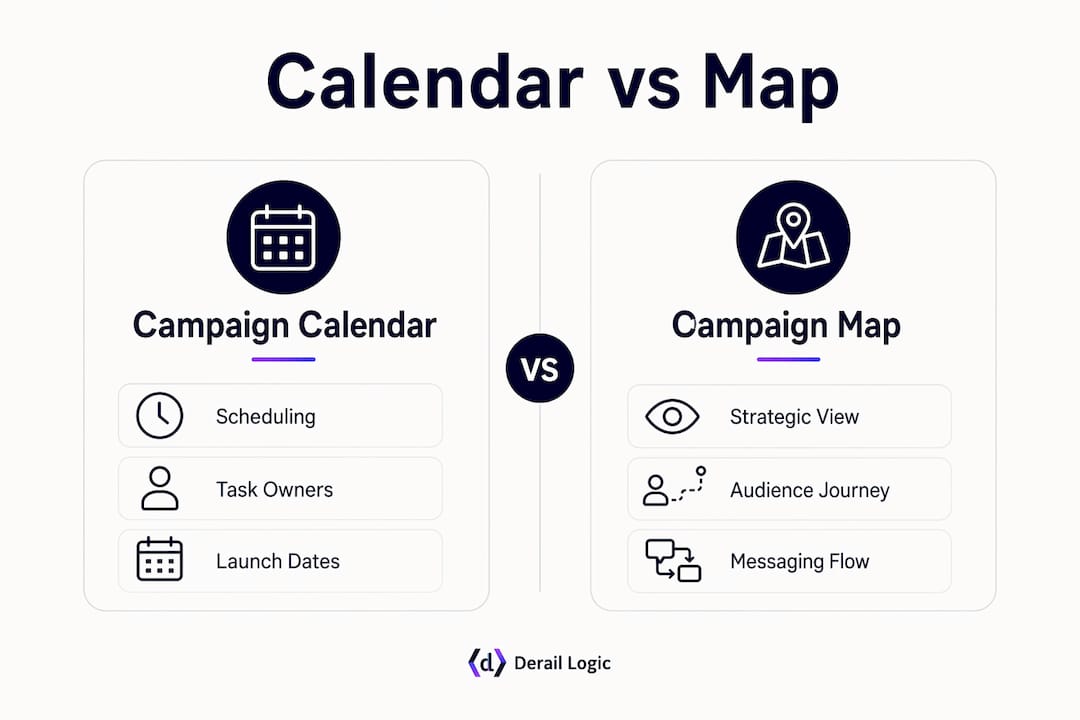
| Dimension | Campaign calendar | Campaign map |
|---|---|---|
| Primary purpose | Tactical execution scheduling | Strategic visualization of activity |
| Time view | Day-by-day or week-by-week | Quarter or annual overview |
| Key question answered | What launches when and who owns it? | Are we balanced across channels and time? |
| Risk it prevents | Missed deadlines and team collisions | Channel gaps and inconsistent messaging |
| Best used by | Campaign managers and ops teams | Marketing directors and strategists |
Visualizing strategy through campaign maps prevents reaction-based planning. When teams skip the map and work only from the calendar, they tend to fill dates reactively rather than building toward a coherent message arc. The result is inconsistent messaging and wasted resources. Integrating both views gives marketing leaders the full picture: strategic intent on the map, operational execution on the calendar.
What best practices ensure an effective campaign calendar?
The most effective campaign calendars share four characteristics: they plan backward, they stay current, they organize by channel, and they enforce governance rules. Miss any one of these, and the calendar loses its value as an operational tool.
-
Plan backward from the launch date. Backward planning from launch dates uncovers dependencies and bottlenecks often missed when planning forward from the current date. Starting at the launch date and working back forces you to ask: When does legal need to approve copy? When does design need the brief? When does the landing page need to be live for QA? Those questions surface the real timeline, not the optimistic one.
-
Treat the calendar as a living document. A campaign calendar must carry status updates marking activities as live, delayed, or complete. An unupdated calendar becomes a record of abandoned plans rather than a tool that tracks real progress. Assign one person per campaign to own status updates, and make that update a non-negotiable part of the weekly governance review.
-
Organize by channel, not by team. Organizing campaign timelines by channel — press, digital, social, content — rather than by team allows clear visibility into clustering and gaps at a glance. When you organize by team, you see what each team is doing. When you organize by channel, you see what the audience experiences. That shift in perspective changes how you balance workload and timing.
-
Enforce collision and suppression rules. Calendar governance rules such as collision blocking and email suppression thresholds protect audience experience and marketing effectiveness. A practical rule: block promotional emails to a segment if that segment has received two or more messages within 48 hours. This protects deliverability and reduces unsubscribe rates.
-
Balance flexibility with structure. The calendar should be firm enough to prevent chaos and flexible enough to accommodate a breaking news moment or a product launch that moves up. Build buffer weeks into the quarter and designate them as “flex capacity” rather than filling every slot in advance.
Pro Tip: Use a content calendar planning guide to map your content cadence before populating campaign dates. Content and campaign calendars work best when they share the same channel structure.
How does technology enhance the role of campaign calendars?
Modern marketing platforms change what a campaign calendar can do. A spreadsheet shows you dates. A connected platform shows you dependencies, progress, attribution data, and audience overlap in real time. That difference matters when you are managing five campaigns across three channels simultaneously.

Modern marketing platforms integrate campaign calendars with project management, automation, and multi-touch attribution to ensure consistency and real-time visibility. Linking dependent tasks with automated schedule adjustments prevents timeline shifts from causing cascade delays. When the creative team pushes a deadline by three days, the platform automatically flags every downstream task that depends on that asset.
The attribution angle is often overlooked. Multi-touch attribution requires consistent UTM naming and campaign registration to track marketing impact accurately. Broken or inconsistent UTM tags destroy attribution, making the campaign calendar critical for data integrity. A governed calendar enforces naming conventions at the point of registration, before anyone builds a link.
Key capabilities that technology adds to calendar management:
- Real-time status dashboards: Every stakeholder sees live progress without asking for a status update.
- Automated dependency alerts: A delay in one task triggers an alert for all linked tasks.
- UTM convention enforcement: The platform validates naming at registration, not after the campaign launches.
- CRM integration: Campaign dates sync with CRM workflows so sales teams know when a nurture sequence is live.
- Analytics connection: Campaign performance data flows back into the calendar view, so you can see what worked in context.
In 2026, marketing operations ownership of a governed calendar differentiates between scaling success and failure by enabling data-driven refusal of excess requests. A governed calendar gives ops the data to say no when campaign capacity thresholds are exceeded. That is not a bureaucratic function. It is how quality stays high when demand keeps growing.
Derail Logic’s campaign studio connects calendar views directly to CRM data, email automation, and analytics, replacing the invisible waste of scattered spreadsheets with a single connected workspace. Teams using a platform like this spend less time chasing status updates and more time acting on campaign insights.
Key Takeaways
A governed campaign calendar is the single most effective tool for preventing coordination failures, protecting audience experience, and maintaining attribution accuracy across marketing teams.
| Point | Details |
|---|---|
| Calendar as operational backbone | A campaign calendar centralizes timelines, owners, and statuses to prevent silos and missed deadlines. |
| Governance drives results | Weekly 30-minute reviews, suppression rules, and launch registration separate high-performing teams from reactive ones. |
| Calendar and map work together | Use the calendar for execution timing and the campaign map for strategic channel balance. |
| Backward planning surfaces risk | Planning from the launch date backward reveals dependencies before they become launch-day problems. |
| Technology enforces discipline | Connected platforms automate dependency tracking, enforce UTM conventions, and sync calendars with CRM and analytics. |
Why calendar governance is the discipline most teams skip
Most marketing teams I have worked with have a campaign calendar. Very few have a governed one. The difference shows up in the same ways every time: a last-minute email blast that hits a segment already fatigued from three messages that week, a product launch that nobody told the content team about until two days before, or a quarter-end report where half the UTM tags are broken and attribution is guesswork.
The calendar itself is not the problem. The discipline around it is. Marketing operations teams must own governed calendars instead of passive spreadsheets, making calendar governance a discipline essential to scaling marketing efforts. That means someone has to be accountable for the rules, not just the dates.
What I have found is that teams resist governance because it feels like bureaucracy. But the teams that commit to it, even just a weekly 30-minute review and a suppression threshold, report fewer reactive crises and better campaign performance within a quarter. The calendar becomes a tool that protects the team’s capacity, not just a record of what they planned to do.
The other thing worth saying: technology helps, but it does not replace the discipline. A connected platform enforces UTM conventions and flags collisions automatically. That removes friction. But someone still has to decide the rules, hold the reviews, and say no when the calendar is full. That is a human function. The content calendar strategy behind your campaigns matters as much as the tool you use to manage it.
If your team is still running campaigns from a shared spreadsheet with no governance layer, the cost is real. It shows up as wasted budget, confused audiences, and attribution data you cannot trust. The fix is not complicated. Start with the rules, then find the platform that enforces them.
— Zachary
How Derail Logic supports campaign calendar management
Derail Logic’s marketing automation platform connects campaign calendars with CRM workflows, email sequences, and analytics in one workspace. Marketing teams stop toggling between tools and start seeing their full campaign picture in one place.

The campaign studio gives teams a visual orchestration layer where every campaign date links to its tasks, assets, and performance data. Governance controls let ops teams enforce suppression rules and UTM conventions without manual policing. For teams managing multiple campaigns across channels, Derail Logic removes the invisible waste that comes from disconnected systems and turns the campaign calendar into a live command center.
FAQ
What is the role of a campaign calendar in marketing?
A campaign calendar organizes all marketing initiatives by date, channel, owner, and status, serving as the operational backbone that keeps teams aligned and prevents scheduling conflicts and audience fatigue.
How often should a marketing team review its campaign calendar?
High-performing B2B teams conduct weekly 30-minute calendar governance reviews to align launches, apply suppression rules, and register upcoming product launches at least 30 days in advance.
What is the difference between a campaign calendar and a content calendar?
A campaign calendar governs the timing and coordination of full marketing campaigns across all channels. A content calendar focuses specifically on scheduling individual content pieces like blog posts, social updates, and emails within those campaigns.
Why does backward planning improve campaign schedule effectiveness?
Backward planning from the launch date forces teams to identify every dependency before work begins, surfacing bottlenecks and realistic timelines that forward planning from the current date typically misses.
How do UTM tags connect to campaign calendar governance?
Consistent UTM naming conventions, enforced at the point of campaign registration in the calendar, protect multi-touch attribution accuracy. Broken UTMs make it impossible to assign ROI correctly across channels.
Recommended
- MartechAI Features — Campaign Studio, CRM, Email, Analytics, SEO & AI | MartechAI
- MartechAI Campaign Studio — Visual Campaign Orchestration Connected to Everything | MartechAI
- How to Align Marketing and Sales Campaign View | MartechAI
- MartechAI Project Management — Task Boards Connected to Your Marketing Work | MartechAI


