



An all-in-one marketing platform is defined as a unified system that consolidates email marketing, CRM, analytics, automation, and campaign management into a single workflow. The role of an all-in-one marketing platform is to eliminate the fragmentation that slows marketing teams down and replace it with a connected operating environment. Consolidating individual tools can reduce monthly subscription costs from $200–$495 down to $17–$97. That gap represents real budget that teams can redirect toward campaigns, content, or headcount. For marketing professionals evaluating integrated marketing solutions, understanding what these platforms actually do, and where they fall short, is the starting point for a sound technology decision.
What core features define an all-in-one marketing platform?
An all-in-one marketing platform, also called a unified martech platform or marketing cloud, combines tools that most teams currently run as separate subscriptions. The core feature set covers the full campaign lifecycle, from audience building to post-send reporting.
The standard features found across these platforms include:
- Email marketing with list segmentation, A/B testing, and deliverability monitoring
- CRM for contact management, deal tracking, and customer profiling
- Landing page builders with form capture and conversion tracking
- Automation workflows that trigger actions based on user behavior or time delays
- Multi-channel campaign execution covering email, SMS, social, and paid channels
- Unified analytics dashboards that report across all channels in one view
Marketing clouds unify email, social media management, analytics, and advertising into one system for multi-channel orchestration. That integration is what separates a genuine all-in-one platform from a tool that simply bundles a few features under one login.
The feature spectrum matters. Entry-level platforms cover email and basic CRM. Enterprise-grade platforms add predictive lead scoring, AI-driven content recommendations, and advanced attribution modeling. Teams should map their actual workflow requirements before evaluating which tier fits their needs.

Pro Tip: Before comparing platforms, list every tool your team currently pays for and the specific job each one does. That inventory reveals which all-in-one features you will actually use versus which ones look good in a demo but will sit idle.
How do all-in-one platforms improve campaign visibility and efficiency?
The clearest benefit of a unified platform is the elimination of data silos. When your email tool, CRM, and ad platform each hold separate customer records, your team spends time reconciling data instead of acting on it. A single platform removes that coordination overhead entirely.
Operational savings include fewer integrations to maintain, simplified reporting from unified data, and central vendor accountability. This reduction in what you might call the “coordination tax” on staff time directly improves decision quality. Your team spends less time copying data between systems and more time reading what it means.
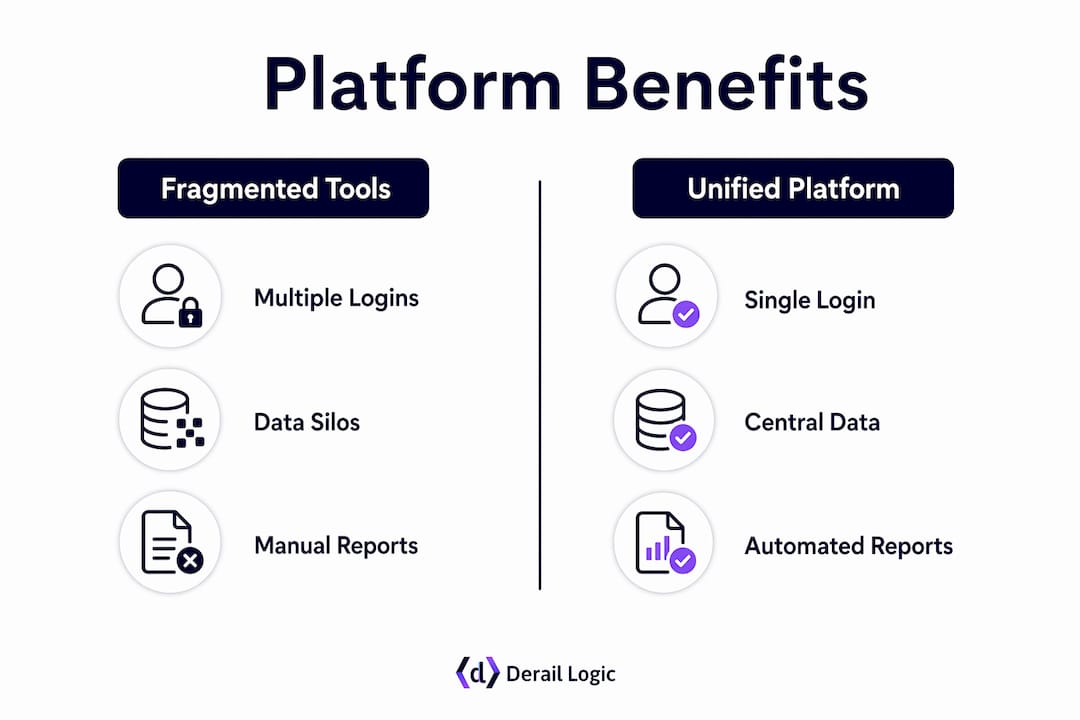
The table below shows how centralized platforms shift team effort across common marketing operations:
| Activity | Fragmented tool stack | Unified platform |
|---|---|---|
| Campaign reporting | Manual export and merge across tools | Single dashboard, real-time view |
| Customer segmentation | Rebuilt in each tool separately | One profile, applied everywhere |
| Automation setup | Configured per tool, no cross-channel logic | Single workflow triggers across channels |
| Vendor management | Multiple contracts, logins, and support queues | One vendor, one contract |
| Onboarding new staff | Learn 5–8 separate tools | Learn one system |
Companies using unified data platforms with advanced personalization report 10–15% average revenue increases compared to fragmented messaging approaches. The mechanism is straightforward: a single customer profile lets you send the right message at the right time without manually syncing data across tools.
Marketing automation within all-in-one platforms enables workflow execution across channels simultaneously without human intervention after setup. For small teams managing complex campaigns, that capability is the difference between a campaign that runs and one that stalls waiting for someone to press a button.
Pro Tip: Use your platform’s unified reporting to identify the one channel that drives the most pipeline, then build your automation workflows outward from that channel. Starting with your strongest signal produces faster results than trying to activate every channel at once.
What are the trade-offs and limitations of all-in-one platforms?
No platform does everything well. The benefits of marketing platforms built on the all-in-one model come with real trade-offs that teams should evaluate honestly before committing.
Best-of-breed tools offer deeper specialization but require complex integration and maintenance compared to all-in-one platforms that favor simplicity and speed. That trade-off is not theoretical. A dedicated email deliverability tool, for example, will outperform the email module of most all-in-one platforms for high-volume senders. Teams with specialized needs in one channel often find the bundled version insufficient.
The key limitations to weigh include:
- Feature depth gaps. All-in-one platforms prioritize breadth. Specialized functions like advanced segmentation, predictive analytics, or enterprise-grade SEO often require a dedicated tool.
- Vendor lock-in. Switching costs for migrating complex automations and funnels can be substantial. Email list migration is straightforward, but rebuilding automation logic takes weeks or months.
- The activation gap. Teams often face a gap where unified data exists inside the platform but the pre-built logic does not match their specific business rules. Closing that gap requires manual adaptation, not just configuration.
- Innovation lag. All-in-one platforms impose what some call an “innovation tax.” Your team accepts the vendor’s roadmap and release schedule rather than choosing the best tool for each job as the market evolves.
- Scalability ceiling. Scaling marketing operations often requires supplementing all-in-one platforms with specialized tools for advanced deliverability, segmentation, or analytics to avoid bottlenecks.
Understanding these limitations does not argue against all-in-one platforms. It argues for entering the decision with clear eyes about where the platform will serve you well and where you may need to supplement it.
How can marketing teams decide if an all-in-one platform fits their needs?
The decision between a unified platform and a composable stack depends less on technology and more on your team’s operational maturity. The choice between all-in-one and composable martech depends mainly on organizational integration capability rather than technology alone. Teams that lack dedicated IT support or integration engineers benefit most from the simplicity of a unified system.
A practical evaluation process follows four steps:
- Audit your current stack. List every tool, its monthly cost, and the specific workflow it supports. Identify which integrations break most often and which data gaps cause the most friction in reporting or campaign execution.
- Assess your IT maturity. All-in-one platforms reduce integration overhead and coordinate marketing data under a single schema, which is especially valuable for teams with lower IT maturity. If your team cannot maintain custom API integrations, a unified platform reduces operational risk significantly.
- Calculate total cost of ownership. Compare your current combined subscription cost against the all-in-one platform’s pricing. Factor in the staff time currently spent on integration maintenance, data reconciliation, and vendor management. That hidden labor cost is often larger than the subscription difference.
- Test with a hybrid strategy. Hybrid strategies starting with all-in-one platforms and layering specialized tools as needed provide balance between stability and growth. Start with the unified platform for core workflows, then add specialized tools only where the platform’s native capability falls short.
The importance of all-in-one tools is clearest for teams that are growing fast and cannot afford the coordination overhead of managing eight separate vendor relationships. For mature teams with dedicated technical resources, a composable approach may deliver more precision. Most teams fall somewhere in between, which is exactly where the hybrid model earns its place.
Key Takeaways
An all-in-one marketing platform delivers the most value when it replaces coordination overhead with unified data, clear reporting, and automation that runs without constant manual input.
| Point | Details |
|---|---|
| Cost reduction is real | Consolidating tools can cut monthly martech spend from $200–$495 to $17–$97. |
| Unified data drives revenue | Single customer profiles enable personalization that correlates with 10–15% revenue increases. |
| The activation gap is the hidden risk | Unified data does not automatically align with your business rules; adaptation work is required. |
| Switching costs are significant | Rebuilding complex automations after migration can take weeks or months of manual effort. |
| Hybrid strategies work best | Start with an all-in-one platform for core workflows and layer specialized tools where needed. |
What I’ve learned about the activation gap no one talks about
The conversation around all-in-one platforms almost always focuses on cost savings and feature checklists. Those matter. But the issue that actually determines whether a platform delivers results is the activation gap, and most teams walk into it unprepared.
The gap works like this: you migrate to a unified platform, your data is finally in one place, and then you realize the platform’s built-in workflows do not match how your business actually operates. Your lead scoring model uses criteria the platform does not support natively. Your nurture sequences depend on logic the automation builder cannot replicate without workarounds. You expected out-of-the-box alignment and instead you have a configuration project.
I have seen teams spend three months in that gap, rebuilding workflows they thought would transfer automatically. The fix is not to avoid all-in-one platforms. The fix is to treat the migration as a process redesign, not a tool swap. Before you move, document every automation and ask explicitly whether the new platform can replicate it. Where it cannot, decide upfront whether you will adapt your process or supplement with a specialized tool.
The teams that get the most from unified platforms are the ones that reshape their workflows to fit the platform’s strengths rather than fighting the platform to match their legacy processes. That requires clear decision ownership. Someone on the team needs authority to say “we are changing this process” without needing six approvals. Without that governance, the activation gap becomes permanent.
For growth-stage teams, my honest recommendation is to start with the all-in-one platform and accept some process adaptation. The coordination savings alone justify it. As you scale, you will identify the two or three areas where a specialized tool genuinely outperforms the platform, and that is when you add it. That sequence is far less painful than trying to build a composable stack from day one without the technical infrastructure to support it.
— Zachary
Derail Logic’s MartechAI: built for teams ready to unify
Marketing teams that have diagnosed their fragmentation problem need a platform that closes the gap between data, automation, and campaign execution without requiring an IT department to hold it together.

Derail Logic’s MartechAI connects CRM, campaign studio, email, analytics, and AI-driven insights into one workflow. The visual campaign studio lets teams plan and execute multi-channel campaigns without switching between tools. The intelligent CRM keeps customer profiles current across every touchpoint. For teams ready to move from a fragmented stack to a connected system, marketing automation with MartechAI is the operational foundation that makes unified execution possible. You can also review the full platform feature set to match capabilities against your team’s specific workflow requirements.
FAQ
What is the role of an all-in-one marketing platform?
An all-in-one marketing platform centralizes email, CRM, automation, analytics, and campaign management into a single system. Its primary role is to eliminate data silos and reduce the coordination overhead that slows marketing teams down.
How do all-in-one platforms reduce marketing costs?
Consolidating individual tools into a unified platform can reduce monthly martech subscription costs from $200–$495 to $17–$97. Teams also save on the staff time previously spent maintaining integrations and reconciling data across separate systems.
What is the activation gap in marketing platforms?
The activation gap occurs when a platform holds unified data but its built-in logic does not match a team’s specific business rules. Closing it requires adapting existing workflows to fit the platform rather than expecting automatic alignment.
When should a team use a hybrid martech strategy?
A hybrid strategy works best for growth-stage teams that need the stability of a unified platform for core workflows but require specialized tools for advanced deliverability, segmentation, or analytics. Starting with an all-in-one platform and adding specialized tools selectively keeps complexity manageable.
How does omnichannel marketing connect to all-in-one platforms?
All-in-one platforms are the operational foundation for omnichannel execution because they hold a single customer profile that applies across email, SMS, social, and paid channels. Without that unified profile, consistent cross-channel personalization requires manual data syncing that most teams cannot sustain at scale.


