



Behavioral data tells you exactly who is warming up to a purchase decision right now, and that is the core of its role in sales outreach. When a prospect visits your pricing page three times in a week, downloads a comparison guide, and attends a product webinar, those timestamped actions are far more reliable buying signals than any demographic profile. The practical payoff: sales teams that act on behavioral signals reach the right accounts faster, with messages that feel relevant instead of random.
Three things you can do today:
- Identify your highest-precision signal (pricing page visits, demo requests, or feature-activation events) and route it directly to a named rep within 24 hours.
- Verify identity deterministically before triggering any personalized outreach. A false match produces an embarrassing email that damages your sender reputation.
- Run a 30-day pilot comparing signal-triggered sequences against your standard list-driven cadence. Measure trigger-to-meeting conversion as the primary metric.
Quick summary:
- Benefits: Higher reply rates, better lead prioritization, shorter sales cycles, earlier identification of product-qualified leads (PQLs), and reduced wasted SDR time.
- Risks: Privacy exposure if CCPA consent flags are not maintained, data-quality failures from stale records or false identity matches, and over-automation that removes the human judgment high-value signals require.
Platforms like Derail Logic’s MartechAI are built to unify these signals, sync them to your CRM, and trigger workflows without the tool fragmentation that buries the signal in noise.
Table of Contents
- What is behavioral data, and where does it come from?
- How does behavioral data improve sales outreach results?
- Which behavioral signals should you prioritize for outreach?
- How do you collect and integrate behavioral data into your sales stack?
- How do you turn behavioral signals into lead scores and PQL definitions?
- How do you convert signals into timely, human-forward outreach?
- How do you measure whether behavioral data is actually improving outreach?
- What are the biggest challenges and compliance risks with behavioral data?
- Your 30/60/90 implementation checklist for behavioral data
- What types of tools handle behavioral data, and how do you choose?
- Signal-based selling vs. raw intent data: what practitioners know
- Key Takeaways
- How a modern sales ops team should actually work with behavioral data
- Derail Logic’s MartechAI connects your signals to outreach
- Useful sources for further reading
- FAQ
What is behavioral data, and where does it come from?
Behavioral data is any timestamped record of an action a person or account takes. It shows engagement and intent, not who someone is in the abstract. A firmographic record tells you a company has 500 employees in fintech. A behavioral record tells you that company’s VP of Sales visited your integration docs page four times this week. The second fact is what moves a deal forward.
How it differs from other data types
- Firmographic data: Company size, industry, revenue, headcount. Useful for filtering fit; tells you nothing about timing.
- Demographic data: Job title, seniority, location. Helps you reach the right person; does not tell you when they are ready.
- CRM history: Past interactions, deal stages, notes. Valuable context but backward-looking.
- Raw intent data: Third-party topic signals aggregated from publisher networks. Shows category-level interest; often lacks contact-level resolution.
Behavioral data is different because it is forward-looking and specific. It captures what someone did, when they did it, and how often, which makes it the most direct proxy for purchase intent available to a sales team.
Signal sources: first-party and third-party
First-party behavioral signals (you own these):
- Website page views, session depth, and scroll behavior
- Product feature usage and in-app event logs
- Email opens, clicks, and reply patterns
- Form submissions, content downloads, and gated-asset requests
- Webinar registrations and attendance duration
Third-party behavioral signals (aggregated externally):
- Buyer intent topic surges from publisher networks
- Ad engagement and retargeting interactions
- Review site activity (G2, Capterra category browsing)
Offline behavioral signals:
- Event check-ins and booth interactions at trade shows
- Sales demo attendance and follow-up question patterns
- In-person meeting notes logged in CRM
Signal-to-intent mapping
| Behavioral Signal | Likely Intent | When to Act |
|---|---|---|
| Pricing page visit (2+ times in 7 days) | Active evaluation | Within 24 hours |
| Demo request form submitted | High purchase intent | Immediately, same business day |
| Feature docs page (3+ sessions) | Technical validation | Within 48 hours |
| Webinar attended (full session) | Research/education | Within 72 hours |
| Email clicked but no reply | Mild interest | Next sequence step, 3–5 days |
| Content download (top-of-funnel) | Early research | Nurture sequence, no direct SDR |
How does behavioral data improve sales outreach results?
Better prioritization is the most immediate benefit. When SDRs work from a signal-ranked queue instead of a static list, they spend time on accounts that are actively evaluating, not accounts that were added to a spreadsheet six months ago. That shift alone reduces cost-per-opportunity because the same number of calls and emails produces more meetings.

The timing improvement is equally significant. Reaching a prospect within 24 hours of a high-intent signal is categorically different from reaching them on a Tuesday because it is their turn in the rotation. Relevance and timing together are what drive reply rates up.
Shorter sales cycles follow naturally. When sales enters a conversation already knowing which features a prospect investigated and which competitors they compared, the discovery phase compresses. The rep can skip generic qualification and move directly to the specific problem the prospect was researching.
Behavioral data analysis also surfaces product-qualified leads earlier than traditional scoring. A PQL is a contact or account that has demonstrated enough product engagement to justify a sales conversation, and behavioral signals are the raw material for defining that threshold.
Operational metrics that shift when you use behavioral signals:
- Trigger-to-meeting conversion: The percentage of signal-triggered outreach attempts that result in a booked meeting. This is your primary signal-quality metric.
- Time-from-signal-to-contact: How quickly a rep acts after a signal fires. Under 24 hours is the target for high-intent signals.
- Signal precision: The ratio of true-positive signals (contacts who were actually evaluating) to total signals fired.
Mini scenario: pricing page visits to booked meetings
Before: An SDR team works a weekly list of 200 accounts. Reps send templated sequences with no context. Meeting rate was low before adopting signal-triggered outreach.
After: The team instruments the pricing page and routes visits to a signal queue. Reps receive an alert with the visitor’s name, company, and session history. Outreach references the product area the prospect explored. Meeting rate on signal-triggered outreach improves significantly in early pilots, with the gap widening as reps refine their message framing.
Pro Tip: Track which signals historically produce meetings, not which signals fire most often. High-volume, low-precision signals (blog visits, homepage views) inflate your queue and train reps to ignore alerts. Start with two or three high-precision signals and expand from there.
Which behavioral signals should you prioritize for outreach?
Not every click deserves a sales call. The signals worth tracking fall into three tiers based on how reliably they predict purchase intent.
High-priority signals (act within 24 hours)
- Pricing page visit (multiple sessions): The single strongest evaluation signal for most SaaS products. A prospect who returns to pricing is comparing options.
- Demo or trial request: Explicit intent. Route to a rep immediately.
- Integration or API docs (repeated visits): Technical validation behavior. The prospect is assessing fit, not just browsing.
- Competitive comparison page visit: The prospect is in an active decision process.
- Account-level multi-thread signal: Multiple contacts from the same company engaging within the same week. This is committee warming and requires a coordinated account play, not a single SDR touch.
Medium-priority signals (act within 48–72 hours)
- Full webinar attendance (not just registration)
- Case study or ROI calculator download
- Return visit to a product-specific feature page
- Email click on a product-focused send
Low-priority signals (nurture, no direct SDR)
- First-time homepage visit
- Top-of-funnel blog post read
- Single email open with no click
Interpretation guidelines
Recency: A pricing page visit from yesterday outweighs one from three weeks ago. Decay signals quickly; most high-intent signals lose predictive value after 7–10 days without follow-up action.
Frequency: Two visits to the same page in one week carries more weight than two visits spread over a month.
Sequence: A contact who reads a blog post, then downloads a comparison guide, then visits pricing is on a clear evaluation path. The sequence matters more than any single event.
B2B vs. B2C differences: In B2B, account-level aggregation is critical. One contact’s behavior is a weak signal; three contacts from the same account engaging in the same week is a strong one. In B2C, session-level behavior (cart abandonment, product page depth, return visit frequency) is the primary signal, and person-level resolution is easier because first-party login data is usually available.
How do you collect and integrate behavioral data into your sales stack?
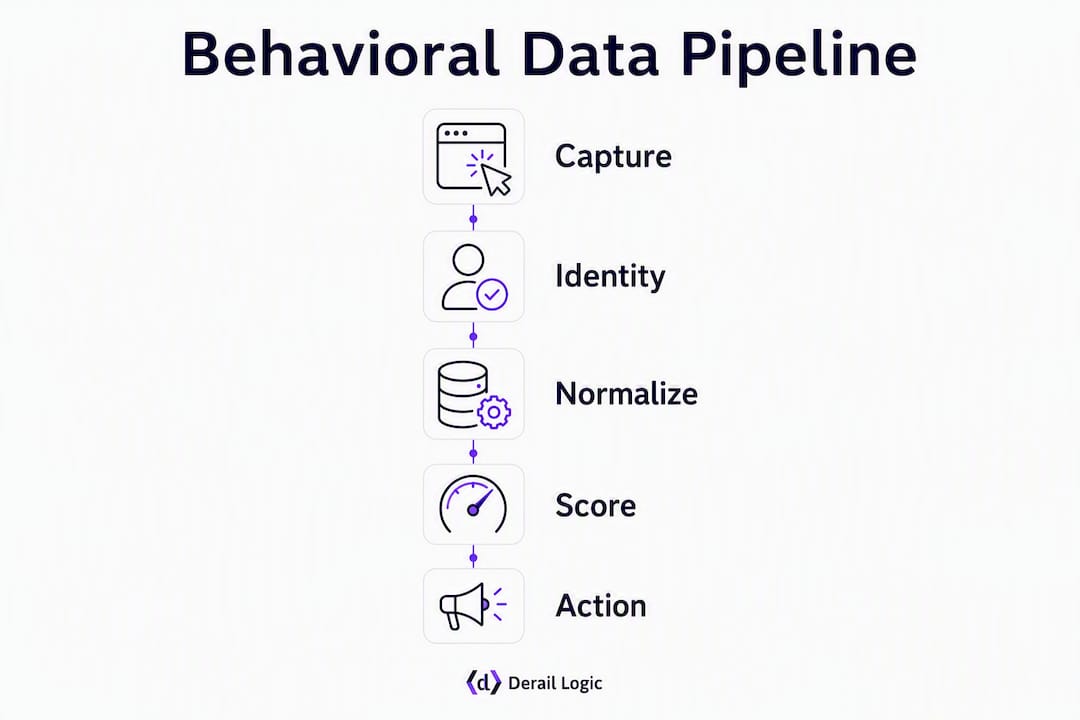
The pipeline has five stages: capture, identity resolution, normalization, scoring, and action. Skipping or rushing any stage produces the false matches and stale data that make behavioral outreach backfire.
Implementation checklist
Stage 1: Capture (instrument your properties)
- Tag every high-value page with event tracking (pricing, demo request, feature docs, integration pages).
- Define a standard event schema: event name, timestamp, URL, session ID, contact ID (if known), and account domain.
- Instrument product events for in-app behavioral signals if you have a product-led motion.
- Confirm that your tag fires correctly in staging before pushing to production.
Stage 2: Identity resolution
- Use deterministic matching first: match on known email, logged-in user ID, or CRM contact ID.
- Apply probabilistic matching (IP-to-company, reverse DNS) only for account-level signals, never for contact-level personalization.
- Require a confidence threshold before associating a session to a named contact. Deterministic visitor identification is the only safe basis for personalized outbound.
Stage 3: Normalization
- Standardize event names and property keys across all sources (web, product, email, offline).
- Deduplicate contact records before signals are scored.
- Attach account-domain to every event so account-level aggregation is possible.
Stage 4: Scoring and aggregation
- Apply signal weights and recency decay (covered in the next section).
- Aggregate contact-level scores to account level for B2B plays.
Stage 5: Actions (CRM sync and triggers)
- Push high-precision signals directly to CRM as tasks or alerts for named reps.
- Route medium-precision signals to automated nurture sequences.
- Log every triggered action with a timestamp and signal payload for auditability.
Data-quality checkpoints:
- Validate email addresses before any signal-triggered send.
- Maintain suppression lists: do-not-contact, current customers (unless expansion play), and opted-out contacts.
- Store CCPA consent flags alongside contact records and check them before triggering outbound. Poor data quality harms deliverability before a single message is sent.
For a deeper look at how CRM should receive and act on these signals, the role of CRM in automated outreach guide covers tactical integration sequencing.
How do you turn behavioral signals into lead scores and PQL definitions?
Raw events are not actionable until they are organized into segments and scores. The framework below gives sales a consistent, repeatable way to prioritize the queue.
Behavioral segmentation by journey stage
Assign every contact to one of four stages based on their signal pattern:
- Research: Consumed top-of-funnel content, no product engagement yet.
- Evaluate: Visited product or pricing pages, downloaded comparison content.
- Validate: Repeated product-page visits, technical docs, or trial/demo request.
- Purchase: Demo completed, pricing page visited post-demo, or contract-stage CRM activity.
Scoring model example
A simple additive model with recency decay works well for most teams starting out:
| Signal | Base Score | Recency Multiplier (within 7 days) |
|---|---|---|
| Pricing page visit | 30 | — |
| Webinar attended (full) | 20 | — |
| Case study download | 10 | — |
| Blog post read | 3 | — |
A contact scoring above 60 within a 14-day window enters the SDR queue. A contact scoring above 40 enters a mid-touch nurture sequence. Scores decay by 20% per week without new activity.
PQL definition example (SaaS product):
A contact qualifies as a PQL when they meet all three conditions:
- Completed at least one core product action (feature activation, integration setup, or report generated).
- Returned to the product on at least three separate days within 14 days.
- Holds a qualifying job title (decision-maker or influencer role) confirmed in CRM.
Governance note: Apply the deterministic-only rule here. If you cannot confirm the contact’s identity through a logged-in session or a verified CRM match, do not trigger personalized outreach based on that score. Automating personalization without human review on high-value signals risks reputational damage when identity resolution fails.
Pro Tip: Review your PQL definition with the product team every quarter. Product usage patterns shift as features evolve, and a PQL threshold set six months ago may no longer reflect the behavior of your best customers today.
How do you convert signals into timely, human-forward outreach?
A signal is only as valuable as the workflow it triggers. The gap between “we have the data” and “a rep sent a relevant message within 24 hours” is where most behavioral programs stall.
Signal-to-action playbook
- Who owns the trigger: High-precision signals (demo request, pricing page multi-visit, PQL threshold crossed) go to a named SDR or AE. Medium-precision signals feed automated sequences. Low-precision signals feed nurture only.
- Context assembly: Before a rep reaches out, they should have: the specific signal that fired, the contact’s CRM history, any other contacts from the same account who engaged recently, and the account’s current deal stage.
- Channel selection: Email for initial contact on most signals. Phone for same-day follow-up on demo requests or PQL triggers. LinkedIn for committee-warming plays where you are reaching a second or third contact at the same account.
- Time-from-signal-to-contact: Under 24 hours for high-intent signals. Under 72 hours for medium-intent. Beyond that, the signal’s predictive value drops sharply.
Message framing rules
Reference the intent, not the click. A message that says “I noticed you visited our pricing page at 2:14 PM on Tuesday” is invasive and counterproductive. A message that says “Teams evaluating [product category] often have questions about how pricing scales with usage” is relevant without being surveillance-adjacent.
- Lead with the problem the prospect was likely researching, not the specific page they visited.
- Keep the first message short: one sentence of context, one question, one clear ask.
- Avoid timestamps, page-specific quotes, or any phrasing that reveals you tracked their exact behavior.
Workflow examples
Event-triggered SDR alert: Pricing page visited twice in 48 hours → CRM task created for named rep → rep reviews account context → sends personalized email within 4 hours.

Account-level multi-thread play: Three contacts from the same account engage within one week → AE is alerted → AE coordinates outreach to each contact with role-specific messaging, not a blast to all three simultaneously.
Semi-automated nurture for low-value signals: Blog post read + email click → contact enters a 5-step nurture sequence → sequence pauses automatically if the contact visits pricing (escalates to SDR queue instead).
Human vs. automated boundary
Committee-level signals and PQL triggers require human review before outreach. AI scales personalization effectively, but it cannot replace the judgment a rep applies when reading an account’s full context before deciding whether to reach out. Automate the alert and the context assembly; keep the human in the loop for the send decision on high-value plays.
Pro Tip: Build a “pause and escalate” rule into every automated sequence. If a contact in a nurture sequence crosses a high-intent signal threshold, the sequence should pause immediately and route the contact to a rep. Continuing to send automated emails to someone who just requested a demo is a fast way to lose the deal.
How do you measure whether behavioral data is actually improving outreach?
Measurement is what separates a behavioral data program from a behavioral data experiment. Without a clear KPI framework, teams cannot tell whether signals are improving results or just adding complexity.
Primary KPIs
- Pipeline velocity: — How quickly signal-sourced opportunities move through stages compared to list-sourced opportunities.
Experiment templates
- Holdout group test: — Take 20% of contacts who cross a signal threshold and withhold outreach for 30 days. Compare pipeline creation between the treated group and the holdout. This measures the true incremental lift from signal-triggered outreach.
Using sequence drop-off data as behavioral evidence
Sequence analytics are themselves behavioral data. If 60% of prospects disengage after step 3 of a 6-step sequence, that drop-off point is telling you something specific about the message, the timing, or the channel at that stage. Treat it as a signal and test a targeted change at exactly that step, not a full sequence rewrite.
Reporting cadence:
- Weekly: signal queue health (volume, precision rate, time-to-contact).
- Monthly: trigger-to-meeting conversion by signal type, opportunity creation rate.
- Quarterly: pipeline velocity comparison (signal-sourced vs. list-sourced), PQL definition review.
What are the biggest challenges and compliance risks with behavioral data?
Behavioral data programs fail in predictable ways. Knowing the failure modes in advance lets you build controls before they become problems.
Common pitfalls
- False identity matches: Probabilistic matching ties a session to the wrong contact. The resulting personalized email goes to someone who never visited your site, which is both embarrassing and a potential CCPA violation.
- Stale contact records: A signal fires for a contact whose job title or company changed six months ago. The rep reaches out to someone who is no longer relevant.
- Misreading casual engagement as intent: A single blog post read does not indicate purchase intent. Over-weighting low-precision signals floods the SDR queue with noise and trains reps to distrust alerts.
- Over-automation: Removing human review from high-value signal workflows produces outreach that feels mechanical and misses the account context a rep would catch immediately.
US privacy and CCPA guidance
Under the California Consumer Privacy Act (CCPA), California residents have the right to know what personal data you collect, opt out of its sale or sharing, and request deletion. For behavioral outreach programs, the practical implications are:
- Maintain a consent flag on every contact record and check it before triggering any outbound.
- Honor opt-out requests within the required timeframe and propagate them to all connected tools (CRM, email platform, sequence tool).
- Log every triggered outbound action with the signal payload and timestamp. Auditability is your defense if a consumer requests an accounting of how their data was used.
- Do not use third-party behavioral data to personalize outreach to California residents without confirming your data provider’s CCPA compliance posture.
This is general information, not legal advice. Confirm your specific obligations with a qualified privacy attorney or your compliance team.
Data-governance checklist
- Deterministic-only rule for contact-level personalization.
- Suppression lists maintained and synced across all outbound tools.
- Do-not-contact list checked before every triggered send.
- Audit log for each triggered outbound action (signal type, contact ID, timestamp, rep assigned).
- Quarterly review of identity-resolution confidence thresholds.
Pro Tip: When a false match is discovered, roll back the personalization immediately, flag the contact record, and run an identity-verification check on the full batch of sessions from the same source. One false match usually signals a systemic issue with a specific data source or matching rule, not a one-off error.
Your 30/60/90 implementation checklist for behavioral data
Getting started does not require a full martech overhaul. The 30/60/90 framework below sequences the work so you build on a solid foundation before adding complexity.
Days 1–30: Instrument and verify
- Identify your three highest-value pages or product events and add event tracking.
- Define your event schema: event name, timestamp, URL, session ID, contact ID.
- Set up deterministic identity resolution and test it against known contacts.
- Sync verified signals to CRM as tasks or alerts for a small pilot group of reps.
- Establish baseline metrics: current meeting rate, current time-from-contact-to-meeting.
Quick wins in the first 30 days:
- Validate pricing-page visitors against your CRM and route confirmed matches to reps.
- Prioritize demo requests as same-day tasks with full account context attached.
- Set up a suppression list sync between your CRM and email platform.
Days 31–60: Score and pilot
- Build your initial scoring model using the signal weights from the framework above.
- Define your first PQL threshold and validate it against 90 days of historical data.
- Run a signal-triggered pilot for one signal type (pricing page visits recommended).
- A/B test signal-aware messaging against your standard template.
- Measure trigger-to-meeting conversion weekly and adjust signal weights based on results.
Days 61–90: Scale and govern
- Expand to two or three additional signal types based on pilot results.
- Add account-level aggregation for B2B multi-thread plays.
- Implement the full governance checklist: audit logs, CCPA consent checks, suppression sync.
- Run a holdout group test to measure incremental lift.
- Schedule a quarterly calibration meeting between sales, marketing, and product to review PQL definitions and signal weights.
Sales-marketing alignment tips:
- Agree on a single source of truth for signal data. Two teams using different tools to track the same signals will produce conflicting priorities.
- Set a shared SLA on follow-up time: sales commits to contacting high-intent signals within 24 hours; marketing commits to maintaining signal quality above an agreed precision threshold.
- Hold a monthly calibration meeting to review which signals produced meetings and which produced noise.
What types of tools handle behavioral data, and how do you choose?
The tool landscape for behavioral data breaks into six categories. Most teams need at least three of them working together; the question is which to prioritize and how to evaluate them.
Platform categories
- Analytics and BI tools: — Measure signal performance, sequence drop-offs, and pipeline attribution.
Evaluation criteria
| Criterion | Why It Matters |
|---|---|
| Data fidelity | Are events captured accurately and completely, with no sampling? |
| Identity determinism | Does the tool support deterministic matching, or only probabilistic? |
| Integration depth | How many native connectors exist for your CRM and sequence tools? |
| Auditability | Can you log and retrieve every triggered action with its signal payload? |
| Real-time triggers | How quickly does a signal fire translate into a CRM task or sequence enrollment? |
| Scalability | Does performance degrade as event volume grows? |
Build vs. buy guidance
Most sales teams should buy before building. A CDP or signal layer built in-house requires significant engineering resources to maintain, and the maintenance cost compounds as your event schema grows. Start with a purpose-built platform that covers signal ingestion, identity resolution, and CRM sync, then add specialized tools (intent providers, visitor identification) as your program matures.
Derail Logic’s MartechAI is built to handle exactly this consolidation challenge. It unifies signal ingestion, CRM sync, and AI-driven trigger workflows in a single platform, which reduces the tool fragmentation that buries signals in operational noise. For teams managing marketing tool sprawl, consolidating the signal pipeline into one platform is often the fastest path to a working behavioral program.
Signal-based selling vs. raw intent data: what practitioners know
Most sales teams treat intent data as a list filter. They pull accounts showing topic-level interest, add them to a sequence, and call it a behavioral program. That approach misses the point entirely.
Signal-based selling is the operational system that converts combined signals into context-aware outbound. Intent data supplies the “what” (a company is researching a topic). Signal-based selling supplies the “how”: combining behavioral, firmographic-change, technographic, relationship, and lifecycle signals into a prioritized queue, then running an agent loop that assembles full account context before selecting an action.
The practical difference shows up in rep behavior. A team using raw intent data sends the same sequence to every account showing topic interest. A team using signal-based selling sends different plays depending on whether the signal is a first-time topic surge, a return visit after a previous conversation, or a committee-warming pattern across multiple contacts.
Three practitioner tips
- Combine signal categories. A single behavioral signal is a weak predictor. A pricing page visit combined with a firmographic trigger (company just raised a Series B) and a relationship signal (the AE met the VP at a conference last month) is a strong one. Build your scoring model to reward signal combinations, not individual events.
- Keep account and contact context in the agent loop. Before any outreach decision, the rep or automation should have the full account picture: current deal stage, recent interactions, other contacts who engaged, and the specific signal payload. Context prevents the “spray and pray” failure mode even when signals are accurate.
- Require auditability of every triggered action. If you cannot trace a triggered email back to the specific signal that fired it, you cannot diagnose failures, defend against compliance questions, or improve the model. Auditability is not a nice-to-have; it is the operational foundation of a trustworthy behavioral program.
PQL collaboration between product and sales ops
PQL definitions fail when product teams define them in isolation. The signals that indicate a user is getting value from the product are not always the same signals that indicate they are ready for a sales conversation. Sales ops should bring conversion data (which PQL patterns actually produced closed deals) back to the product team quarterly, and product should bring usage-pattern data (which behaviors precede churn vs. expansion) back to sales ops. That feedback loop is what keeps PQL definitions calibrated to reality.
Pro Tip: Behavioral analytics in marketing goes deeper on how to structure the analytics layer that feeds PQL definitions. If your scoring model is built on gut feel rather than historical conversion data, that article is a practical starting point.
Key Takeaways
Behavioral data improves sales outreach by identifying who is actively evaluating, when to act, and what to say, but only when identity resolution is deterministic and governance controls are in place.
| Point | Details |
|---|---|
| Prioritize high-precision signals | Pricing page visits, demo requests, and PQL thresholds produce meetings; blog reads and homepage views do not. |
| Verify identity before personalizing | Use deterministic matching only for contact-level outreach; probabilistic matching belongs at the account level. |
| Define PQLs with product and sales ops | Quarterly calibration between teams keeps PQL thresholds aligned with actual conversion patterns. |
| Measure trigger-to-meeting conversion | This single metric tells you whether your signals are accurate and your outreach is timely. |
| Derail Logic’s MartechAI unifies the stack | It connects signal ingestion, CRM sync, and AI-driven trigger workflows in one platform, reducing the fragmentation that buries signals. |
How a modern sales ops team should actually work with behavioral data
The teams that get the most out of behavioral data are not the ones with the most sophisticated scoring models. They are the ones with the clearest operating agreements between sales, marketing, and product.
In practice, that means sales ops owns the signal pipeline: instrumenting events, maintaining the scoring model, and syncing triggers to CRM. Marketing owns the nurture sequences that handle medium- and low-precision signals. Product owns the PQL definition in collaboration with sales ops. And SDRs own the 24-hour SLA on high-intent signals.
The daily workflow looks like this: a signal dashboard reviewed each morning by sales ops, flagging any anomalies in signal volume or precision rate. Deterministic matches verified before any new contacts enter the personalized outreach queue. Committee-level signals (multiple contacts from the same account engaging in the same week) escalated to a named AE, not routed to an automated sequence.
What breaks this system is not technology. It is the absence of shared agreements. When marketing defines a “hot lead” differently than sales does, signals get ignored or misrouted. When product changes a core feature without telling sales ops, PQL thresholds go stale. The “human glue” in a behavioral data program is the calibration meeting, held monthly, where all three teams review what worked, what did not, and what needs to change.
Derail Logic’s MartechAI connects your signals to outreach
Most behavioral data programs stall not because the signals are wrong, but because the signals live in one tool, the CRM lives in another, and the sequence platform never gets the full picture. That fragmentation is the real cost, and it compounds every time a new tool is added.

Derail Logic’s MartechAI addresses this directly. The platform ingests behavioral signals from web, product, and email sources, applies AI-driven scoring using your actual business data, and syncs triggers to your CRM in real time. Every triggered action is logged with its signal payload, so your team has the auditability the governance checklist requires. The Autopilot feature surfaces high-intent opportunities before you have to go looking for them, and the marketing automation layer handles the nurture sequences for medium-precision signals without requiring a separate platform.
For teams working through the 30/60/90 checklist above, MartechAI covers the instrumentation, scoring, CRM sync, and audit logging in a single subscription. Start a free trial at derail-logic.com and run your first signal-triggered pilot within the first 30 days.
Useful sources for further reading
- Behavioral data analysis (Outsales) — Practical overview of how behavioral analysis supports lead scoring, PQL identification, and churn prevention across demand generation and customer success teams.
FAQ
What is behavioral data in sales outreach?
Behavioral data is any timestamped record of an action a prospect takes, such as visiting a pricing page, downloading a guide, or attending a webinar. Sales teams use these signals to identify who is actively evaluating, prioritize outreach, and personalize messages based on demonstrated intent rather than demographic assumptions.
How does behavioral data differ from intent data?
Intent data aggregates topic-level signals from third-party publisher networks and shows category-level interest at the account level. Behavioral data is first-party and contact-specific, capturing exactly what a person did on your own properties. Signal-based selling combines both, using intent data for account-level warming and behavioral data for contact-level precision.
What is a product-qualified lead (PQL)?
A PQL is a contact or account that has demonstrated enough product engagement to justify a direct sales conversation. A typical SaaS PQL definition requires a core feature activation, multiple return sessions within a defined window, and a qualifying job title confirmed in CRM.
How do CCPA rules affect behavioral outreach in the US?
Under CCPA, California residents can opt out of the sale or sharing of their personal data and request deletion. For outreach programs, this means maintaining consent flags on every contact record, honoring opt-outs across all connected tools, and logging every triggered outbound action for auditability. Confirm your specific obligations with a qualified privacy attorney.
How does Derail Logic’s MartechAI support behavioral data outreach?
MartechAI ingests behavioral signals from web, product, and email sources, applies AI-driven scoring, syncs triggers to your CRM in real time, and logs every triggered action with its signal payload. The Autopilot feature surfaces high-intent opportunities automatically, and the marketing automation layer handles nurture sequences for medium-precision signals within a single platform.