



A CRM is defined as the central system that stores, organizes, and activates customer data to power personalized outreach at scale. The role of CRM in automated outreach goes far beyond contact storage. It connects behavioral signals, purchase history, and engagement data to automated workflows that send the right message at the right moment. CRM-driven automation boosts sales productivity by about 34%, reduces manual data entry by 80–90%, and improves response times. Those numbers reflect a fundamental shift: outreach is no longer a volume game. It is a data quality game, and your CRM is the engine.
How does CRM data drive personalized automated outreach?
CRM data is the raw material that separates relevant outreach from noise. The most effective automated campaigns pull from three core data layers: lead status, engagement history, and behavioral triggers.
Lead status alone changes the entire tone of a message. Writing to an “Interested” prospect differs fundamentally from initiating contact with a cold lead. Treating both the same way is one of the most common and costly mistakes sales teams make. Your CRM tells you exactly where each contact sits in the buying process.

Behavioral signals add a second layer of precision. When a contact opens three emails in a week, visits your pricing page, or downloads a case study, those events are buying triggers. AI-assisted workflows use these CRM signals to fire personalized messages at exactly the right moment, without a rep manually watching every account.
Segmentation ties it all together. Teams that segment their CRM contacts by industry, engagement level, and funnel stage send messages that feel personal even at volume. The goal is not to automate more. The goal is to automate smarter, using data that already lives in your CRM.
- Lead status: Determines message tone and call to action
- Engagement history: Reveals interest level and timing windows
- Behavioral triggers: Signals buying intent for timely follow-up
- Contact history: Prevents duplicate or contradictory outreach
- Firmographic data: Enables industry and company-size segmentation
Pro Tip: Before building any automated sequence, audit your CRM fields. Sequences built on incomplete data produce generic messages. Sequences built on rich data produce conversations.
What are the productivity and sales benefits of integrating CRM with outreach automation?
The productivity case for CRM-powered automation is concrete. Integrating CRM data with outreach tools increases response rates from 2.8% to 6.5% and conversion rates by up to 300%. That is not a marginal improvement. It is the difference between a campaign that breaks even and one that drives measurable revenue.
Sales cycle length also shrinks. Companies using integrated CRM and outreach solutions see sales cycles accelerate by up to 30% with more personalized experiences. Faster cycles mean more deals closed per quarter without adding headcount.
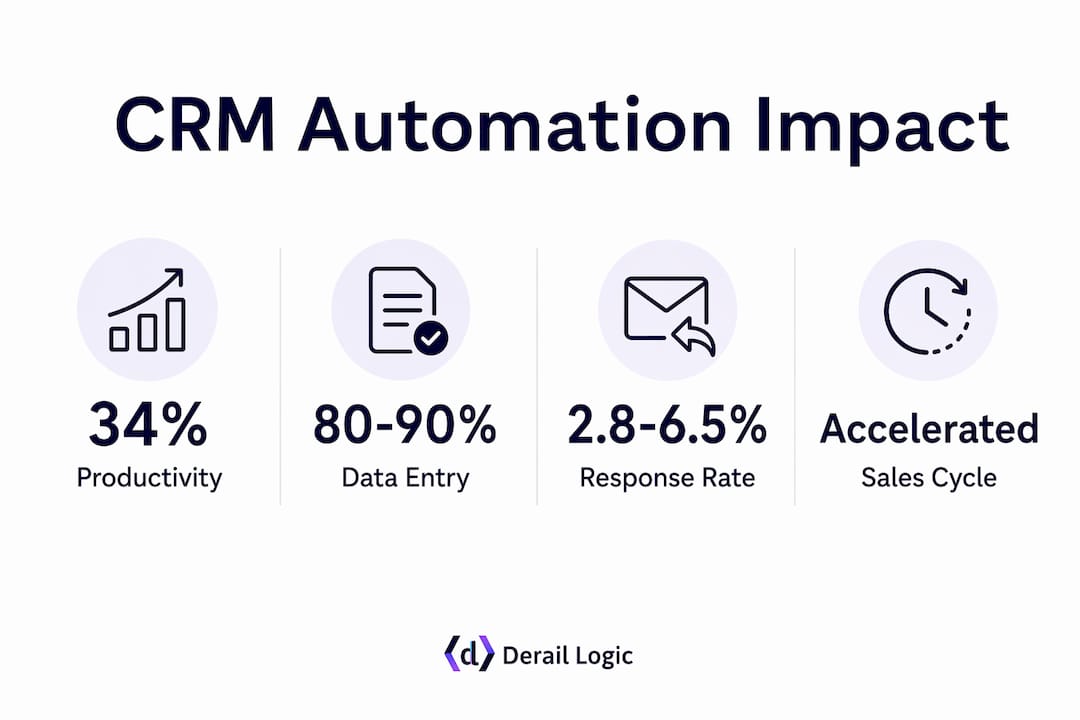
The time savings compound quickly. When CRM handles data entry, contact updates, and follow-up scheduling automatically, reps spend their hours on conversations rather than administration. That shift in focus is where the 34% productivity gain actually shows up in practice.
| Metric | Impact |
|---|---|
| Response rate improvement | 2.8% to 6.5% with CRM-integrated outreach |
| Conversion rate increase | Up to 300% with enriched CRM data |
| Sales cycle reduction | Up to 30% faster with personalized campaigns |
| Manual data entry reduction | 80–90% reduction through CRM automation |
| Sales productivity boost | Approximately 34% improvement |
Pro Tip: Track your pre-automation baseline metrics before switching on CRM workflows. Without a baseline, you cannot prove ROI to leadership or identify which sequences actually move the needle.
Personalized content built from CRM data consistently outperforms generic messaging across every channel. Email, LinkedIn, and SMS campaigns all benefit from the same principle: relevance drives response.
How to balance automation with human touch in CRM-driven outreach?
Automation handles volume. Humans handle nuance. The most effective CRM-powered outreach programs draw a clear line between the two.
Automated CRM outreach handles administrative tasks best. Scheduling follow-ups, updating contact records, sending initial touchpoints, and triggering re-engagement sequences are all tasks where automation adds speed without sacrificing quality. These are repeatable, rule-based actions that do not require judgment.
Relationship-building is different. Complex negotiations, objection handling, and high-value account conversations require a rep who has read the CRM record and understands the full context. Handing those moments to an automated sequence is where teams lose deals they should have won.
The practical workflow looks like this:
- Automate: Initial outreach sequences, follow-up reminders, data entry, meeting confirmations, and re-engagement triggers
- Keep human: Responses to replies, discovery calls, proposal discussions, and any message requiring empathy or judgment
- Use CRM as the handoff signal: When a contact replies or hits a lead score threshold, the CRM flags the record for human review and pauses the automated sequence
CRM re-engagement campaigns with warm contacts achieve 2–3x higher reply rates than cold outreach. That stat matters because it shows warm CRM data is an asset most teams underuse. The human follow-up on those warm replies is where the relationship actually starts.
What challenges do teams face in CRM-based automated outreach?
CRM-powered outreach fails when the data inside the CRM is wrong. That happens more often than most teams realize.
-
Data decay. CRM data decays 25–30% annually. People change jobs, companies rebrand, and contact details go stale. Outreach to stale records harms sender reputation and wastes budget. Quarterly data audits and automated enrichment tools are not optional. They are the foundation of any outreach program that scales.
-
Incomplete records. A CRM full of contacts with missing job titles, no engagement history, and blank industry fields cannot power meaningful segmentation. Teams need a data entry standard and a process for enriching existing records before building sequences.
-
Over-automation. Scaling automated outreach without data quality control risks deliverability and campaign success. Sending high volumes from a CRM with poor data triggers spam filters and burns domain reputation. Volume without quality is invisible waste.
-
Ignoring CRM context. Reps who skip the CRM record and rely entirely on automated sequences miss signals that would change their approach. A contact who previously said “call me in Q3” should not receive a generic cold sequence in Q1. The CRM holds that context. Using it is a choice.
-
Compliance gaps. Automated outreach at scale must respect opt-out records, GDPR consent flags, and CAN-SPAM rules stored in the CRM. A single compliance failure can pause an entire outreach program. Build compliance checks into the workflow, not as an afterthought.
What practical steps can teams take to maximize CRM’s role in outreach?
The gap between teams that get results from CRM automation and those that do not usually comes down to execution habits, not technology.
Separating your CRM as a system of record from your go-to-market execution platform improves both scalability and compliance. Your CRM stores the truth about each contact. Your outreach platform executes the sequences. Keeping those roles distinct prevents data corruption and makes troubleshooting faster.
- Set up lead scoring. Assign point values to behaviors like email opens, page visits, and form fills. Use the score to trigger sequences automatically and flag high-intent contacts for human follow-up.
- Build segmentation before sequences. Segment by industry, lead status, and engagement level before writing a single email. Sequences written for a specific segment outperform generic sequences every time.
- Adopt the 90-second pre-read habit. High-performing reps spend 90 seconds reading CRM records before crafting outreach. That single habit improves relevance more than any AI tool alone.
- Use multichannel workflows. CRM data should feed email, LinkedIn, SMS, and phone sequences in a coordinated pattern. Contacts who see consistent, relevant messaging across channels respond faster.
- Review analytics weekly. CRM analytics show which sequences convert, which contacts stall, and where the workflow breaks. Weekly reviews turn data into decisions rather than reports that sit unread.
Customer retention also improves when CRM data triggers re-engagement campaigns at the right moment. Teams that use CRM signals to identify at-risk accounts and reach out proactively retain more revenue than those who wait for churn signals.
Pro Tip: Map your CRM fields to your outreach variables before launching any sequence. If your email template calls for “last product used” but that field is blank for 60% of contacts, the sequence will break or send embarrassing placeholder text.
Key Takeaways
A CRM system is the single most important data asset powering personalized, scalable automated outreach, and its impact depends entirely on data quality and workflow discipline.
| Point | Details |
|---|---|
| CRM data quality drives results | Stale or incomplete records produce poor outreach. Audit and enrich CRM data quarterly. |
| Automation handles volume, humans handle nuance | Automate repetitive tasks; keep human judgment for replies, negotiations, and high-value accounts. |
| Integrated CRM boosts key metrics | Response rates, conversion rates, and sales cycle length all improve with CRM-connected outreach. |
| Lead status shapes message strategy | Match outreach tone and content to CRM lead status for higher relevance and reply rates. |
| 90-second pre-read beats tool upgrades | Reading the CRM record before outreach improves personalization more than adding new software. |
What I have learned from watching teams use CRM automation
Most teams I have observed treat their CRM as a filing cabinet. They store contacts, log a few notes, and then build automated sequences that ignore most of what is in there. The result is outreach that looks automated because it is. Contacts can tell.
The teams that actually get results from CRM automation do something different. They treat the CRM as a live intelligence feed. They build sequences that change based on what the CRM knows. A contact who attended a webinar gets a different message than one who only downloaded a PDF. That distinction is not complicated. It just requires discipline.
The 90-second pre-read habit is the single most underrated practice in sales outreach. I have watched reps skip it because they trust the automation to handle personalization. It does not. AI tools can insert a first name and a company name. They cannot replace a rep who noticed that a contact just got promoted and opens the message with that context.
The other thing most teams miss is the value sitting in their dormant CRM records. Warm contacts who engaged 12–18 months ago and went quiet are not dead leads. They are warm leads who need a relevant reason to re-engage. AI-powered enrichment combined with a well-timed human message converts those contacts at rates that cold outreach cannot match.
My recommendation for 2026 is simple. Stop adding outreach tools and start using the data you already have. Your CRM is already full of signals. Build workflows that actually read them.
— Zachary
How Derail Logic connects CRM data to outreach that converts
Derail Logic built MartechAI to solve exactly the problem this article describes: CRM data sitting disconnected from the outreach tools that need it.

MartechAI brings together an intelligent CRM, a visual campaign studio, AI-driven personalization, and deep analytics in one platform. Marketing teams and sales teams can build multichannel outreach sequences that pull live CRM data, score leads automatically, and flag high-intent contacts for human follow-up. The marketing automation features cover email, SMS, and campaign workflows without requiring separate tools that never quite sync. If you want outreach that uses your CRM data the way it was meant to be used, MartechAI gives your team the infrastructure to do it at scale.
FAQ
What is the role of CRM in automated outreach?
A CRM centralizes customer and prospect data and feeds that data into automated outreach workflows. It enables personalized, timely communication at scale by connecting lead status, engagement history, and behavioral signals to messaging sequences.
How does CRM data improve outreach personalization?
CRM data provides lead status, contact history, and behavioral triggers that allow outreach sequences to send messages matched to each contact’s position in the buying process. This relevance drives higher response rates and fewer spam complaints.
How much does CRM automation improve sales productivity?
CRM-driven automation boosts sales team productivity by about 34% and reduces manual data entry by 80–90%, freeing reps to focus on conversations rather than administrative tasks.
How often does CRM data go stale?
CRM data decays 25–30% annually as contacts change jobs, companies rebrand, and details become outdated. Regular data audits and automated enrichment are required to maintain outreach effectiveness.
Should all outreach be automated through a CRM?
No. Automated CRM outreach works best for administrative tasks and initial touchpoints. Replies, complex negotiations, and high-value account conversations require human judgment and should be flagged by the CRM for rep follow-up rather than handled by automation alone.