


Post-purchase emails are any message sent after a transaction that reassures, informs, or drives the next sale, and they split into two jobs: confirming and converting. The single highest-impact first move is a confidence-first order confirmation that answers “did this work?” before anything else, because that one email cuts support inquiries and sets up every dollar of repeat revenue that follows.
TL;DR:
- Immediate order confirmation is crucial for building trust and reducing support inquiries, with 35 to 45 percent improvement in repeat purchases when sequenced properly.
- Transactional emails, like shipping notices and refunds, are mandatory and should never be combined with promotional content to avoid confusing customers and damaging trust.
- A structured timeline from Day 0 to Day 30, with key touchpoints such as social proof and replenishment reminders, optimizes customer engagement and repeat sales.
- Segmentation by customer type and behavior, along with event-based triggers, ensures relevant messaging and improves flow effectiveness, especially for first-time versus repeat buyers.
- Proper mobile design, clear subject lines, and dedicated complaint handling greatly enhance the relevance, usability, and response rates of post-purchase emails.
Table of Contents
- What Post-Purchase Emails Are (and Why They Outperform Everything Else You Send)
- What Are the Core Types of Post-Purchase Emails?
- What Is the Right Timeline for Post-Purchase Emails?
- How Do You Segment and Automate Post-Purchase Flows?
- What Should Post-Purchase Email Copy and Subject Lines Say?
- What KPIs Actually Show Whether Post-Purchase Emails Are Working?
- How MartechAI’s Pilot Data Backs This Playbook
- What Legal and Privacy Rules Apply to Post-Purchase Emails?
- How Do You Personalize Beyond Basic Segmentation?
- How Should Post-Purchase Emails Be Designed for Mobile?
- How Should You Handle Complaints Through Post-Purchase Emails?
- Author Perspective: Priorities and Common Pitfalls
- How MartechAI Helps You Build and Scale This Sequence
- Sources
- FAQ
What Post-Purchase Emails Are (and Why They Outperform Everything Else You Send)
Post-purchase emails fall into two distinct categories, and confusing them is where most programs go wrong. Transactional emails, like order confirmations, shipping notices, and delivery updates, are mandatory. Customers expect them, and skipping or delaying them erodes trust fast. Engagement emails, like thank-you notes, review requests, and cross-sell offers, are strategic. Nobody demands them, but they’re where loyalty and lifetime value actually get built.
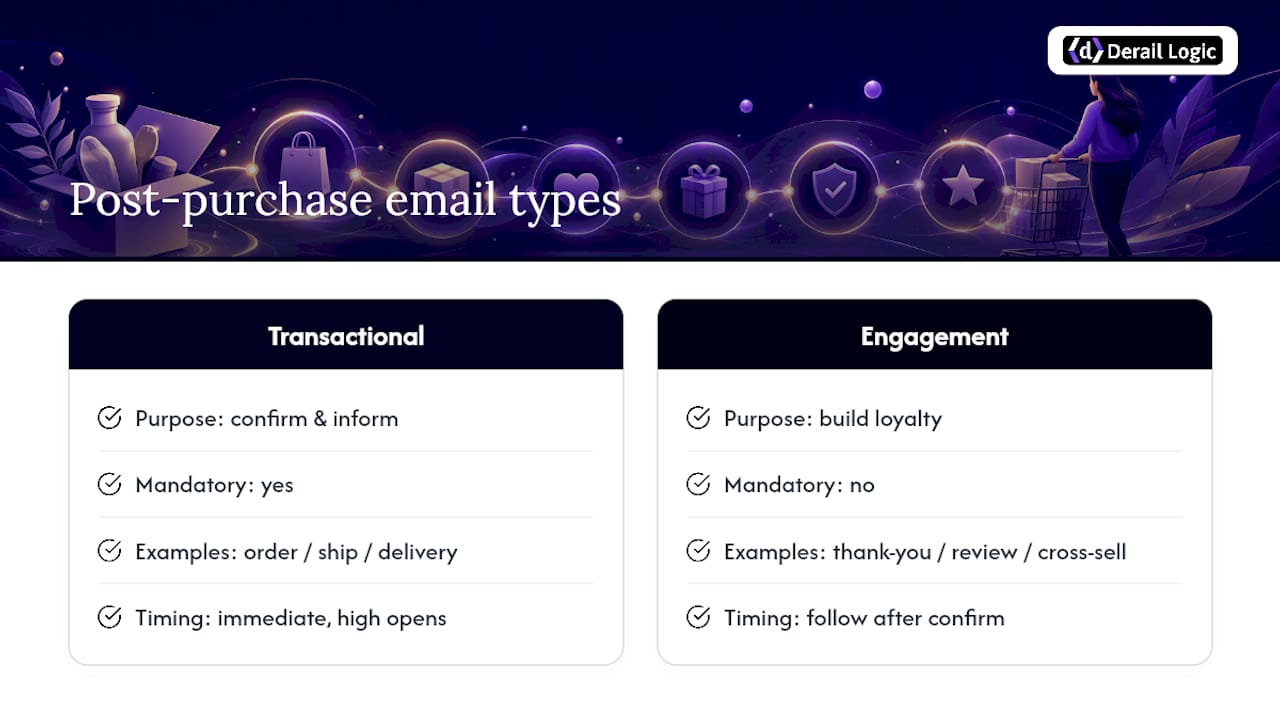
The distinction matters because these two categories combine to build both trust and repeat purchases, and treating a shipping notice like a sales pitch (or a review request like an afterthought) wastes the moment. The window right after purchase is when open rates spike. A customer who just paid you money is actively watching their inbox for confirmation, which means transactional sends often get read within minutes, and the engagement emails that follow inherit some of that attention if they’re timed well.
Pro Tip: Never bury order details under a promotional banner in your confirmation email. Customers scanning for a tracking number or order total will bounce straight to your support inbox if they can’t find it in three seconds, and that single friction point creates a support ticket you didn’t need.
The number to watch: MartechAI’s internal pilot data shows ecommerce brands running structured post-purchase email automation see a 35 to 45 percent improvement in repeat purchase rate compared to accounts sending generic, unsequenced follow-ups. That range reflects pilot-scope implementations, not a universal guarantee, but it’s a meaningful signal that sequencing beats sporadic sending.
Relationship-building content, not the transactional layer, is where brands earn repeat business. Confirmations keep customers calm. Everything after that is where you make the sale.
What Are the Core Types of Post-Purchase Emails?
A complete post-purchase program needs three tiers of messaging, and each tier has a different job. Mixing them up (sending a cross-sell offer before a shipping confirmation, for instance) confuses the customer about what stage of the transaction they’re in.
Transactional emails (mandatory, non-negotiable):
- Order confirmation. Confirms the purchase went through, lists items and total, and sets expectations for what happens next.
- Payment receipt. A separate or combined message confirming the charge, often needed for expense reports or tax records.
- Shipping notification. Confirms the order left the warehouse and includes tracking information.
- Delivery confirmation. Confirms the package arrived, which is also the natural trigger point for the next relationship-building send.
- Return or refund confirmation. Confirms a return was received or a refund processed, and it’s one of the most trust-sensitive emails you’ll send.
Relationship-building emails (strategic, high trust-return):
- Thank-you email. A short, personal note that isn’t trying to sell anything, sent close to delivery.
- Onboarding or how-to email. Especially valuable for anything with a learning curve. A skincare routine, a piece of software, a supplement with dosing instructions.
- Review request. Timed after the customer has had enough time to actually use the product.
- NPS or satisfaction survey. Useful for catching dissatisfaction before it becomes a public review.
- Community or referral invite. Turns a happy customer into a source of new customers.
Revenue-driving emails (the ones that pay for the program):
- Cross-sell. Suggests complementary products based on what was just purchased.
- Upsell. Suggests a higher-tier version of what the customer already owns.
- Replenishment reminder. Critical for consumables. Timed around when the product is likely to run out.
- VIP or loyalty invite. Rewards repeat behavior and nudges toward a second or third purchase.
- Win-back. Targets customers who haven’t returned within an expected window.
The mandatory tier isn’t optional; skipping it damages trust immediately. The other two tiers are where you have creative latitude, and where most of the post-purchase email examples worth studying actually live. A lean program can combine the thank-you and onboarding emails into a single Day 3 send. A mature program separates them and adds a survey. The right combination depends on product complexity: durables need more education, consumables need more replenishment logic, and anything with a real learning curve (skincare, supplements, software) benefits from a dedicated how-to email that a simple accessory doesn’t need.
What Is the Right Timeline for Post-Purchase Emails?
A tested Day 0 through Day 30 architecture gives every send a clear job and prevents the common mistake of firing a cross-sell offer before the customer has even opened the box. The industry-standard version of this timeline, documented by Chronos Agency, breaks down into five checkpoints.
- Day 0: Order confirmation. Immediate, transactional, confidence-first. No selling.
- Days 1 to 3: Shipping and delivery updates, followed by a thank-you. This window is about confidence and warmth, not conversion. If the product needs explanation, this is also where a short how-to email fits.
- Day 7: Social proof. A review request or a “here’s how other customers use this” message. By Day 7, most products have been unboxed and tried at least once.
- Day 14: Early cross-sell. Now that trust is established, a relevant complementary product suggestion lands without feeling premature.
- Day 21: Replenishment reminder (for consumables) or a deeper how-to for durables. Timing here should match your product’s actual usage cycle, not a fixed calendar number.
- Day 30: VIP invite or category expansion. By now you know whether this customer is engaged. If they’ve opened and clicked along the way, this is the moment to invite them into a loyalty tier or a broader product range.
Branch the sequence by customer type, not just by day count. First-time buyers need more education and reassurance early; repeat buyers can skip straight to social proof and cross-sell since they already trust you. Consumables and durables also diverge hard at the Day 21 mark: a coffee subscription customer needs a replenishment nudge, while a furniture buyer needs care instructions or an extended warranty pitch instead.
SMS works best as a parallel channel rather than a replacement for email. Two consent-gated touchpoints are usually enough to start: a delivery check-in and a short problem-solution message if something goes wrong. Adding more than that early tends to create noise before you’ve learned what your audience actually responds to.
How Do You Segment and Automate Post-Purchase Flows?
Five segments cover most ecommerce programs, and skipping any one of them means sending the wrong message to the wrong customer at the wrong time.
- First-time buyer. Needs the full confidence and education sequence.
- Repeat buyer. Can skip early reassurance and move faster into social proof and cross-sell.
- High-LTV or VIP. Deserves earlier access to loyalty perks and a different tone entirely.
- Category-specific. A skincare buyer and a hardware buyer need completely different onboarding content.
- Return-risk. Customers showing early signs of dissatisfaction (a support ticket, a delayed delivery, a low NPS score) should be pulled out of the standard cross-sell track immediately.
Each of these segments depends on clean event data. At minimum, your ESP or CRM needs to track order_placed, order_shipped, order_delivered, the SKU or product category, days_since_delivery, and explicit opt-in flags for email and SMS separately. Running first-time and repeat flows through the same automation, without distinguishing based on that data, is one of the fastest ways to tank relevance, since the messages differ in purpose: one is about building confidence, the other is about recognition and catalog expansion.
Before launching, run through a short implementation checklist: suppress marketing sends for any customer mid-return or mid-complaint, gate promotional content so it never fires ahead of a transactional email, test the full sequence in a staging environment with real order events, and monitor deliverability weekly rather than assuming it’ll stay stable once it’s live.
Pro Tip: Build cross-sell and upsell triggers as behavior-gated branches, not blanket sends. Only fire them for customers who opened the delivery email or clicked a help doc, which signals they’re satisfied enough to consider buying again.
A step-by-step automation checklist is worth reviewing before launch if your team hasn’t built a segmented flow before. It catches gaps in trigger logic that are easy to miss on a first pass.
What Should Post-Purchase Email Copy and Subject Lines Say?
Templates work best as starting points, not scripts. Adjust tone to match your brand, but keep the structural logic intact.
- Order confirmation: “Your order is confirmed. Here’s what happens next.” Subject line formula: confidence-first, e.g., “Order #[number] confirmed. We’ve got you.”
- Shipping and delivery: “It’s on the way. Track it here.” Followed by, “It’s arrived. Here’s how to get started.” Subject formula: benefit-driven, e.g., “Your [product] just shipped.”
- Thank-you and onboarding: “Thanks for choosing us. Here are three ways to get the most out of [product].” Subject formula: warm and direct, e.g., “Quick tips for your new [product].”
- Review request: “You’ve had a few days with [product]. Mind sharing your take?” Subject formula: social proof, e.g., “Join 4,000+ customers who left a review.”
- Replenishment: “Running low? Reorder in one click.” Subject formula: urgency without pressure, e.g., “Your [product] is probably running out soon.”
Reusable template libraries from ESPs like Omnisend consistently outperform generic confirmation copy in testing, largely because specific, benefit-oriented subject lines beat vague ones almost every time. Stick to one primary call-to-action per email. A confirmation email should have one button (track my order), not three competing links. Always include a small fallback support link near the footer for customers who hit a snag, and design the primary button to sit within thumb’s reach on a mobile screen, since most of these emails get opened on a phone within minutes of being sent.
What KPIs Actually Show Whether Post-Purchase Emails Are Working?
Track six numbers, and don’t let vanity metrics like raw open rate stand in for the ones that actually predict revenue.
- Open rate, as a baseline health check, though it matters less than what happens after the open.
- Click-through rate, which tells you whether the content and CTA are actually relevant.
- Revenue per recipient, the clearest single number for whether a flow is paying for itself.
- Repeat purchase rate (RPR), the metric that matters most over a 90-day window, and the one MartechAI’s pilot data ties directly to sequencing quality.
- Unsubscribe rate, an early warning sign that you’re sending too much or too soon.
- Support ticket volume, which should drop if your transactional emails are doing their job.
Run flow-level experiments with a holdout group rather than testing changes against your entire list at once. Hold back 10 to 20 percent of customers from a new sequence variant and compare their behavior against the group that received it. High-value tests worth running first include shifting the educational email from Day 3 to Day 1, moving the review request earlier or later depending on your product’s typical usage timeline, and testing a single clear CTA against a split CTA with two competing options. Subject-line tone (direct versus casual) is also worth testing early since it’s cheap to run and often shows a fast, measurable lift.
How MartechAI’s Pilot Data Backs This Playbook
The Day 0 through Day 30 architecture described above isn’t theoretical. It maps directly onto features already built into a connected marketing platform: a visual campaign studio for laying out the sequence, an intelligent CRM for tracking which segment a customer falls into, event-based triggers for firing sends off order_delivered or days_since_delivery, and an AI engine for adjusting subject lines and timing based on what’s actually converting.
Ecommerce brands running structured, sequenced post-purchase automation saw a 35 to 45 percent improvement in repeat purchase rate compared to unsequenced sending. The recommended pilot scope is a single product category over a 90-day window, long enough to capture at least one full replenishment cycle for consumables.
That range comes from first-party pilot implementations, not a lab study, and results vary by product category and starting baseline. Teams considering a pilot should start narrow. Pick one segment, run the full Day 0 to 30 sequence, and measure RPR before expanding to the rest of the catalog. A related resource on behavior-based handoffs shows how the same triggering logic applies to B2B nurture sequences, which is useful context if your team manages both ecommerce and lead-gen flows.
What Legal and Privacy Rules Apply to Post-Purchase Emails?
Transactional emails, like order confirmations and shipping notices, generally fall outside strict marketing consent requirements under the CAN-SPAM Act because they’re necessary to complete a transaction the customer already agreed to. That doesn’t mean they’re exempt from every rule. CAN-SPAM still requires a physical mailing address and an unsubscribe mechanism in any commercial email, and mislabeling a promotional email as “transactional” to dodge opt-out requirements is a common compliance mistake that regulators do watch for.
Engagement and revenue-driving emails, like cross-sell offers, review requests, and win-back campaigns, are marketing communications and need explicit consent where required. If you serve customers in the European Union, GDPR requires a clear legal basis for that consent, plus an easy, honored opt-out path. The safest architecture treats transactional and marketing sends as genuinely separate flows with separate suppression logic, rather than one long chain where a customer who unsubscribed from marketing still gets hit with a “you’ll love this too” email disguised as a delivery update.
Keep a documented record of opt-in timestamps and sources for every subscriber, since that record is what protects you if a compliance question ever comes up. Review your suppression lists regularly, especially after a return or complaint, since customers who initiate a return often expect (and legally may require) reduced marketing contact until the issue resolves.
How Do You Personalize Beyond Basic Segmentation?
Segmentation gets you the right list. Personalization gets you the right message inside that list, and the gap between the two is where a lot of programs plateau. Dynamic content blocks that swap in the actual product purchased, its specific use case, or a customer’s past order history turn a generic template into something that reads like it was written for that one person.
A skincare brand, for example, can pull the exact product name and recommended usage frequency into the onboarding email rather than sending a generic “here’s how to use our products” message. An AI-driven approach to product-level personalization can generate that dynamic content at catalog scale, which matters once you’re managing more than a handful of SKUs across a sequence.
Beyond product-specific content, track stated preferences, not just purchase behavior. If a customer indicates a preference for a certain scent, size, or category during checkout or a survey, feed that preference into future cross-sell and replenishment sends rather than defaulting to “customers also bought.” Preference-based personalization tends to outperform pure behavioral targeting because it respects an explicit signal instead of guessing from indirect data.
The limit here is relevance, not creativity. A dynamic block that inserts the wrong product name because of a data sync error damages trust faster than a generic email ever would, so testing the personalization logic in staging before it goes live matters as much as writing the copy itself.
How Should Post-Purchase Emails Be Designed for Mobile?
Most post-purchase emails get opened on a phone within minutes of being sent, since customers are actively checking for confirmation on the device that’s already in their hand. Design decisions that work fine on desktop routinely fail on mobile: multi-column layouts collapse awkwardly, small tap targets miss, and long paragraphs get skimmed or ignored entirely.
Keep the structure simple. A single-column layout with a clear hierarchy (headline, one key detail, one button) outperforms anything more complex. Buttons need to be large enough for a thumb tap, roughly 44 pixels tall at minimum, and placed high enough in the email that the customer doesn’t need to scroll to find the primary action.
Subject lines also need mobile discipline. Most phone inboxes truncate subject lines around 30 to 40 characters, so front-load the important word. “Order confirmed” reads fine truncated; a clever, delayed punchline does not. Preview text deserves the same attention, since it’s the second line most people actually read before deciding whether to open.
Test every template on an actual phone screen before launch, not just a desktop preview pane. Image-heavy emails should include alt text for cases where images don’t load automatically, which happens more often than most teams assume on mobile mail clients. A confirmation email that renders as a blank white box because an image failed to load creates exactly the kind of confusion the entire transactional layer exists to prevent.
How Should You Handle Complaints Through Post-Purchase Emails?
A dissatisfied customer who emails a complaint deserves a different track than the standard cross-sell sequence, and continuing to send promotional content to someone mid-complaint is one of the fastest ways to turn a fixable problem into a lost customer. The moment a return, refund request, or negative reply comes in, that customer should be pulled out of the revenue-driving flow entirely.
Replace the standard sequence with a short, direct response track. Acknowledge the issue within the same email that confirms a return or refund is being processed, rather than making the customer chase down a separate answer. Keep the tone plain and apologetic where appropriate, and always give a clear next step: a support link, a phone number, or a direct reply option, not a generic “contact us” button buried in a footer.
Review requests need the same gating logic. Sending a “how was your experience?” email to a customer who just filed a complaint is tone-deaf at best and can escalate a private issue into a public one-star review. Hold review requests for any customer flagged as return-risk until the underlying issue is actually resolved.
Once resolved, a short follow-up asking if the fix worked shows the brand followed through, and that single email often does more for retention than an entire cross-sell sequence would have. Customers who’ve had a problem handled well sometimes convert into more loyal repeat buyers than customers who never had an issue at all, simply because the resolution proved the brand stands behind its product.
Author Perspective: Priorities and Common Pitfalls
Get the confirmation email right before you touch anything else. Confidence first, education second, promotion last. That order matters more than any subject-line trick, because a customer who’s anxious about whether their order went through won’t care about a cross-sell offer.
The technical mistakes that derail programs are almost always the boring ones. Missing suppression rules that let a marketing email fire during an active return. Merging first-time and repeat flows because it was faster to build one automation instead of two. These aren’t creative failures. They’re setup failures, and they’re the ones nobody notices until RPR quietly stalls.
If you’re starting from scratch, fix your order confirmation subject line this week, add a Day 3 how-to email, and measure repeat purchase rate over the next 90 days. That’s the whole starting move.
— Zachary
How MartechAI Helps You Build and Scale This Sequence
Derail Logic gives you the pieces this entire sequence depends on without forcing you to stitch together four separate tools to get there. The visual campaign studio lets you lay out the full Day 0 to 30 flow, branch by segment, and see the whole architecture at a glance instead of guessing how your automation platform’s trigger logic actually connects.

The intelligent CRM tracks the event data this playbook depends on: order status, delivery timestamps, and opt-in flags, so segmentation by first-time versus repeat buyer happens automatically rather than through a manual list export. Autopilot surfaces the moments worth acting on, like a cluster of customers hitting their replenishment window at the same time, before you’d catch it by scanning a dashboard yourself. Pilot implementations following this exact sequencing structure are what produced the 35 to 45 percent RPR improvement referenced earlier.
If your current setup means juggling separate calendars, CRM exports, and email platforms just to send a confirmation email on time, a platform walkthrough is the fastest way to see what a connected version looks like. Start a trial and map your own Day 0 to 30 sequence in the campaign studio this week.
Sources
- How to Build a Post-Purchase Email & SMS Flow | Chronos Agency
- Post-Purchase Emails: Guide + 15 Examples & Free Templates | Omnisend
FAQ
What Are Examples of Post-Purchase Questions?
Common post-purchase questions include “Where is my order?”, “How do I use this product?”, “Can I return this?”, and “Would you recommend this to others?” Each maps directly to a specific email type: shipping updates, onboarding content, return policy information, and review requests.
What Is a Good Template for a Post-Purchase Thank-You Email?
A strong thank-you email confirms the order arrived, thanks the customer by name, and offers one simple next step, such as a how-to tip or a link to support, without pushing a sale. Send it within one to three days of delivery.
What Does Post-Purchase Mean?
Post-purchase refers to everything that happens after a customer completes a transaction, including order fulfillment, delivery, customer support, and the follow-up communication designed to build trust and encourage repeat business.
What Is the 3-Email Rule?
The 3-email rule generally refers to a minimal post-purchase sequence covering confirmation, shipping and delivery, and a follow-up (thank-you or review request), giving even lean teams a starting structure before expanding into a full Day 0 to 30 flow.


