



A high-performing lead nurture sequence moves each contact from first interest to a sales-ready action, usually a meeting, trial, or MQL handoff, by combining immediate value at Day 0 with behavior-triggered escalation. Before you write a single subject line, map your one measurable goal and the exact action that enrolls a lead. That single decision determines everything else in the sequence.
TL;DR:
- Building a lead nurture sequence with clear enrollment triggers and a single measurable goal significantly boosts sales-ready leads while reducing costs.
- Segment leads by both ideal customer profile fit and behavioral intent to tailor messaging and avoid maintaining overly complex or unmanageable groups.
- A five- to seven-email cadence over two to four weeks, with compressed timelines for high-intent leads, creates the optimal balance of engagement and response rates.
- Subject lines should sound personalized and human, with body copy between 50 and 125 words and a single, clear CTA per email to maximize relevance.
- Implement clear behavior triggers and exit rules, such as site visits or replies, to pause or route leads effectively, ensuring sequences remain relevant and avoid over-communication.
Table of Contents
- Why Build a Lead Nurture Sequence in the First Place?
- Step 1: Define the Sequence Goal and Enrollment Triggers
- Step 2: Segment by ICP Fit and Behavioral Intent
- Step 3: The Sequence Skeleton and Recommended Cadence
- Step 4: Email Anatomy and Copy Best Practices
- Step 5: Behavior Triggers, Handoff Rules, and Exit Conditions
- Step 6: Measurement, Benchmarks, and the Optimization Plan
- Ready-to-Adapt Email Templates for a 5 to 7 Touch Sequence
- Common Mistakes, a Quick Audit, and When to Rebuild
- How MartechAI’s Own Team Approaches Nurture Sequences
- Run This Sequence Without Stitching Five Tools Together
- Sources
- FAQ
Why Build a Lead Nurture Sequence in the First Place?
A nurture sequence is a qualification engine, not just a content calendar. Every email either moves a lead closer to sales readiness or it doesn’t belong in the sequence.
The numbers back this up. Companies that run formal nurture strategies generate 50% more sales-ready leads at 33% lower cost than companies that don’t, according to Forrester’s research on the B2B buying journey.
The 50/33 rule: Formal nurture programs produce 50% more sales-ready leads while cutting cost per lead by 33%, compared to companies with no structured nurture process.
From day one, track three metrics: open rate (subject line and sender health), reply rate (message relevance), and stage progression rate (the percentage of enrolled leads that reach your defined goal). Everything else is secondary.
Step 1: Define the Sequence Goal and Enrollment Triggers
Pick one goal per sequence. “Book a demo,” “convert to trial,” or “flag as MQL” all work. “Build brand awareness” does not, because it can’t be measured against a handoff point.
Once the goal is set, decide what specific action enrolls a lead. A nurture automation guide from Rework recommends defining entry triggers explicitly, rather than dumping every new contact into one generic drip.
Common entry triggers by intent tier:
- High intent: pricing page visit, demo request abandoned mid-form, live chat inquiry
- Mid intent: gated content download, webinar registration, comparison guide request
- Low intent: newsletter signup, blog subscription, generic contact form fill
Capture the source and tag the intent level at the moment of enrollment. A lead who downloaded a pricing comparison and a lead who subscribed to a blog need different opening emails, even if they land in the same CRM the same afternoon. Skipping this tagging step is the single most common reason nurture sequences underperform.
Step 2: Segment by ICP Fit and Behavioral Intent
Segmentation doesn’t need to be complicated to work. Most teams do better with four to six clear segments than with a dozen overlapping one’s nobody maintains.
Start with a fit filter: does this lead match your ideal customer profile (ICP)? Non-ICP leads still deserve a sequence, just a lighter one focused on education and long-term brand recall rather than a hard sales push.
Layer behavioral intent on top of fit:
- ICP + high intent: compressed, sales-forward sequence with a meeting CTA by email two
- ICP + mid intent: standard 5–7 email arc building from value to proof to ask
- ICP + low intent: slower cadence, heavier on education and case studies
- Non-ICP + any intent: newsletter-style nurture, no sales CTA, occasional check-in
Segmenting by capture channel and intent tier this way reveals the lead’s immediate problem, which should drive the sequence’s primary theme.
Pro Tip: Resist the urge to build a segment for every possible combination of source and behavior. If a segment gets fewer than 10 leads a month, fold it into a broader one. A segmentation matrix nobody can maintain performs worse than no segmentation at all.
Step 3: The Sequence Skeleton and Recommended Cadence
Five to seven emails spread across two to four weeks is the practical sweet spot for most B2B nurture campaigns. Fewer than five and you don’t have room to build a real case; more than seven and reply rates tend to fall off a cliff.
Here’s a skeleton that works for a mid-intent track:
- Day 0: Deliver the promised asset immediately and set expectations for what’s coming next.
- Day 2 to 3: Send a short educational email tied to the lead’s original interest, no CTA beyond “reply if this resonates.”
- Day 6 to 7: Introduce a proof point, a case study, a specific result, or a short customer story.
- Day 10 to 12: Address the most common objection directly and offer a low-friction next step.
- Day 15 to 17: Make a direct ask (demo, call, trial) with a clear single CTA.
- Day 20 (optional): A soft “breakup” email that re-engages or moves the lead to long-term nurture.
- Day 25 to 28 (optional): Final value-add touch before moving to quarterly re-engagement.
For high-intent leads (pricing page visits, demo clicks), compress this same arc into five to seven days and skip straight to the ask by email three. For long sales cycles, after an initial 30 to 60 day active window, stretch remaining touches to monthly value sends rather than letting the sequence go silent entirely.
Step 4: Email Anatomy and Copy Best Practices
Subject lines should read like they came from a person, not a campaign. Skip the exclamation points and the “Re:” tricks; they hurt deliverability and trust more than they help open rates.
Body copy performs best between 50 and 125 words. One idea per email, one CTA per email. If you find yourself listing three benefits and two links, split it into two emails instead.
Practical rules that hold up across most B2B nurture programs:
- Write the preview text as a continuation of the subject line, not a repeat of it.
- Personalize beyond the first name: reference the specific page visited or asset downloaded.
- Put the CTA in a full sentence, not a lonely button with no context.
- Use example formats from Adobe’s lead nurturing collection if you’re stuck on structure.
Pro Tip: A short, unedited-looking video works better mid-sequence than a polished one. Use it sparingly, around email three or four, when a lead has shown enough interest to warrant a personal touch, and keep the framing text under 40 words. A LinkedIn connection request or comment on a lead’s post around the same touchpoint often outperforms a sixth email entirely.
Step 5: Behavior Triggers, Handoff Rules, and Exit Conditions
Every nurture sequence needs rules for interrupting itself, including clear sales pipeline apps from your CRM data to effectively route leads when it’s time for the sales team to engage. A Rework playbook on post-capture automation is direct about this: without explicit exit conditions, sequences keep emailing people who’ve already moved on, either toward a purchase or away from one.
Behavior triggers that should pause automation and alert sales:
- Pricing page visit within an active sequence
- Demo link clicked, even without a form submission
- Three or more site visits inside 48 hours
- Reply to any email in the sequence, positive or negative
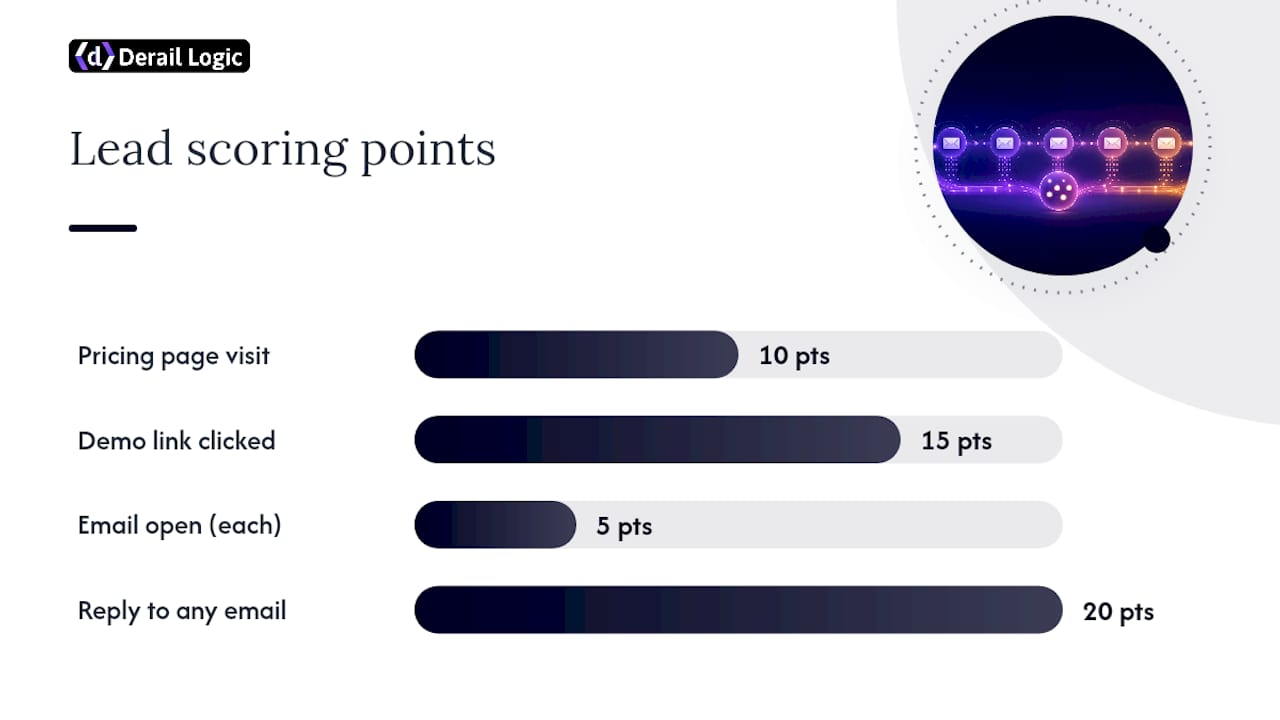
A simple scoring model helps standardize this. Assign 10 points for a pricing visit, 15 for a demo click, 5 for each email open, and 20 for a reply. Most teams set the MQL threshold somewhere between 40 and 60 points, adjusted after the first quarter of data.
Exit rules the automation must enforce without exception: a reply pauses the sequence immediately, sales assignment removes the lead from nurture entirely, an unsubscribe halts everything, and sequence completion without conversion moves the lead to a quarterly re-engagement track rather than deleting the record. Our guide on behavioral data in sales outreach covers how to wire these triggers into a CRM workflow.
Step 6: Measurement, Benchmarks, and the Optimization Plan
Three KPIs tell you almost everything: open rate signals subject line and list health, reply rate signals message relevance, and stage progression rate tells you whether the sequence is actually doing its job.
When something breaks, the diagnosis is usually simple:
- Open rate drops after email one: the subject line or sender reputation is the problem, not the content.
- Opens are fine but replies are near zero: the CTA is unclear or the value isn’t specific enough.
- Replies happen but leads don’t progress: the handoff process to sales is broken, not the emails.
Run a 30 to 90 day test cycle and change one variable at a time, subject line, send time, or CTA placement, never all three together. Mapping a single measurable goal per email makes this diagnostic process far easier, because you know exactly what each email was supposed to accomplish before you start comparing results.
Ready-to-Adapt Email Templates for a 5 to 7 Touch Sequence
Here’s a mid-intent, five-email framework you can adapt today. Each line names the email’s purpose and a subject prompt to build from.
- Day 0, Delivery: Purpose is to deliver the asset and confirm the relationship. Subject prompt: “Here’s your [asset name], plus what’s next.”
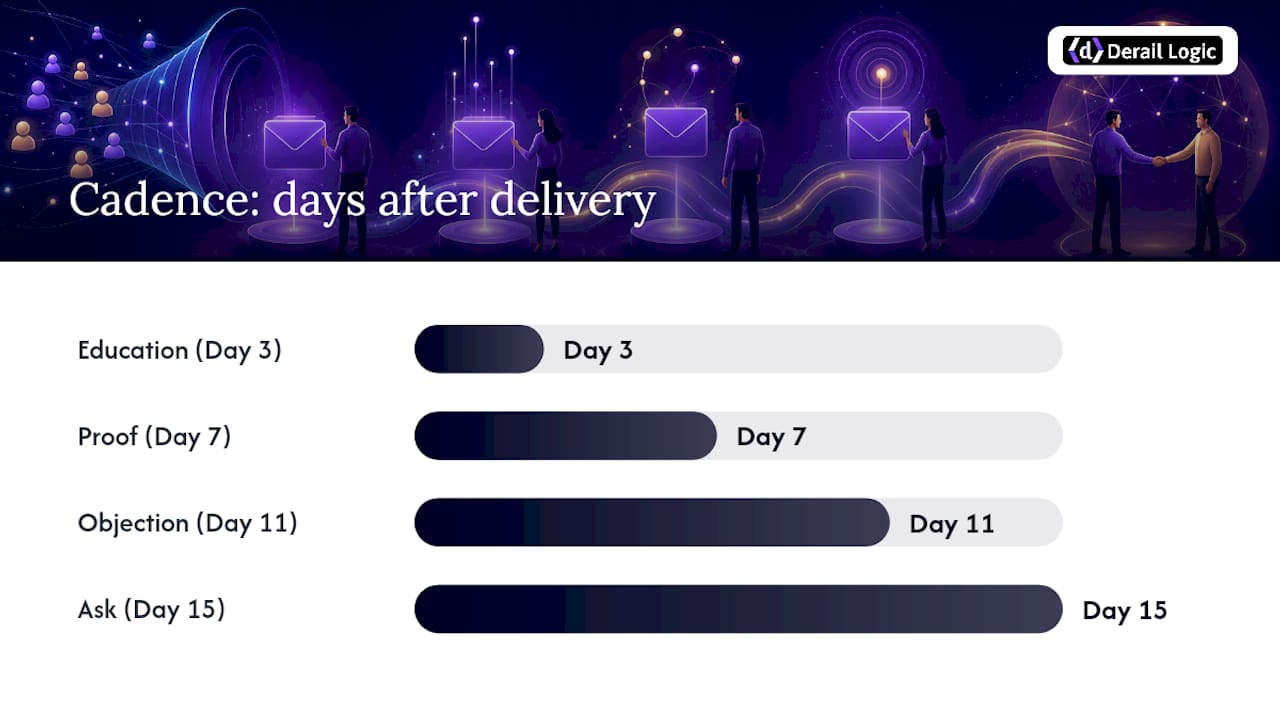
- Day 3, Education: Purpose is to expand on the problem the lead is trying to solve. Subject prompt: “The mistake most teams make with [topic].”
- Day 7, Proof: Purpose is to show a specific result from a comparable customer. Subject prompt: “How [type of company] solved [specific problem].”
- Day 11, Objection: Purpose is to name and defuse the most common hesitation. Subject prompt: “Is [common concern] holding you back?”
- Day 15, Ask: Purpose is to make a direct, low-friction request. Subject prompt: “Worth 15 minutes to talk through [goal]?”
For high-intent leads, compress the same arc into five days: Day 0 delivery, Day 1 proof (skip education entirely, they’re already convinced of the problem), Day 3 objection handling, Day 4 direct ask, and Day 5 a short breakup email if there’s no response. The CTA in every high-intent email should point straight at a calendar link, not a reply.
Use personalization tokens for company name, role, and the specific page or asset that triggered enrollment. Insert proof content, a case study link or a short video testimonial, at the third touch in either track; that’s where leads have enough context to care about someone else’s results.
Common Mistakes, a Quick Audit, and When to Rebuild
Five mistakes account for most underperforming sequences: generic subject lines, multiple CTAs crammed into one email, no defined exit condition, ignoring behavioral triggers entirely, and sending on a fixed schedule regardless of engagement.
Run this audit in under an hour:
- Does every email have exactly one CTA?
- Is there a documented entry trigger for this sequence?
- Does a reply or pricing-page visit pause automation?
- Has stage progression been checked in the last 30 days?
| Signal | Likely Fix |
|---|---|
| Open rate below 15% | Rewrite subject lines, check sender reputation |
| Replies near zero after three emails | Cut length, sharpen the single CTA |
| No stage progression after 60 days | Rebuild the sequence, don’t just tweak it |
| High opens, no clicks | CTA is unclear or buried mid-paragraph |
If three or more audit items fail, rebuild the sequence from the goal down rather than patching individual emails.
How MartechAI’s Own Team Approaches Nurture Sequences
We build our own nurture programs inside MartechAI’s campaign studio, mapping enrollment triggers and CRM handoff rules before writing a single email, exactly the sequence outlined above. Behavioral scoring and attribution run through the platform’s intelligent CRM, so a pricing page visit or demo click updates a lead’s status without manual review. For teams building this out further, our CRM automation guide covers implementation in more depth than this article can.
— Zachary
Run This Sequence Without Stitching Five Tools Together
Most of what this guide describes, goal mapping, intent segmentation, behavior triggers, scoring thresholds, requires a CRM, an automation tool, and an analytics dashboard talking to each other in real time. Derail Logic’s marketing automation platform handles all three inside one workflow, so a pricing page visit updates the lead score and pauses the sequence automatically, without a Zapier chain breaking quietly in the background.

The visual campaign studio lets you build the exact five to seven touch skeleton from this article and set exit conditions visually, rather than hunting through nested automation menus. The Autopilot feature handles the behavior-based handoffs, surfacing a hot lead the moment they hit a demo page instead of waiting for your next dashboard check. If you’re currently running your nurture sequence across a separate email tool, a spreadsheet for scoring, and a CRM that doesn’t talk to either, consider rebuilding the sequence in one place instead.
Sources
- Forrester — customer success and buying journey report
- Rework — Post-capture nurture automation guide
- Sendspark — Lead nurturing emails: templates & examples
- Alex Berman — Nurture sequence guide
FAQ
What Is a Lead Nurturing Process?
A lead nurturing process is a structured series of touchpoints, mostly email, that moves a contact from initial interest toward a defined sales outcome, like a meeting or trial signup, using timed content and behavior-based triggers.
What Are Some Examples of Lead Nurturing Activities?
Common activities include automated email sequences, retargeting ads, personalized case study sends, LinkedIn outreach tied to email engagement, and sales alerts triggered by pricing page visits or demo clicks.
What Are the Best Lead Nurturing Strategies?
The strategies that perform best combine intent-based segmentation, a single measurable goal per sequence, five to seven emails spaced over two to four weeks, and explicit rules for handing hot leads to sales.
How Do I Nurture My Leads Effectively?
Map one goal and one entry trigger per sequence, segment by ICP fit and intent, keep each email under 125 words with a single CTA, and build in behavior triggers that pause automation the moment a lead shows real buying intent.
How Long Should a Lead Nurture Sequence Run?
Most B2B sequences run five to seven emails over two to four weeks, compressed to five to seven days for high-intent leads and extended to monthly touches after an initial 30 to 60 day window for longer sales cycles.


