
An ecommerce SEO audit is a systematic review of your store’s crawlability, technical health, on-page content, and site speed to find what’s blocking sales-ready pages from ranking. Before anything else, open Google Search Console and check your Coverage report. If many of your submitted URLs aren’t indexed, that’s your starting point. Fix indexation blockers first, then move to performance and on-page work.
TL;DR:
- Ensuring at least 70% of submitted URLs are indexed is crucial, as lower indexation indicates systemic blockers like sitemap or robots.txt issues.
- Prioritizing template-level fixes, such as canonical tags and titles, can resolve widespread problems affecting thousands of product pages efficiently.
- Combining crawl data with server logs helps identify crawl budget waste and validates which pages Googlebot actually requests.
- Regularly rerunning coverage reports and lightweight crawls every 30 days minimizes regressions and maintains SEO gains over time.
- Using a centralized platform to track findings and automate workflows prevents loss of insights, ensures accountability, and measures actual traffic and ranking improvements.
Table of Contents
- What Does an Ecommerce SEO Audit Actually Cover?
- How Do You Conduct an Ecommerce SEO Audit Step by Step?
- Which Tools Give You the Most Reliable Audit Data?
- How Do You Prioritize and Roadmap Audit Fixes?
- How Does Auditing Change for Large Catalogs and Different Platforms?
- How Can MartechAI Support Your Audit Workflow?
- Common Audit Surprises and Quick Wins
- Centralize Your Audit Findings and Track the Lift
- Sources
- FAQ
What Does an Ecommerce SEO Audit Actually Cover?
An SEO audit for ecommerce websites isn’t one task. It’s five interlocking checks, and skipping any one of them leaves money on the table. Think of it like a car inspection: you don’t just check the tires and call it done.
Here’s what belongs in a genuine ecommerce performance review:
- Crawlability and indexation. Your robots.txt file, XML sitemap, and Search Console Coverage report tell you whether Google can even find and index your product pages. Google’s own ecommerce guidance treats crawlability, sitemap hygiene, and clean URL design as foundational, not optional.
- Technical SEO. Status codes, redirect chains, canonical tags, URL parameters, and pagination all affect whether search engines treat your catalog as one coherent site or a maze of duplicate signals.
- Performance and mobile rendering. Core Web Vitals (LCP, INP, and CLS) measure how fast your pages load and respond on the devices most shoppers actually use.
- On-page SEO and schema. Titles, meta descriptions, H1s, product descriptions, and Product structured data determine how your pages get interpreted and displayed in search results.
- Site architecture, internal linking, and backlinks. How pages connect to each other, and how your link profile compares to competitors, shapes which pages Google decides are worth ranking.
Each pillar feeds the next. A perfectly optimized product description on a page Google can’t index is invisible. Fast pages with no internal links pointing to them rarely get discovered. Treat these as connected systems, not a checklist you tick in isolation.
How Do You Conduct an Ecommerce SEO Audit Step by Step?
A full technical SEO audit for ecommerce sites follows a logical sequence: you can’t fix on-page issues on pages Google hasn’t indexed, and you can’t judge speed problems until you know which templates are actually broken. Here’s the order that works, along with what to export and what typically goes wrong at each stage.
1. Set your scope and baseline. Before touching a single tool, decide which sections of the site you’re auditing (full catalog, or a sample of category and product templates) and pull your current numbers. Export your XML sitemap, note your total indexed URL count in Search Console, and record baseline organic sessions and conversion rate from GA4. You’ll compare against these numbers later to prove the audit worked.
2. Validate your sitemap and check Coverage. Open Search Console’s Coverage (or Pages) report and compare submitted URLs against indexed URLs. A healthy store typically has at least 70% of submitted URLs indexed; if you’re well under that, something systemic is blocking pages. Common culprits: sitemap entries pointing to redirected or noindexed URLs, or category pages accidentally excluded by a robots.txt rule written months ago and forgotten. Export the “Excluded” tab and sort by reason. “Crawled, currently not indexed” on hundreds of product pages usually points to thin or duplicate content, not a technical error.
3. Run URL Inspection on priority pages. Pick your top 20 revenue-generating product and category pages and run them through URL Inspection individually. This shows you exactly how Googlebot rendered the page last, which catches JavaScript rendering issues that a standard crawl might miss.
4. Reconcile crawl data with server logs. A crawler like Screaming Frog gives you the site as it’s structured; server logs show what Googlebot actually requested. JetOctopus’s audit methodology stresses merging these two data sets, because crawl budget waste on filtered or parameter URLs often only shows up in logs, not in a standard crawl.
5. Clean up status codes and redirect chains. Export every 4xx and 5xx response from your crawl. Broken internal links to discontinued products are the most common offender. For redirects, flag any chain longer than one hop; each extra hop dilutes link equity and slows page load.
6. Fix canonical tags and parameter handling. Faceted navigation (filtering by size, color, price) generates enormous numbers of near-duplicate URLs. Each variant needs a canonical tag pointing to the primary version, or a consistent parameter-handling rule. This is one of the most common sources of wasted crawl budget on large catalogs, according to JetOctopus’s analysis of enterprise sites.
7. Audit pagination and infinite scroll. Category pages that paginate to page 40 need clear rel next/prev signals or self-referencing canonicals; infinite scroll setups often hide products from crawlers entirely unless a paginated fallback URL exists.
8. Review titles, meta, H1s, and descriptions at the template level. Export title tags for your entire product catalog and filter for duplicates. If 3,000 products share a title pattern with no unique modifiers, that’s a template fix, not 3,000 individual edits.
9. Check for thin and duplicate product content. Filter for product pages under roughly 50 words of unique description, and flag variant pages (different color, same product) competing against each other for the same keyword.
10. Run Core Web Vitals and PageSpeed checks on templates. Test one representative product page and one category page, not every URL. Look for render-blocking scripts, oversized hero images, and third-party tags (reviews widgets, chat plugins) dragging down INP.
11. Pull your backlink profile and run a keyword gap analysis. Export referring domains and identify which pages hold the most link equity. Compare your top category-page rankings against competitors’ for the same commercial keywords to spot where you’re structurally behind.
Which Tools Give You the Most Reliable Audit Data?
No single tool tells the whole story, and the biggest mistake in an ecommerce SEO analysis is trusting one data source over another when they disagree. Field data usually wins over lab estimates, and crawl data usually needs a reality check against what Googlebot is actually requesting.
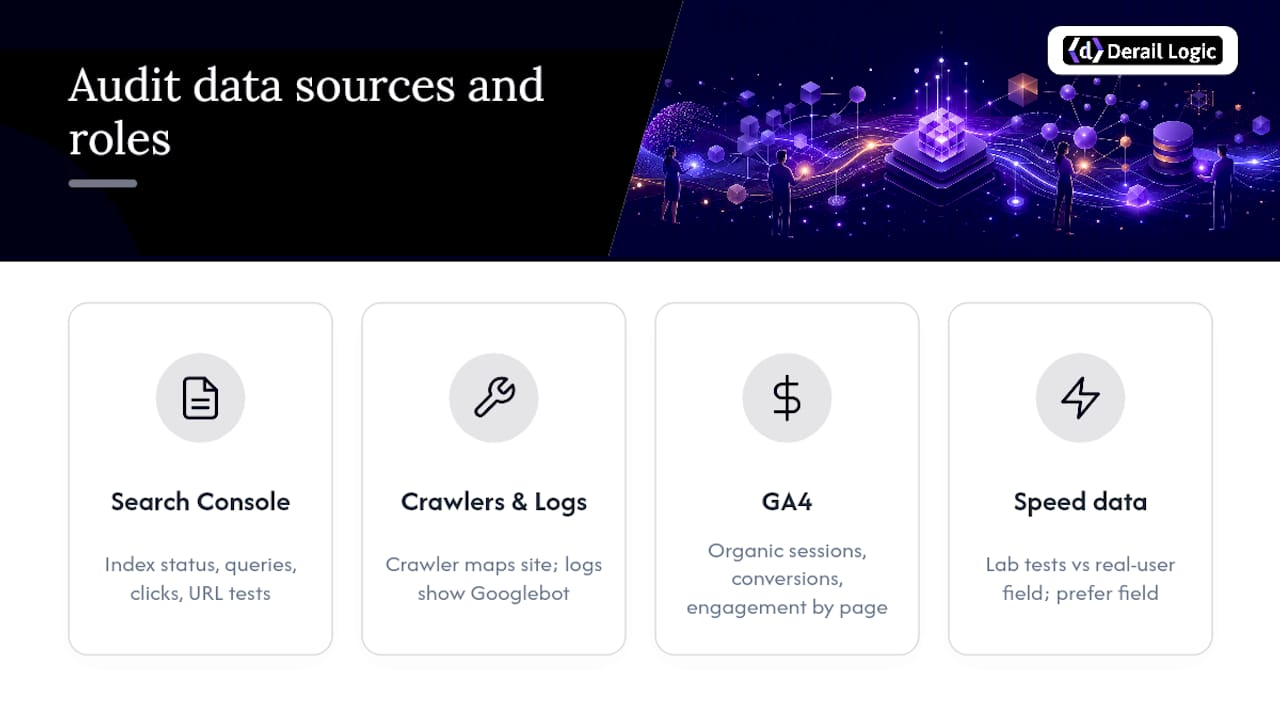
Google Search Console is your foundation. The Coverage report shows indexation status, the Performance report shows which queries and pages actually drive clicks, the Core Web Vitals report shows field data (real user measurements, not lab simulations), and URL Inspection lets you test individual pages against the live index.
Crawlers and log files work together, not separately. A crawler like Screaming Frog maps your site as built. Server logs, which tools like JetOctopus specialize in analyzing, show what Googlebot actually fetched. When a category page ranks well but shows up rarely in logs, that’s a crawl-budget warning sign worth investigating before it becomes a ranking problem.
GA4 connects your technical findings to revenue. Pull organic sessions, conversion events, and engagement rate by landing page. A page with strong impressions in Search Console but poor engagement metrics in GA4 might have a content or speed problem the crawl data alone won’t reveal.
Speed tools split into two camps. PageSpeed Insights lab data tells you what’s happening under controlled test conditions. The Chrome UX Report and Core Web Vitals field data tell you what real visitors on real connections experience, which is what Google actually uses for ranking. Always prioritize field data when the two disagree. Understanding the technical foundation behind these signals is worth a deeper look if technical SEO for online stores is new territory for your team.
How Do You Prioritize and Roadmap Audit Fixes?
A typical audit surfaces dozens, sometimes hundreds, of issues. Trying to fix everything at once guarantees you fix nothing well. The fix is a simple impact times effort matrix, scoring each finding on how much organic revenue it likely affects against how much work it takes to resolve.
Score every finding as High, Medium, or Low on both axes, then sort into three tiers:
- P0 (fix this week): High impact, low effort. Index blockers on category pages, a robots.txt rule accidentally blocking
/products/, a missing canonical tag on your top 50 SKUs by revenue. - P1 (fix this sprint): High impact, higher effort. Template-level title tag rewrites across the catalog, Core Web Vitals fixes on the product page template, faceted navigation canonicalization.
- P2 (fix this quarter): Lower impact or effort that requires broader coordination. Backlink outreach, content depth improvements on lower-traffic category pages, internal linking restructuring. Sound site architecture decisions tend to live in this tier because they pay off over months, not days.
A workable 90-day roadmap looks like this: Month one, clear all P0 index and crawl blockers, targeting a measurable jump in indexed URL percentage. Month two, ship template-level fixes for titles, meta, schema, and Core Web Vitals on your top templates. Month three, tackle content depth on thin product pages and begin backlink outreach, tracking organic sessions and conversion rate against your baseline.
How Does Auditing Change for Large Catalogs and Different Platforms?
A 200 SKU store and a 200,000 SKU marketplace can’t use the same audit method. Crawling every URL on a massive catalog wastes time and crawl budget alike. Instead, segment by template type (product, category, brand, filtered) and crawl a statistically representative sample of each, then extrapolate findings across the template.
Platform quirks matter more than most audits acknowledge. Shopify stores generate sitemaps automatically, but the platform’s robots.txt is only partially editable, so certain parameter-blocking rules need to happen through app-level canonical tags instead. WooCommerce stores frequently generate duplicate content through variant attributes (a shirt in five colors each getting its own indexable URL) unless canonicalization is configured deliberately. Headless and JavaScript-rendered storefronts carry the highest risk of rendering gaps between what a browser shows a shopper and what Googlebot actually indexes, which makes URL Inspection non-negotiable for headless builds.
The rule for deciding template versus page-level fixes is straightforward: if the same issue appears on more than a handful of URLs sharing a layout, fix the template and spot-check a sample afterward to confirm the fix propagated correctly.
How Can MartechAI Support Your Audit Workflow?
Running an audit is one project. Keeping the fixes from regressing six months later is the harder problem, and it’s usually where teams lose the gains they worked for.
A simple audit workbook, tracking columns for URL, issue type, severity, owner, target date, and status, keeps findings from disappearing into a spreadsheet nobody reopens. A unified marketing platform can connect that tracking directly to campaign and content workflows, so a flagged product-page issue routes to the person who owns that content instead of sitting in a shared doc. Structured-data validation, scheduled Search Console report pulls, and task handoffs between marketing and engineering all live inside one workflow instead of scattered across five tools and a Slack thread.
Common Audit Surprises and Quick Wins
Three things surprise almost every team running their first audit. First, the biggest wins are almost always template fixes, not individual page edits. Second, canonical tags break more often through app installations and theme updates than through anything a developer intentionally changed. Third, indexation problems compound. A blocked category page doesn’t just lose that page. It cuts off crawl access to every product linked from it.

The most common estimation error is underestimating how long stakeholder sign-off takes on template changes. Budget for that, not just the technical fix itself.
One maintenance habit prevents most regressions: rerun your Coverage report and a lightweight crawl every 30 days. Catching a broken canonical in week one is a five-minute fix. Catching it six months later, after Google has deindexed a quarter of your catalog, is a much bigger cleanup.
— Zachary
Centralize Your Audit Findings and Track the Lift
Spreadsheets and shared docs work for a one-time audit. They fall apart the moment you need to track fixes across multiple sprints, multiple owners, and multiple platforms at once. A marketing platform can give ecommerce teams one place to log audit findings, assign owners, and connect fixes to the analytics that show whether they actually moved organic traffic and conversions.

Instead of juggling a crawler export, a Search Console tab, and a task tracker, MartechAI’s marketing automation tools let you route audit findings straight into campaign workflows your team already uses. If you want the platform to flag emerging SEO opportunities on its own between audits, Autopilot surfaces those signals before you’d catch them manually. Visit the platform’s site to learn about trial options and integration with Search Console data.
Sources
For hands-on implementation, consult Google’s ecommerce best practices for canonical technical guidance, Schema for structured data validation, and Backlinko’s audit checklist for a downloadable workbook template.
- Best practices for ecommerce sites in Google Search
- Your Ecommerce SEO Audit Checklist for 2026 – JetOctopus
- The Enterprise Guide to Ecommerce Technical SEO in 2026 – Shopify
FAQ
What Is an Ecommerce SEO Audit?
It’s a structured review of your store’s crawlability, technical health, on-page content, speed, and link profile to find what’s blocking pages from ranking and converting.
How Often Should I Run an Ecommerce SEO Audit?
Run a full audit at least twice a year, and rerun a lightweight Coverage and crawl check every 30 days to catch regressions early.
What’s the First Thing I Should Check in an Audit?
Start with Google Search Console’s Coverage report to see what percentage of your submitted URLs are actually indexed; a healthy store typically sits at 70% or higher.
Should I Fix Individual Pages or Templates First?
Fix templates first. A single canonical or title tag fix at the template level can resolve the same issue across thousands of SKUs at once, compared to editing pages one by one.
Can MartechAI Help Me Track Audit Fixes?
Yes. MartechAI centralizes audit findings, assigns owners, and connects remediation work to analytics so you can measure whether fixes actually lifted organic traffic and conversions.