



Treat your CRM as the governed orchestration layer, not just a contact database, and connect marketing automation to it through clean, standardized data. If a full unified platform isn’t realistic yet, a governed integration approach (iPaaS) gets you most of the benefit. Either way, the next move is the same: standardize your critical fields and run one pilot workflow, like a welcome series or lead nurture sequence, to prove the lift before you scale.
TL;DR:
- A governed integration approach through iPaaS can deliver most benefits if a fully unified platform isn’t feasible, but standardizing critical fields is essential before scaling campaigns.
- CRM automation handles operational tasks to free sales and support teams, while marketing automation orchestrates personalized multichannel campaigns, requiring clear ownership of customer data.
- Faster response times, improved retention, and higher campaign efficiency occur when live CRM signals trigger timely, personalized marketing actions, especially for high-frequency ecommerce and subscription businesses.
- Building a controlled pilot with unified customer profiles, event triggers, and dynamic segmentation is necessary to validate lift and avoid costly rework caused by messy data.
- Most failures stem from poor data quality, duplicate records, consent errors, and over-messaging, emphasizing the importance of governance, error monitoring, and a manual pause switch during implementation.
Table of Contents
- What Is CRM Marketing Automation, and Why Does the Distinction Matter?
- What Business Outcomes Does CRM-Driven Automation Actually Deliver?
- Which Features and Workflows Should You Build First?
- How Do You Design the Integration and Data Model?
- What’s the Step-by-Step Implementation Roadmap?
- Which KPIs Actually Prove CRM Marketing Automation Is Working?
- What Are the Most Common Pitfalls, and How Do You Prevent Them?
- What Does a Real Pilot Look Like in Practice?
- What Should Marketing Leaders Prioritize First?
- How Can MartechAI Help You Run This Pilot?
- Sources
- FAQ
What Is CRM Marketing Automation, and Why Does the Distinction Matter?
CRM marketing automation means using customer data stored in your CRM to trigger and personalize marketing campaigns automatically, rather than running your CRM and your marketing tools as two disconnected systems that happen to share a customer list. That sounds like a small difference. It isn’t.
Standalone marketing automation and true CRM automation solve different problems. CRM automation handles the operational side: data entry, follow-up sequencing, lead routing, deal-stage updates. It’s built to free your sales and service teams from repetitive tasks so they can spend time on the conversations that actually close deals. Marketing automation, on the other hand, is built for orchestrating campaigns across channels, personalizing content at scale, and managing lifecycle journeys like onboarding or re-engagement.
The operational question that separates the two is ownership. Who owns the customer record when a lead moves from “marketing qualified” to “sales qualified”? Who owns the trigger when a support ticket closes and a win-back email should fire? In a fragmented setup, the answer is often “nobody, clearly,” which is how leads go cold and customers get the wrong email at the wrong time.
Unified customer profiles solve this by giving every system a single, current view of each contact, built from CRM records, purchase history, support tickets, and behavioral data. Event-driven orchestration then reacts to changes in that profile in real time: a support case closes, a cart sits untouched for six hours, a subscription lapses, and the right workflow fires without anyone opening a spreadsheet.
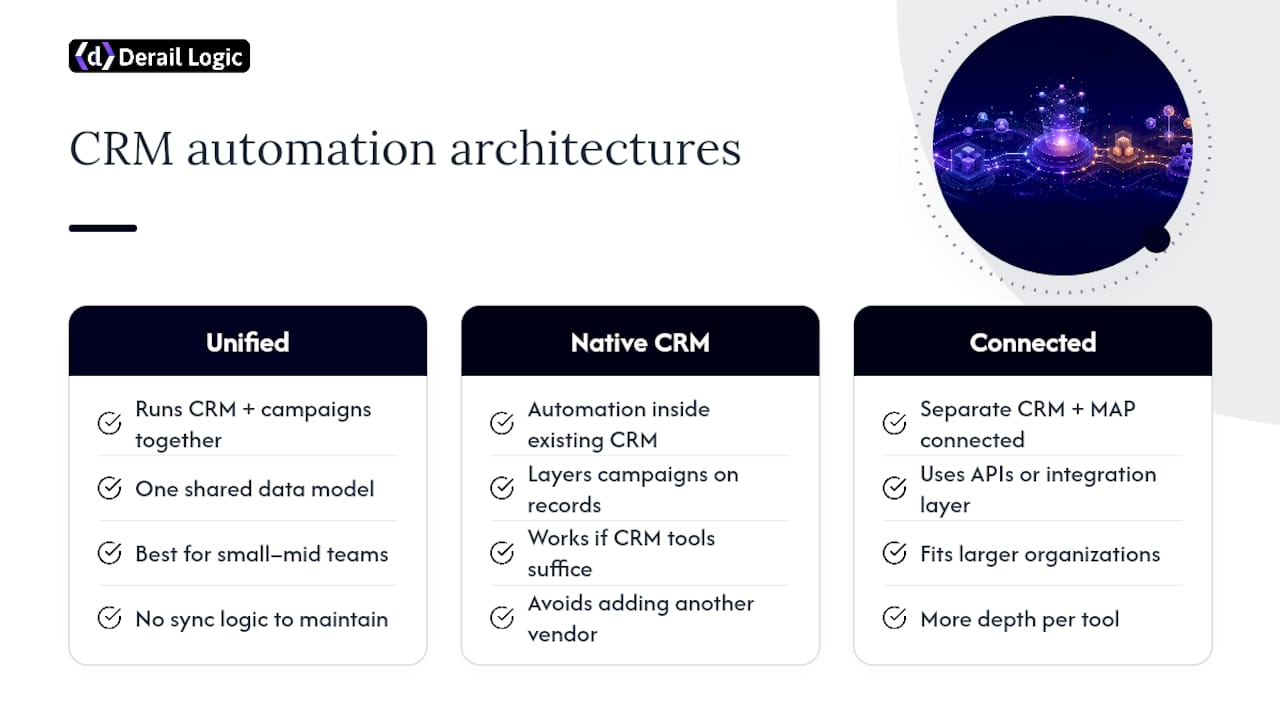
Three architectures show up repeatedly once you start comparing options:
A unified platform runs CRM, campaign execution, and analytics inside one system with one data model. This tends to fit small and mid-sized teams best because there’s no sync logic to maintain and no risk of two systems disagreeing about the same customer.
Native CRM automation uses the automation features built into your existing CRM, layering campaigns on top of records you already manage there. This works when your CRM’s native tools are strong enough for your use case and you want to avoid adding another vendor.
Connected best-of-breed, where a dedicated CRM and a separate marketing automation platform talk to each other through APIs or an integration layer, fits larger organizations with existing tooling investments and dedicated technical resources to maintain the connections. It offers more depth per tool, at the cost of more places for something to break.
None of these is universally correct. The right choice depends on your current stack, your budget, and how much engineering support you have on hand to keep two or three systems in sync.
What Business Outcomes Does CRM-Driven Automation Actually Deliver?
Faster speed-to-contact, higher retention, and lower cost per campaign are the three outcomes that show up most consistently once CRM data drives marketing automation instead of sitting beside it. The mechanism is simple: when marketing triggers use live CRM signals, timing improves, and timing is most of what separates a relevant message from an ignored one.
Revenue impact concentrates in a few specific places. Lead response time drops because a new inquiry can trigger an instant, personalized follow-up instead of waiting for the next manual outreach cycle. Retention improves because renewal and churn-risk signals living in the CRM can fire re-engagement campaigns before a customer actually leaves, not after. And campaign efficiency rises because segmentation pulls from real behavioral and transactional data rather than a static list someone exported three months ago.
The value shows up most where messaging frequency is high and timing is everything. High-frequency B2C flows (ecommerce carts, subscription renewals, browse abandonment) benefit disproportionately, because these are moments when a five-minute delay measurably hurts conversion. Subscription businesses see a similar lift from lifecycle orchestration: usage data flowing from the product into the CRM can trigger upsell or win-back sequences automatically.
Illustrative Result: In An ecommerce email automation pilot, applying CRM-triggered timing, holdout groups, and AI-driven personalization together produced a repeat purchase rate of 35% to 45%. That’s a client-reported figure from one pilot, not a universal benchmark, but the pattern behind it (timing plus personalization plus measurement discipline) holds across most ecommerce and subscription use cases.
Realistic benchmarks matter more than aspirational ones. If your current welcome series gets opened but never converts, the fix usually isn’t more automation, it’s better data feeding the automation you already have. CRM-driven marketing automation earns its value by making existing campaigns sharper, not by adding volume for its own sake.
Which Features and Workflows Should You Build First?
Five features separate a CRM marketing automation setup that works from one that generates noise: unified profiles, event triggers, dynamic segmentation, lead scoring, and orchestration with throttling controls. Get these right before you build a single campaign.
- Unified customer profile. Every touchpoint, purchase, support ticket, and email open rolls up to one record. Without this, segmentation is guesswork.
- Event triggers. Automations should fire on real actions (cart abandoned, ticket closed, invoice overdue), not on arbitrary calendar dates.
- Dynamic segmentation. Segments update automatically as behavior changes, so a customer who just churned drops out of your upsell list without manual cleanup.
- Lead scoring. Behavioral and firmographic signals combine into a score that decides when a lead moves from nurture to sales handoff.
- Orchestration and throttling. The system needs to know when a contact is already mid-workflow in another sequence, and cap how many messages one person receives in a given window.
- Consent management. Every workflow needs to check permission status before sending, not just at signup.
CRM automation built around these capabilities tends to include lead scoring, real-time notifications, and lightweight virtual assistants for routine follow-up, which is where a lot of the productivity gain actually comes from.
Five workflows deliver most of the value for most teams, and they’re worth building in roughly this order:
Welcome series. Trigger: new signup or first purchase. Input: signup source and initial preferences. KPI: activation rate within 7 days.
Lead nurture to sales handoff. Trigger: lead score crosses a threshold. Input: engagement history and firmographic data. KPI: time-to-first-contact and MQL-to-SQL conversion rate.
Cart or browse abandonment. Trigger: session inactivity after adding an item. Input: product viewed, cart value, customer history. KPI: recovery rate and revenue per recovered cart.
Post-purchase replenishment or reorder. Trigger: time since last purchase matched to typical reorder cycle. Input: product category and purchase frequency. KPI: repeat purchase rate.
Churn prevention or win-back. Trigger: usage decline, support escalation, or subscription lapse. Input: engagement trend and account health score. KPI: reactivation rate.
Each of these depends on the workflow automation fundamentals: triggered events, delayed steps, and multi-step branching, all built to reduce manual intervention rather than replace judgment entirely.
Pro Tip: Sequence your workflows so no contact can be in more than two active journeys at once, and build a global send cap (several marketing messages per week) before you launch your second automation. Teams that skip this step almost always end up apologizing for an unsubscribe spike within the first month.
How Do You Design the Integration and Data Model?
Pick one of three architectures for connecting CRM and marketing automation, and the choice comes down to a trade-off between speed, governance, and how much technical support you have on staff. A unified platform gives you the least friction. Native CRM automation gives you the least new vendor overhead. A connected best-of-breed setup with an orchestration layer gives you the most depth, at the cost of more moving parts to maintain.
At scale, the primary bottleneck isn’t campaign creativity, it’s data fragmentation. The fix is treating the CRM as a governed orchestration layer rather than one silo among several, and building an explicit data model before you connect anything.
That data model needs a few non-negotiable rules:
- Canonical keys. Every system needs to agree on what uniquely identifies a customer, whether that’s email, a CRM record ID, or a hashed customer number. Pick one and enforce it everywhere.
- Event schema. Define what counts as an “event” (purchase, ticket closed, email opened) and standardize the fields each event carries, before you wire up triggers.
- Identity resolution. Decide how duplicate or partial matches get merged, especially across web, email, and point-of-sale data.
- Sync direction and field ownership. For every shared field, name the system of record. If both your CRM and your ecommerce platform claim ownership of “customer status,” you will eventually get contradictory triggers.
- Webhook and reverse-sync logic. Real-time triggers usually need webhooks; less time-sensitive updates can run on scheduled sync. Know which fields need which.
Operationally, this is where most fragility shows up. Point-to-point integrations, where system A talks directly to system B, work fine with two systems. Add a third or fourth, and error handling becomes a genuine problem: a failed sync in one direction can silently desynchronize records for weeks before anyone notices. An orchestration layer, or iPaaS, becomes worth the investment once multiple back-office systems need to stay coordinated, because it centralizes error handling, retry logic, and monitoring instead of scattering it across every point-to-point connection you’ve built.
Monitoring deserves its own line item in your plan, not an afterthought. Set up alerts for sync failures, unexpected volume spikes (a sign a trigger is misfiring), and record-count mismatches between systems. The Freshworks approach of unifying sales and marketing around one customer view illustrates why single-source-of-truth architecture keeps reporting and personalization simpler than a patchwork of synced systems ever will.
What’s the Step-by-Step Implementation Roadmap?
Run the rollout in four phases, and resist the urge to skip straight to building workflows before your data is standardized. That single shortcut causes most of the failures teams report later.
- Phase 0: Alignment and audit. Get marketing, sales, and IT in the same room to agree on which KPIs matter (conversion rate, time-to-contact, retention) before anyone touches a tool. Audit every system currently holding customer data, and list every field that’s duplicated, inconsistent, or simply missing.
- Phase 1: Data standardization and consent mapping. Build your canonical data model here: agree on field names, formats, and ownership. This is also when you map consent status across every channel, since a workflow that ignores an opt-out is a governance failure waiting to happen. Quick wins live here too, like cleaning duplicate records, which requires no new engineering at all.
- Phase 2: Pilot workflow and measurement. Build exactly one workflow, usually a welcome series or lead nurture sequence, set a service-level agreement for how fast it should trigger, and test it against a holdout group that receives no automation. This is where you get your first real read on lift.
- Phase 3: Scale with governance. Once the pilot proves out, document a runbook for each new workflow, assign monitoring responsibility, and set rollback procedures before you add the next automation.
Standardizing data before automating isn’t optional groundwork, it’s the actual project. Teams that build five workflows on messy data usually end up rebuilding all five within a year, because a workflow amplifies whatever quality the underlying data already has, good or bad.
Pro Tip: Budget at least as much time for Phase 1 (data standardization) as you do for building your first three workflows combined. Teams that rush this phase almost always resurface the same problems, just wearing a new automation’s name.
If you want a structured checklist tailored to smaller teams working through this for the first time, this step-by-step marketing automation guide for SMBs walks through the sequencing in more granular detail than most vendor documentation bothers to.
Which KPIs Actually Prove CRM Marketing Automation Is Working?
Six metrics tell you whether your automation is generating real business value: conversion rate, customer lifetime value (LTV), repeat purchase rate, time-to-first-contact, campaign ROMI (return on marketing investment), and adjusted customer acquisition cost (CAC). Track all six, not just the one that makes the best slide in a quarterly review.
- Conversion rate by workflow stage, not just overall, so you can see exactly where a sequence loses people.
- LTV segmented by acquisition channel and by which automated workflows a customer passed through.
- Repeat purchase rate, especially for ecommerce and subscription businesses, since it’s the clearest signal that lifecycle automation is doing its job.
- Time-to-first-contact for new leads, which usually correlates directly with close rate.
- Campaign ROMI, calculated by tying CRM-tagged revenue events back to the specific campaign that triggered them.
- CAC, adjusted to account for the labor hours automation actually removed, not just the platform’s subscription cost.
Coupling CRM-synced revenue events with campaign data is what makes ROMI measurable rather than a rough guess. Without that link, you’re left attributing revenue by feel, which tends to overstate whatever channel your team likes best.
Measurement Reality Check: A workflow with no holdout group can’t prove causation, only correlation. If 20% of contacts who received your win-back sequence reactivated, but you never held back a comparison group, you don’t actually know whether the sequence caused that or whether those customers would have come back anyway.
If the treatment group doesn’t meaningfully outperform the holdout, that’s your signal to revise the workflow, not to declare victory and move on.
What Are the Most Common Pitfalls, and How Do You Prevent Them?
Data fragmentation, premature automation, and consent errors cause more automation failures than any technology limitation. Each has a specific, preventable cause.
- Poor source data. A CRM field that’s 40% blank or inconsistently formatted will produce broken personalization (“Hi {{first_name}}”) the moment you automate around it.
- Duplicate records. Two records for the same customer mean two separate journeys firing simultaneously, often with contradictory messaging.
- Consent errors. A workflow built before consent status syncs correctly can email someone who opted out days earlier, which is a compliance problem, not just an annoyance.
- Over-messaging. Multiple workflows firing on the same contact in the same week, with no global send cap coordinating them.
- Race conditions across syncs. Two systems updating the same field near-simultaneously can leave a record in a state neither system intended.
A short governance checklist prevents most of this before it happens:
- Assign admin roles explicitly; automation configuration in most platforms is (and should be) restricted to a small number of trained users, not open to anyone who wants to build a campaign.
- Validate schema changes before they go live; a renamed field in one system can silently break a trigger in another.
- Require change control on any live workflow edit, so nobody adjusts a send time mid-campaign without a record of it.
- Set up error monitoring with alerts for sync failures and volume anomalies.
- Document a rollback path for every automation before launch, not after something goes wrong.
Pro Tip: Build a manual “pause all” switch before you build your fifth workflow. Every team eventually needs to stop everything at once, usually during a data migration or an unexpected system outage, and discovering you don’t have that switch mid-crisis is a bad way to learn the lesson.
What Does a Real Pilot Look Like in Practice?
A governed pilot on a unified platform typically combines three components: a visual campaign builder for sequencing, an intelligent CRM for triggers and scoring, and analytics for measurement, all reading from the same customer data. That structure is exactly what MartechAI’s ecommerce pilot used to reach its 35% to 45% repeat purchase rate result, and the setup is worth breaking down because the mechanics translate to most unified platforms, not just this one.
The pilot’s inputs were straightforward: purchase history, product category, and email engagement signals, all living in one profile per customer. Triggers fired on two conditions: time since last purchase matched to typical reorder windows, and a decline in engagement that signaled churn risk.
To run something comparable on your own stack, the checklist looks like this:
- Confirm your customer profile includes purchase history and engagement data in one place before building any trigger.
- Define your reorder or lifecycle window using actual historical purchase intervals, not a guess.
- Build one AI-personalized sequence (subject line and content variation) rather than a single static template for everyone.
- Hold back a comparison group of at least 10% of eligible contacts.
- Measure repeat purchase rate at 30, 60, and 90 days, not just immediately after send.
This is a reported pilot result, not a guaranteed outcome for every business. The pattern behind it, timing plus personalization plus a proper control group, is what’s replicable, not the exact percentage.
What Should Marketing Leaders Prioritize First?
Most teams over-invest in workflow variety and under-invest in the two things that actually determine whether automation works: clean data and one proven pilot. If you do nothing else this quarter, fix your canonical customer identity (one key, one system of record, no ambiguity about which field wins in a conflict) and run a single welcome or nurture workflow against a holdout group before building anything else.
The organizational habit most teams skip is ongoing identity governance. Standardizing data once, at launch, and never revisiting it is how a clean pilot degrades into a fragmented mess eighteen months later, as new tools get bolted on and nobody owns the canonical model anymore. Assign a specific person, not a committee, to own that governance permanently. The CRM’s growing role in automated outreach only holds up as data quality holds up alongside it.
Automation doesn’t replace marketing judgment. It removes the excuse to guess about timing when the data to know better already sits in your CRM.
— Zachary
How Can MartechAI Help You Run This Pilot?
Running the architecture described above from scratch usually means stitching together a campaign tool, a CRM, and an analytics dashboard from three different vendors, then hoping the syncs hold. Some unified marketing platforms put a visual campaign studio, an intelligent CRM, and deep analytics inside one workflow, so the canonical data model this article walks through comes built in rather than assembled by hand.

That structure matters most in the pilot phase. Because the CRM, the campaign builder, and the reporting layer read from the same customer profile, you can launch a welcome series or lead nurture workflow, measure it against a holdout group, and see the result in one dashboard instead of reconciling numbers across three exports. The platform’s feature set covers exactly the workflow types this guide recommends starting with: welcome sequences, cart recovery, and lifecycle re-engagement.
Before committing to any platform, run your own evaluation checklist: confirm it supports canonical identity resolution, event-driven triggers, consent tracking, and holdout-based measurement. If those four boxes check out, the next step is a straightforward one: start a trial through MartechAI’s marketing automation service and pilot one workflow against your own data before deciding whether to scale.
Sources
- What Is CRM automation? | IBM
- What is CRM automation? A complete guide (2026) – Celigo
- What Is Marketing Automation? A Comprehensive Guide | NetSuite
- Workflow Automation | Sales CRM Automation | Pipedrive
FAQ
Will AI Replace CRM Systems?
No. AI is being built into CRM platforms to improve scoring, personalization, and follow-up timing, but it still relies on the structured customer data a CRM manages; it augments the system rather than replacing it.
Is CRM Hard to Learn?
Most modern CRM platforms are designed for marketing and sales users without technical backgrounds, so basic proficiency usually takes days, not weeks. The harder part isn’t the software, it’s standardizing the data feeding it.
What Is the Difference Between CRM and Marketing Automation?
CRM automation manages customer records, follow-ups, and lead routing, while marketing automation coordinates multichannel campaigns and lifecycle journeys; the two work best when connected through one shared customer profile.
What Are the Best CRM and Marketing Automation Platforms?
The right choice depends on your scale and existing stack: unified platforms like MartechAI suit teams that want CRM, campaign execution, and analytics under one governed data model, while native CRM automation or a connected best-of-breed setup fits organizations with more complex existing tooling.
How Do I Choose Between a Unified Platform and Connected Tools?
Choose a unified platform if you want one data model and minimal sync risk. Choose connected best-of-breed tools if you need deeper feature depth in one specific area and have the technical resources to maintain the integration.


