



The features that matter are contact and 360-degree customer profiles, audience segmentation, marketing automation workflows, campaign orchestration across channels, analytics with attribution, integrations and APIs, and AI-driven predictive scoring. Everything else is a variation on those seven. If a platform can’t do all seven reasonably well, it’s a database with a nicer interface, not a marketing CRM. This article breaks down what each feature does, how to prioritize them, and how they fit together in practice.
TL;DR:
- Most marketing CRMs should excel in campaign orchestration, segmentation, automation, analytics, integrations, and AI-driven scoring, with gaps usually in these core features.
- Advanced features like dynamic segmentation, multi-channel orchestration, real-time attribution, and AI scoring are typically available only in mid-tier or enterprise plans.
- Correct identity resolution and data hygiene are crucial for accurate customer profiles, which underpin effective segmentation and personalization.
- Teams should align CRM feature requirements with their core goals, such as lead scoring for e-commerce or campaign management for agencies, before choosing a platform.
- Vendors should be questioned about sync latency, data exportability, and the availability of analytics features to avoid costly mismatches after adoption.
Table of Contents
- What Marketing CRM Features Actually Cover
- How Each Marketing CRM Feature Works in Practice
- How to Choose the Right Marketing CRM Features for Your Team
- How MartechAI Maps to This Feature Checklist
- When Full CRM Depth Is Overkill, and When It Isn’t
- Ready to Put These Features to Work?
- Sources
- FAQ
What Marketing CRM Features Actually Cover
A marketing CRM is built to centralize customer data and turn it into campaigns, not just store contact records. That distinction matters because plenty of tools marketed as “CRM software” are really just sales pipelines with an email button bolted on. A true marketing CRM supports campaign orchestration, segmentation, personalization, and measurement across the full customer journey, which is a fundamentally different job than tracking deal stages.
Here’s the core feature set marketers should expect, and who typically gets access to each tier:
- Contact and 360° profiles — unified records combining demographics, behavior, and purchase history. Available at nearly every pricing tier, but depth (web activity, support tickets, ad engagement) usually requires mid-tier plans or above.
- Audience segmentation — grouping contacts by behavior, lifecycle stage, or custom attributes. Basic static lists exist even on free tiers; dynamic, rule-based segments that update automatically are a mid-tier feature.
- Marketing automation and workflows — trigger-based nurture sequences and lead routing. Entry-level tools handle simple drip email; advanced platforms handle multi-branch logic with conditional splits.
- Campaign management and omnichannel orchestration — building and coordinating campaigns across email, SMS, social, and paid channels from one interface. This is where the gap between SMB tools and enterprise platforms widens fastest, with AI voice agents integrated seamlessly into customer engagement workflows like those featured by Orphora AI.
- Landing pages and form capture — building pages and forms that feed directly into contact records without manual export. Common in mid-tier suites; often missing from pure sales CRMs.
- Lead scoring and routing — ranking contacts by engagement or fit, then handing qualified leads to sales automatically. Usually a paid add-on until you reach growth-tier pricing.
- Analytics, dashboards, and attribution — real-time reporting on campaign performance and revenue impact. Enterprise CRM platforms treat this as a core differentiator, not an afterthought.
- Integrations and open APIs — connections to ad platforms, e-commerce systems, and content tools. The size of a platform’s integration marketplace often predicts how well it will fit an existing tech stack.
- AI and predictive scoring — models that flag which leads are likely to convert or which send time will perform best. Increasingly bundled into mid-tier plans rather than reserved for enterprise.
Small business teams tend to lean hardest on segmentation and automation. Agencies prioritize campaign orchestration and reporting because they answer to clients. E-commerce brands live and die by attribution and lead scoring, since every campaign has a revenue number attached to it. B2B teams weight lead routing and CRM-to-sales handoffs above everything else, because a mishandled lead is a lost deal, not just a missed click.
How Each Marketing CRM Feature Works in Practice
Knowing the feature names is one thing. Knowing what actually happens when a marketer configures them is another, and that gap is where most implementations go sideways.
Contact and 360° customer profiles
A usable profile needs more than name, email, and company. It needs behavioral signals: pages visited, emails opened, ads clicked, past purchases, and support interactions, all tied to one identity. The hard part is identity resolution, matching a person across devices and channels without duplicating their record three times. Most platforms handle this through matching on email address first, then cookie or device ID as a secondary signal, which means cross-device tracking is never perfect. Data hygiene matters more here than almost anywhere else in the stack: a profile polluted with duplicate entries or stale fields will quietly wreck your segmentation logic later, because segments pull from fields that no longer reflect reality.

Segmentation and personalization
Static segments are lists you build once, like “customers in California.” Dynamic segments update automatically based on rules, like “opened three emails in the last 14 days but hasn’t purchased.” The second kind is what makes personalization actually work at scale, because it means a contact moves in and out of campaigns based on real behavior instead of a marketer manually rebuilding lists every week.
Personalization tokens (dynamically inserting a name, product recommendation, or last-purchase date into an email) are table stakes now. What separates a mediocre implementation from a strong one is A/B and A/B/n testing discipline: testing subject lines is easy, testing full journey branches is where most teams give up too early.
Automation and workflow design
Triggered flows fire off an action, someone abandons a cart, downloads a guide, or hits a pricing page twice. Scheduled flows run on a calendar, like a weekly newsletter. Most nurture sequences blend both.
The part marketers underestimate is error handling. What happens when an email bounces mid-sequence? When a lead qualifies for two different nurture tracks at once? Good automation design builds in exit conditions and suppression rules before launch, not after a customer gets six emails in one day.
- Map the trigger. Define exactly what behavior starts the workflow, and what disqualifies someone from it.
- Build the branch logic. Decide what happens if a contact opens but doesn’t click, versus clicks but doesn’t convert.
- Set the sales handoff. Establish the SLA for how fast a scored lead needs to reach a rep, and what happens if nobody claims it.
- Add suppression rules. Prevent overlap with other active campaigns targeting the same contact.
- Test the exit path. Confirm contacts actually leave the workflow when they convert, instead of continuing to receive irrelevant messages.
Pro Tip: Before building any nurture sequence, write out the “unhappy path” first, what happens when someone unsubscribes mid-flow, buys early, or triggers two workflows at once. Most automation failures aren’t bad copy. They’re missing exit logic.
Campaign management and omnichannel orchestration
A visual campaign studio lets a marketer map an entire journey, welcome email, SMS follow-up, retargeting ad, and a second email if there’s no response, on one canvas instead of stitching together five separate tools. This is the feature that most directly determines how fast a team can launch. Vendors increasingly treat a visual builder plus prebuilt automation recipes as the difference between a campaign that takes days to launch and one that takes hours.
Channel capability varies more than people expect. Email is universal. SMS support is common but sometimes region-restricted, Nutshell, for example, notes that some of its SMS drip features are US-only, which matters if your customer base spans borders. Push notifications and social integration are less standardized across platforms and worth testing directly rather than trusting a feature checklist.
Landing pages and web forms round out the orchestration layer. A form that doesn’t sync instantly into the CRM creates a data gap where leads sit in a spreadsheet for a day before anyone follows up, and that lag alone can cost a meaningful share of conversions.
Analytics, dashboards, and attribution
Real-time dashboards matter because campaign decisions made on yesterday’s data are decisions made too late. The KPIs that matter most for marketing CRM users: customer acquisition cost (CAC), lifetime value (LTV), conversion rate by channel, and the velocity at which a marketing-qualified lead becomes a sales-qualified one.
Attribution is where most teams overreach. First-touch and last-touch attribution are simple to build and easy to misread; multi-touch models are more accurate but require more data plumbing than most SMB teams have set up. Start simple, and treat sophisticated attribution as a maturity milestone, not a launch requirement.
A CRM’s value as a single source of truth depends on how well it consolidates interactions across email, social, website, and purchase history into one view that both marketing and sales can trust.
Data latency is the quiet killer of good analytics. If your dashboard updates once a day instead of in near real time, you’re making today’s ad spend decisions on numbers that are already stale.
Integrations and APIs
The integrations that matter most: ad platforms (for spend and conversion data), your CMS or website platform, e-commerce systems if you sell products directly, and your support desk if customer service data feeds marketing decisions.
Sync patterns split into two camps. Real-time webhooks push data instantly, which matters for time-sensitive triggers like cart abandonment. Batch syncs update on a schedule, hourly or daily, which is fine for reporting but too slow for anything requiring an immediate response. The common pitfall is assuming an integration is real-time when it’s actually running on a four-hour batch job, and discovering that only after a campaign underperforms.
AI and predictive features
Predictive lead scoring uses historical conversion patterns to rank which contacts are most likely to buy, so sales spends time on the leads worth calling instead of working a list alphabetically. Next-best-action recommendations go a step further, suggesting the specific email, offer, or channel most likely to convert a given contact based on similar past behavior.
The limits matter as much as the capability. Predictive models are only as good as the historical data feeding them, and a model trained on six months of thin data will make confident, wrong recommendations. Bias creeps in when a scoring model over-weights signals correlated with past sales success rather than actual buying intent, which can quietly deprioritize entire customer segments. Treat AI scoring as a strong second opinion, not a verdict.
How to Choose the Right Marketing CRM Features for Your Team
Feature checklists are easy to collect and hard to prioritize. Run every option through five criteria before signing a contract.
- Business objectives and KPIs. If your primary goal is pipeline velocity, lead scoring and sales handoff matter more than social scheduling. If it’s retention, segmentation and lifecycle automation matter more than acquisition tools.
- Integration needs. List every tool in your current stack, ad platforms, CMS, e-commerce, support desk, and confirm native integrations exist before assuming an API will bridge the gap cheaply.
- Team capacity and governance. A platform with 40 automation triggers is worthless if nobody owns the rules for when they fire. Match feature complexity to the size of your team.
- Measurement and reporting requirements. Decide upfront whether first-touch attribution is good enough or whether you need multi-touch modeling, because that decision affects which tier you need.
- Budget and total cost of ownership. Factor in seat limits, contact-volume caps, and the cost of add-on modules, not just the advertised starting price.
Ask vendors direct, specific questions rather than accepting a feature-page checklist at face value:
- What’s the actual sync latency between your CRM and our ad platforms, real time or batch?
- Can we export our full contact and campaign history if we switch platforms later?
- What does a sample attribution report actually look like, not a demo screenshot?
- Is AI scoring included at our tier, or is it a separate add-on module?
Pro Tip: Ask every vendor for a live dashboard walkthrough using sample data that resembles your actual volume, not their polished demo account. A dashboard that looks clean with 200 contacts can crawl at 50,000.
Red flags worth walking away from: vendors who can’t answer the sync-latency question directly, platforms that lock attribution reports behind the top-tier plan, and any tool that treats data export as a premium feature rather than a basic right.
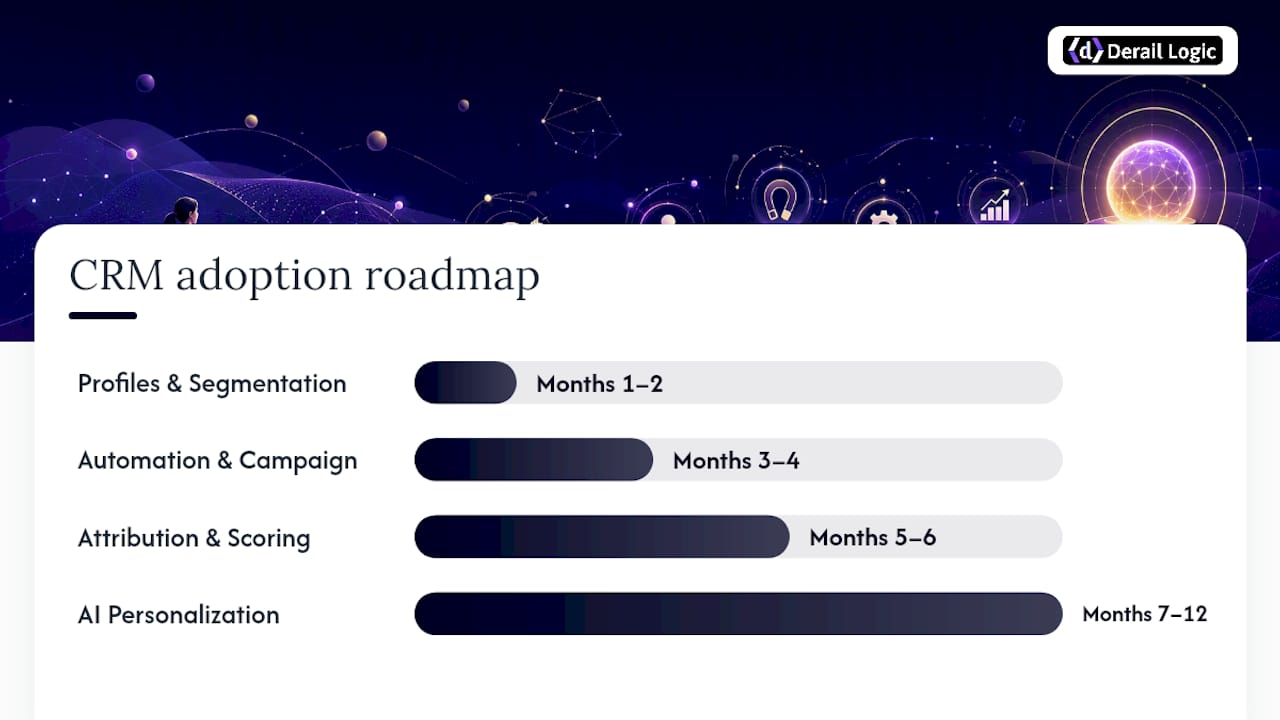
For teams starting from zero, a rough adoption roadmap over six to twelve months looks like this: months one and two, contact profiles and basic segmentation; months three and four, automation workflows and one omnichannel campaign end to end; months five and six, attribution reporting and lead scoring; months seven through twelve, AI-driven personalization once you have enough historical data to trust it.
How MartechAI Maps to This Feature Checklist
Every feature covered above corresponds to a specific module inside MartechAI, built so marketers aren’t stitching five disconnected tools together to get one campaign live.
- Contact and 360° profiles live inside MartechAI’s intelligent CRM, pulling behavioral and transactional data into one record instead of scattering it across a calendar tool, an analytics dashboard, and a spreadsheet.
- Campaign orchestration happens in the visual campaign studio, where a marketer builds a multi-channel journey on one canvas rather than jumping between an email tool and a separate social scheduler.
- Analytics and attribution run through MartechAI’s analytics layer, connected directly to the campaigns that generated the data, so reporting doesn’t require a manual export-and-merge step.
- AI-driven insights are generated from a business’s own real data, not a generic industry benchmark, which is the difference between a recommendation that fits your customers and one that fits an average customer who doesn’t exist.
Picture a mid-sized e-commerce brand launching a fall product drop. The team builds the journey in the campaign studio: a teaser email, an SMS reminder two days before launch, and a retargeting sequence for anyone who viewed the landing page but didn’t buy. The CRM segments the audience automatically based on past purchase category. Analytics tracks conversion by channel in real time, so the team catches on launch day that SMS is outperforming email and shifts spend accordingly, instead of finding that out three weeks later in a monthly report.
Readers who want to go deeper on any single piece of this can review MartechAI’s approach to automated outreach and lead nurturing or the full feature breakdown across campaign studio, CRM, and analytics.
When Full CRM Depth Is Overkill, and When It Isn’t
Full feature depth isn’t automatically the right call. A five-person team running one email newsletter doesn’t need multi-touch attribution or AI lead scoring, they need clean contact data and one reliable automation. Best-of-breed tools stitched together look cheaper individually but rack up integration overhead and data-sync failures that all-in-one platforms are built to avoid.
The governance point matters more than the tooling: strategic alignment, not the CRM install itself, determines whether the platform becomes an actual single source of truth or just another data silo. Before adopting full depth, ask whether your team can staff clean data entry, own automation rules, and act on attribution reports. If the answer is no across all three, start with contact profiles and one automated workflow, then expand.
— Zachary
Ready to Put These Features to Work?
Most marketing teams don’t lack ambition, they lack a place where campaign planning, CRM data, and analytics actually talk to each other. MartechAI is built to close that specific gap: instead of a calendar tool, a CRM, and a dashboard living in three separate logins, you get one workflow where the campaign you build feeds the CRM segment you’re targeting, which feeds the analytics report you’ll actually read.

For marketing teams, agencies, and e-commerce brands who are tired of exporting spreadsheets between tools just to see if a campaign worked, MartechAI’s marketing automation platform connects the visual campaign studio, intelligent CRM, and analytics into one place. Every workflow described in this article, segmentation, triggered nurture sequences, real-time attribution, runs through the same system instead of five disconnected ones. Start a free trial on the MartechAI landing page and build your first end-to-end campaign this week, not next quarter.
Sources
- CRM Marketing – Definition, Features, and Benefits + 5 Best Marketing CRM Tools | Creatio
- CRM marketing 101: Definition, benefits, and powerful strategies | Zendesk
- Monday
- Top CRM Features and Functions for Businesses | NetSuite
FAQ
What are the main features of a CRM built for marketing?
The core set includes contact and 360° profiles, audience segmentation, marketing automation, omnichannel campaign orchestration, analytics with attribution, integrations and APIs, and AI-driven predictive scoring.
What are the 7 C’s of CRM?
Definitions vary by source, but the concept generally covers customer focus, contact management, communication, campaign management, customization, coordination across teams, and continuous data collection, all built around keeping one accurate customer view.
What are the top CRM tools for marketing teams?
Rather than ranking specific vendors, the better approach is matching feature depth to your team’s stage: platforms with strong campaign orchestration and analytics, like MartechAI, fit teams that need planning, execution, and measurement in one workflow instead of stitched-together point tools.
What are the 5 areas of CRM?
The five commonly cited areas are contact and data management, marketing automation, sales force automation, customer service and support, and analytics and reporting, with marketing CRMs weighting the first, second, and fifth most heavily.
Is a marketing CRM different from a sales CRM?
Yes. A sales CRM centers on deal stages and pipeline tracking, while a marketing CRM centers on campaign orchestration, segmentation, and attribution, though the strongest platforms blend both under one contact record.


