



Structured data is Schema.org markup that translates page content into a format search engines can read as facts rather than guesses. It makes pages eligible, not guaranteed, for rich results like star ratings, recipe cards, and job postings. JSON-LD is the recommended format because it separates schema from your HTML, and getting it right means clearer entity understanding for Google and a real shot at better click-through rates.
TL;DR:
- Using JSON-LD for structured data is preferred because it separates schema markup from HTML, improving maintainability and compatibility with modern frameworks.
- The most impactful schema types for typical sites are Article, Product, BreadcrumbList, Event, LocalBusiness, JobPosting, VideoObject, and Recipe, each requiring specific mandatory properties to qualify for rich results.
- Validating schema with Google’s Rich Results Test and Schema Markup Validator, along with regular sitewide audits via Search Console, reduces errors and maintains eligibility.
- Common mistakes that disqualify pages include missing required fields, inaccurate formats, using generic types, and marking up non-visible content.
- Implementing structured data from a consistent data source and updating it regularly ensures accuracy as site content evolves, especially when integrated with content management or automation tools.
Table of Contents
- What Structured Data and Schema.org Actually Do
- JSON-LD vs. Microdata vs. RDFa: Which Format Wins
- Which Schema Types Actually Move the Needle
- How to Implement Structured Data Without Breaking It Later
- Validating and Monitoring Structured Data So Errors Don’t Slip Through
- Common Structured Data Mistakes That Kill Eligibility
- What Results to Actually Expect From Structured Data
- A Practitioner Checklist for Keeping Schema Clean at Scale
- Structured Data’s Role in Voice Search and Featured Snippets
- Making Structured Data Work With the Rest of Your SEO Strategy
- Keeping Structured Data Accurate as Your Site Evolves
- Testing Structured Data Beyond Google’s Tools
- Where Schema Should Sit on Your SEO Roadmap
- Where MartechAI Fits Into Your Schema Workflow
- Where to Verify Your Structured Data Setup
- Sources
- FAQ
What Structured Data and Schema.org Actually Do
Schema.org is the shared vocabulary maintained collaboratively by Google, Microsoft, Yahoo, and Yandex to describe entities, properties, and the relationships between them. It’s not a Google invention. It’s a cross-engine standard, which is why marking up a page correctly pays off across search platforms, not just one.
Structured data expresses facts your HTML can’t communicate on its own: that a number is a price, that a date is a publish date, that a name refers to an author versus a business. Schema encourages using the most specific type available rather than a generic fallback like “Thing,” because specificity is what lets search engines disambiguate entities with confidence.
Where structured data earns its place is in the gap between what a page looks like and what a machine can parse:
- HTML tells a browser how to render a page visually
- Structured data tells a machine what the content means
- Together, they let search engines match your page to the right query intent, not just the right keywords
This is the layer that separates a page merely containing information from a page a search engine can confidently cite.
JSON-LD vs. Microdata vs. RDFa: Which Format Wins
All three formats are valid per Schema.org, but they are not equally practical. Microdata and RDFa require you to embed attributes directly inside your visible HTML tags, which means every template change risks breaking your markup. JSON-LD lives in a separate script block, decoupled from the DOM entirely.
That separation is why modern implementation guides treat JSON-LD as the default choice for anything built on a contemporary stack:
- Maintainability: developers can update schema without touching page markup
- Portability: the same JSON-LD block can be generated programmatically from a CMS field or product feed
- Compatibility: React, Next.js, and headless CMS architectures render JSON-LD cleanly, where Microdata often gets tangled in component logic
Legacy Microdata still works if it’s already deployed and stable. There’s rarely a reason to rip it out just to swap formats. But for anything new, JSON-LD is the practical standard.
Pro Tip: If you’re injecting JSON-LD through Google Tag Manager because you can’t touch the template directly, treat it as a stopgap. Server-rendered schema loads more reliably and is less likely to get blocked by a crawler that skips JavaScript execution.
Which Schema Types Actually Move the Needle
Google supports dozens of Schema.org types, but a handful do most of the heavy lifting for typical business sites. Matching the right type to the right page is what determines rich result eligibility, not how much markup you add.
- Article: news posts, blog content, editorial pages. Requires headline, image, and datePublished.
- Product + Offer: e-commerce listings. Needs price, availability, and currency, and for full merchant features you’ll need the stricter offer-level properties Google expects for transactional listings, not just the lighter editorial version of Product schema.
- BreadcrumbList: any page with a clear hierarchy. Low effort, consistently helps with SERP breadcrumb display.
- Event: ticketed or scheduled events. Requires startDate, location, and name.
- LocalBusiness: physical storefronts or service areas. Needs address, phone, and business hours.
- JobPosting: job listings. Requires title, datePosted, and hiringOrganization.
- VideoObject: embedded or hosted video. Needs thumbnailUrl, uploadDate, and duration.
- Recipe: cooking content. Requires ingredients, cook time, and nutrition where applicable.
The common failure isn’t choosing the wrong type outright. It’s stopping short on required properties, which quietly disqualifies a page from the rich result it was aiming for.
How to Implement Structured Data Without Breaking It Later
Building JSON-LD correctly the first time saves you from a slow accumulation of silent errors across hundreds of templated pages.
- Pick the most specific @type for the page. A product page gets Product, not CreativeWork. A local storefront gets LocalBusiness, not Organization. Specificity is what Schema.org’s own framework rewards.
- Fill every required property, not just the recommended ones. Use ISO 8601 date formats (2026-03-12), absolute URLs (never relative paths), and always declare
"@context": "https://schema.org"at the top of the block. - Choose your injection method based on your stack. For static HTML, drop the script tag directly in the head. For Next.js or other SSR frameworks, render JSON-LD server-side so crawlers see it without executing JavaScript. For WordPress, hook into
wp_heador use a template partial tied to your post type. - Reserve Google Tag Manager for cases where you can’t touch the template. Practical guides treat GTM injection as a valid fallback, but server-rendered schema is more reliable and reaches a broader set of crawlers, including ones that skip JavaScript entirely.
- Generate JSON-LD from the same canonical data source that populates the visible page, whether that’s a CMS field or a product feed. This is the single biggest defense against content mismatch.
- Maintain a structured-data inventory. A spreadsheet or internal dashboard tracking which templates emit which schema types prevents the slow drift that happens when a developer updates a template and forgets the JSON-LD block riding along with it.
Pro Tip: When a page needs multiple related entities, e.g., an Article that references its Author and Publisher, use an @graph array instead of stacking separate script tags. It makes the relationships explicit and avoids duplicating the same entity data twice.
Validating and Monitoring Structured Data So Errors Don’t Slip Through
Deploying JSON-LD without validating it is how teams end up with schema that’s been silently broken for months. The workflow has three distinct layers, and skipping any one of them leaves a blind spot.
- Rich Results Test checks Google-specific eligibility: does this markup qualify for the rich result you’re targeting, and are all required fields present?
- Schema Markup Validator checks raw syntax against the Schema.org specification, catching structural errors that Rich Results Test won’t always flag.
- Search Console’s Enhancement reports monitor your entire site over time, surfacing valid, invalid, and warning counts by schema type so you catch regressions across hundreds of URLs at once, not one page at a time.
Why This Matters: Google’s own case studies on structured data adoption point to measurable CTR improvements for pages like Rotten Tomatoes, Food Network, and Nestlé after implementing rich result eligible markup, though the exact lift varies by content type and query.
Run both eligibility and syntax checks, because each tool catches a different class of error. Build a post-deploy check into your release process, and schedule a periodic sitewide audit, because template changes, plugin updates, and CMS migrations are the most common causes of schema getting stripped or malformed without anyone noticing until traffic quietly drops.
Common Structured Data Mistakes That Kill Eligibility
Most schema failures trace back to a small set of repeatable mistakes, not obscure edge cases.
- Marking up content that isn’t visible to users. Google’s guidelines treat this as a mismatch, and it can disqualify the page from eligibility entirely.
- Missing required fields. A Product without price or availability, or an Event without a startDate, won’t qualify no matter how much optional detail surrounds it.
- Wrong data formats. Currency codes that don’t match ISO 4217, dates that aren’t ISO 8601, or prices formatted as strings with symbols instead of plain numbers.
- Over-generalizing the type. Defaulting to generic types like Thing, or stacking incompatible types on the same block, confuses more than it clarifies.
- No governance plan. Validation, template testing, and monitoring need to be a recurring habit, not a one-time launch task.
Every one of these is preventable with a checklist. None of them require advanced tooling to catch, just consistency.
What Results to Actually Expect From Structured Data
Structured data makes a page eligible for a rich result. It does not guarantee one. Google decides per query, per search, which pages earn the enhanced display, and that decision can shift based on competition, freshness, and relevance signals unrelated to your markup.
Track these metrics in Search Console to see the real effect:
- Impressions and rich result impressions broken out by search appearance
- Click-through rate compared before and after your schema deployment
- Time-to-recrawl, since Google needs to re-crawl and process the page before new markup can influence results
Why This Matters: The CTR improvements Google highlights in its own structured data case studies are real, but they come from specific implementations at scale. Run your own before/after comparison on a representative page set rather than assuming a universal lift.
A Practitioner Checklist for Keeping Schema Clean at Scale
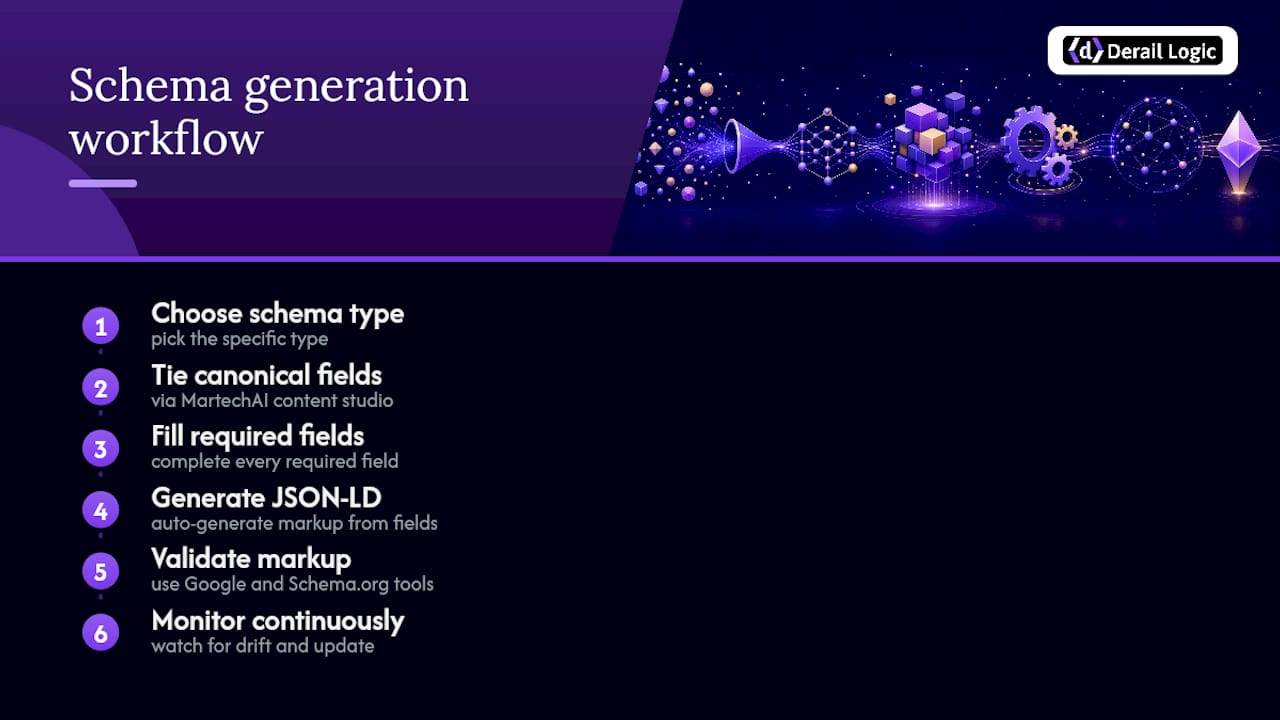
The operational version of everything above: choose the specific type, fill every required field, generate JSON-LD, validate with both Google and Schema.org tools, then monitor continuously.
Template-driven platforms like MartechAI’s content studio help by tying schema generation to the same canonical fields that populate your campaign content, which cuts down the drift that happens when markup and visible copy fall out of sync.
Structured Data’s Role in Voice Search and Featured Snippets
Voice assistants don’t read a full page aloud. They read the single best answer they can extract with confidence, and structured data is one of the clearest signals that helps them extract it correctly. When a page carries FAQPage or HowTo markup with clean question and answer pairs, an assistant has a machine-readable shortcut instead of having to parse ambiguous prose.
Featured snippets work on a related but distinct mechanism. Google can pull a snippet from unmarked HTML, but structured data narrows the ambiguity that causes Google to choose the wrong sentence, or skip a page entirely in favor of a better-labeled competitor. A Recipe page with proper cookTime and nutrition properties has a clearer path to the recipe carousel than a page relying on Google to infer those facts from paragraph text.
The practical implication for SEO professionals: if voice and snippet visibility matter for your content, prioritize structured data on pages built around direct questions and step-by-step processes. A support article structured as HowTo, with numbered steps and clear text properties for each one, gives assistants and snippet algorithms alike a format they can lift cleanly. A blog post that answers “what is X” in its first sentence, backed by matching Article schema, has a similar advantage.
This isn’t a guarantee of snippet placement. Google still ranks based on relevance and authority first. But structured data removes one layer of interpretive risk, and in a competitive SERP, removing risk is often the difference between showing up in the answer box and simply ranking on page one.
Making Structured Data Work With the Rest of Your SEO Strategy
Structured data doesn’t operate in isolation. It works best layered onto the same content and technical decisions that already drive your rankings, and treating it as a separate checklist item disconnected from the rest of your SEO work is a missed opportunity.
Internal linking is a clear example. BreadcrumbList schema reinforces the hierarchy your internal links already establish, and when both signals agree, Google gets a more confident read on how your site is organized. If your site architecture already groups product categories logically, breadcrumb markup just makes that structure explicit to search engines instead of leaving it to inference.
Content optimization and structured data reinforce each other in the same way. An Article schema block that lists a headline mismatched from the actual on-page H1 creates the exact content inconsistency Google’s guidelines warn against. Keeping your title tags, headings, and schema properties aligned isn’t extra work if you generate schema from the same canonical fields that populate your visible content in the first place.
For e-commerce specifically, technical SEO fundamentals like crawlability and page speed determine whether Google even reaches your Product schema often enough to keep it fresh. A page that recrawls slowly means your price and availability updates lag in search results, undermining the accuracy structured data is supposed to guarantee. Schema markup and technical health aren’t separate projects. They’re the same project viewed from two angles.
Keeping Structured Data Accurate as Your Site Evolves
Structured data isn’t a deploy-once asset. Sites change constantly: prices update, products go out of stock, articles get edited, job postings expire, and every one of those changes can leave your schema quietly out of sync with the page it describes.

The fix starts with sourcing schema from the same data layer that drives your visible content, not a separate manual entry process. If your JSON-LD pulls the same price field your product page displays, a price change updates both simultaneously. Manual duplication is where drift creeps in, one missed update at a time.
Build a recurring audit into your calendar rather than treating validation as a launch-day task. A quarterly sweep through Search Console’s Enhancement reports will catch schema that’s degraded due to a template update, a plugin conflict, or a CMS migration nobody flagged as schema-relevant. Expired content deserves particular attention: an Event page for a conference that already happened, or a JobPosting for a role that’s been filled, should either update its markup or be removed, since stale structured data can mislead both users and search engines.
Version control matters more than most teams assume. When a developer updates a page template, structured data changes should go through the same review process as any other code change, not get bolted on separately after the fact. Treating schema as first-class code, tracked in the same repository and reviewed in the same pull requests, is what actually prevents the slow decay that hits sites relying on ad hoc, manually maintained markup.
Testing Structured Data Beyond Google’s Tools
Google’s Rich Results Test and Schema Markup Validator cover the majority of use cases, but they’re not the whole picture if your traffic includes meaningful volume from other search engines.
Bing supports its own set of rich result types through Bing Webmaster Tools, which includes a markup validator with somewhat different eligibility rules than Google’s. If a meaningful share of your traffic comes from Bing, running your schema through its validator separately is worth the extra step, since a page can pass Google’s Rich Results Test and still trip a warning in Bing’s tool over a property Bing weighs differently.
Yandex, which matters for sites with Russian-language or Eastern European audiences, also parses Schema.org markup and has its own webmaster validation tools. The underlying vocabulary is the same across all three engines, since Schema.org is explicitly built as a shared standard, but each engine’s interpretation of “required” versus “recommended” properties can diverge slightly.
The practical takeaway: validate against Schema.org’s own specification first, since that’s the baseline every engine builds from, then layer on engine-specific checks based on where your actual traffic comes from. A site with negligible Bing or Yandex traffic doesn’t need to build a habit around their tools. A site with meaningful international reach should treat single-engine validation as incomplete.
Where Schema Should Sit on Your SEO Roadmap
Prioritize product and landing pages first. That’s where rich results translate most directly into revenue, not blog archives. After that, build scalable templates rather than hand-coding page by page, and split ownership between SEO strategy and developer implementation so neither side becomes a bottleneck. Plugins are fine for small sites. For anything with real template complexity, manual or programmatic JSON-LD gives you more control.
— Zachary
Where MartechAI Fits Into Your Schema Workflow
Derail Logic gives marketing teams a way to generate structured data straight from the same product feeds and content templates that already drive campaigns, instead of maintaining schema as a separate manual task bolted onto publishing.

A product feed template inside MartechAI’s marketing automation tools can emit JSON-LD alongside the page content it describes, so a price change or stock update flows into both the visible listing and its Product schema at the same time. That’s the drift problem most teams never solve manually. The platform’s AI engine pulls from live business data across integrated sources, which means schema generated through it reflects current CRM and analytics data rather than a stale export from last quarter.
If you’re managing schema across dozens or hundreds of templated pages and tired of catching errors after they’ve already cost you a rich result, start a trial and connect your product feed to see how the template-driven approach holds up against your current process.
Where to Verify Your Structured Data Setup
Bookmark these before your next deployment:
- Google Search Central’s structured data introduction for official format and eligibility guidance
- Schema for the full vocabulary and type hierarchy
- Google’s Rich Results Test for query-level eligibility checks
- The Schema Markup Validator for raw syntax verification
- Search Console’s Enhancement reports for sitewide monitoring over time
- Organization schema implementation guidance for entity-level markup on business pages
Sources
- Intro to How Structured Data Markup Works | Google Search Central
- Schema
- How to Add Schema Markup to Modern Websites Using JSON-LD (Without SEO Plugins) | SitePoint
- Structured Data for SEO: What It Is & How to Add It | SEOcrawl AI
- How to Add Schema Markup (JSON-LD) | Molixa
FAQ
What is structured data in SEO?
Structured data is Schema.org markup embedded in a page’s code that describes its content in a machine-readable format, letting search engines understand facts like prices, dates, and entity types rather than inferring them from plain text.
What is the most commonly used structured data markup for SEO?
JSON-LD is the most widely recommended format because it decouples schema from HTML, making it easier to maintain and deploy across modern CMS and JavaScript frameworks.
What is an example of structured data on Google?
A recipe page with Recipe schema showing a star rating, cook time, and calorie count directly in Google’s search results is a common example, along with Product schema displaying price and availability.
Does adding structured data guarantee a rich result?
No. Structured data makes a page eligible, but Google decides per query whether to display the enhanced format, based on relevance, competition, and content quality.
Can plugins handle structured data instead of manual JSON-LD?
Plugins work fine for small sites with simple needs, but template-driven or manual JSON-LD generation, the approach platforms like Derail Logic support, gives larger sites more control and fewer conflicts as page counts grow.


