



Marketing platform integration unifies customer data, automates workflows, and unlocks AI-driven personalization so marketing teams can execute faster campaigns with accurate attribution and less manual overhead. Put simply, it is the data and workflow connectivity between your CRM, marketing automation platform (MAP), analytics tools, ad platforms, and e-commerce systems that turns a fragmented tech stack into a coherent operating system.
The highest-value outcomes marketing teams gain from integration:
- Unified customer view: Every touchpoint, from email clicks to CRM deal stages, feeds a single profile.
- Reduced manual work: Automating integrations cuts the administrative load on marketing operations teams.
- Faster campaign execution: Synced data means triggers fire on behavior, not batch schedules.
- Improved attribution: Consolidated data across channels makes multi-touch models reliable.
- Better sales productivity: Brands that connect CRM to marketing automation report measurable gains in conversion rates and sales team output.
Table of Contents
- What does marketing platform integration actually mean for your team?
- What are the main types of marketing platform integrations?
- Why do the business benefits of platform integration matter?
- What are the highest-impact integration use cases?
- How should you architect integrations to avoid integration debt?
- What integration challenges should you plan for?
- What does a practical integration implementation checklist look like?
- How do you measure whether an integration is working?
- What should marketing managers do this quarter?
- Key Takeaways
- The integration decisions that actually separate good teams from great ones
- How MartechAI by Derail Logic fits into your integration roadmap
- Useful sources
- FAQ
What does marketing platform integration actually mean for your team?
Marketing platform integration is the practice of creating reliable data and workflow connections between the tools your team uses daily. That includes CRMs like Salesforce and HubSpot, email and marketing automation platforms like Marketo (Adobe) and Mailchimp, analytics systems, ad platforms, e-commerce engines, and internal systems like ERPs or customer support tools.
Two types of data flows matter here. Synchronous flows move data in near real time, which is what you need for live personalization or instant lead routing. Asynchronous flows move data in scheduled batches, which is usually fine for reporting and audience refreshes but will block real-time decisioning. Knowing which flow type a given use case requires is the first architectural decision your team needs to make.
Ownership of integrations rarely sits in one place. Marketing operations typically leads the business requirements and vendor relationships. Data engineering or a marketing data team handles the technical build and maintenance. Product and IT own security, access controls, and API governance. Sales ops cares about CRM data quality. Legal and security review data-sharing agreements. When these groups do not have clear ownership boundaries, integrations become everyone’s problem and no one’s priority.
What are the main types of marketing platform integrations?
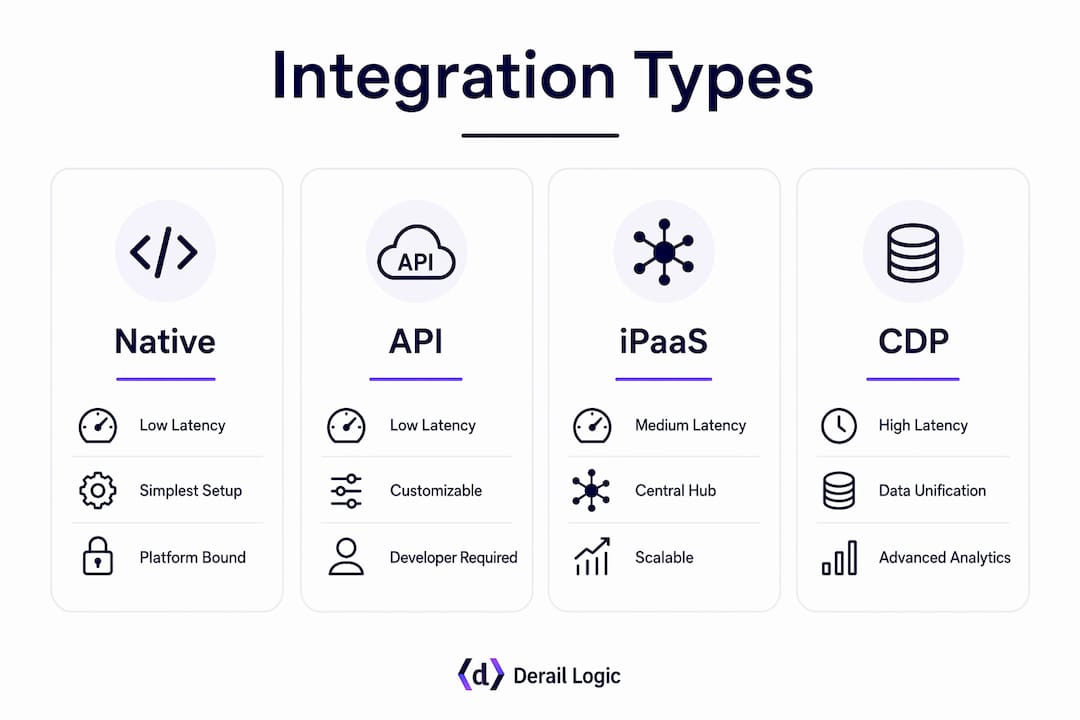
The four practical tiers are native integrations, direct API connections, iPaaS middleware, and central data layer syncs. Each has a different cost, latency profile, and maintenance burden.
- Native integrations: Built into the platform itself (e.g., HubSpot’s native Salesforce connector). Fast to activate, low developer effort, but limited to what the vendor chose to expose. Best for standard use cases between two major platforms.
- Direct API / custom integrations: Your team or a developer writes to the vendor’s API directly. Direct APIs enable near real-time bi-directional syncs and give you full control over data shape and logic. Higher developer effort, but the right choice for mission-critical or high-volume flows.
- iPaaS / third-party hubs: Platforms like middleware orchestration tools connect many apps with low-code workflows. Third-party hubs prioritize breadth and speed of connection over depth. Good for quick connectivity across many tools, but can introduce latency and create dependency on a vendor’s uptime.
- Central data layer (CDP / cloud data warehouse): All platforms write to and read from a shared data store. Highest setup cost, but the most durable architecture for AI-driven personalization and attribution. Twilio Segment is a common CDP choice; Snowflake or BigQuery serve as the warehouse layer.
| Dimension | Native | Direct API | iPaaS / Hub | CDP / Warehouse |
|---|---|---|---|---|
| Latency | Low–medium | Low (real-time capable) | Medium–high | Low (streaming) or high (batch) |
| Developer effort | Low | High | Low–medium | High |
| Maintenance risk | Low | Medium | Medium | Medium–high |
| Best fit | Standard two-platform sync | Mission-critical, high-volume | Broad connectivity, many tools | AI personalization, unified analytics |
Typical integration endpoints include CRM, email/MAP, paid ad platforms (Google Ads, Meta), web analytics, e-commerce platforms, product telemetry, ERP, and customer support systems. The right tier for each endpoint depends on three factors: how much data volume flows through it, how low the latency requirement is, and how critical a failure would be to revenue or compliance.
Why do the business benefits of platform integration matter?
The business case for integration comes down to four concrete outcomes, each tied to something a marketing manager can measure.

Unified customer view drives personalization. When CRM deal data, email engagement, and website behavior all resolve to the same profile, your team can segment with precision and trigger messages based on actual intent signals. Companies that excel at personalization generate significantly more revenue from those activities than less-effective counterparts.
Workflow automation lowers operational cost. Every manual export, copy-paste, or spreadsheet reconciliation is invisible waste. Connecting your MAP to your CRM eliminates the human glue holding data flows together and frees your team for strategy.
CRM and MAP sync improves sales productivity. Businesses that integrate CRM with marketing automation see measurable improvement in sales productivity. Lead scores, engagement history, and deal stage all become visible to sales reps without them leaving their CRM.
Consolidated data improves attribution and budget decisions. When ad spend, email engagement, and CRM pipeline data live in the same place, you can run multi-touch attribution models that actually reflect how customers buy. That means budget moves toward what works, not what was easiest to measure.
What are the highest-impact integration use cases?
The following use cases represent the clearest ROI opportunities for most marketing teams, ordered roughly by implementation complexity.
- Lead enrichment and routing: When a prospect fills out a form, an API call to an enrichment tool (like Clearbit) appends firmographic data, then a CRM workflow routes the lead to the right rep based on territory and score. Primary KPI: lead-to-opportunity conversion rate. Integration tier: direct API.
- Event-driven personalization: A user completes a product trial action. That behavioral event triggers a MAP sequence with content matched to their usage pattern. Requires real-time API or streaming write to the central data layer. Primary KPI: trial-to-paid conversion lift.
- Cross-channel orchestration: Email, SMS, and in-app messages are coordinated through a single orchestration platform so a customer never receives the same message twice across channels. Marketo and HubSpot both support this natively for their own channels; a CDP or warehouse layer extends it across third-party channels. Primary KPI: message fatigue rate and unsubscribe rate.
- Product-usage-driven expansion: Product telemetry (feature adoption, usage frequency) syncs to the CRM and triggers an expansion campaign when a usage threshold is crossed. Integration tier: direct API or warehouse sync. Primary KPI: expansion revenue per account.
- Attribution and back-office reporting: Ad spend from Google Ads and Meta, email engagement from Mailchimp, and pipeline data from Salesforce all land in a central warehouse. A BI tool (Looker, Tableau) builds a unified dashboard. Primary KPI: cost per pipeline dollar and campaign ROI.
For an event-driven campaign, the workflow looks like this: behavioral event fires → API writes to MAP → MAP checks CRM for contact attributes → personalized message sends → engagement data writes back to CRM. The whole sequence runs in seconds when the integration tier is correct. Teams using this pattern typically see faster time-to-action and higher engagement rates than batch-triggered alternatives.
How should you architect integrations to avoid integration debt?
A stratified architecture is the most durable approach. Think of it in three layers: a creation layer (content tools, CMS, AI-native writing tools), an orchestration layer (your MAP or engagement platform, handling email, SMS, push, and in-app), and a proprietary data layer (your CRM, CDP, or cloud data warehouse as the master record). Each layer has a defined job. Execution tools write back to the central source of truth; they do not become the source of truth themselves.

A capability-led approach to platform selection prevents redundant tools and reduces integration debt by focusing on orchestration, scalability, and integration architecture from the start. That means evaluating platforms on how well they integrate, not just on feature lists.
When to choose which tier: use native integrations for standard, low-volume syncs between major platforms. Use direct API for anything mission-critical, high-volume, or requiring real-time latency. Use iPaaS for broad connectivity across many tools where latency tolerance is moderate. Reserve the CDP or warehouse layer for AI-driven use cases, unified analytics, and any flow where data quality and identity resolution are non-negotiable.
Integration debt accumulates when teams choose the wrong tier for a critical flow. A low-cost hub handling high-volume, low-latency data will eventually fail under load or introduce lag that breaks personalization logic. Fixing it later costs far more than choosing correctly upfront, because by then the broken pattern is embedded in campaign workflows, reporting, and vendor contracts.
Pro Tip: Define a master record for every key data entity (contact, account, deal, event) before you build a single integration. Specify which system owns each field and which direction data flows. Without this, every new integration creates a new conflict.
For AI-driven use cases, favor real-time API flows or streaming writes into the central data layer. Batch syncs are adequate for reporting but will block live personalization and real-time decisioning. The role of AI in marketing strategies depends entirely on the quality and freshness of the data layer underneath it.
What integration challenges should you plan for?
Most integration projects hit the same set of obstacles. Knowing them in advance lets you build mitigations into the project plan rather than discovering them in production.
Common challenges and mitigations:
- Schema drift: A vendor updates their API and your field mappings break. Mitigation: version your API contracts and set up automated monitoring that alerts on field-level failures.
- Duplicate profiles: The same person exists in your MAP and CRM under different email addresses. Mitigation: define identity resolution rules (email as primary key, phone as secondary) before any sync runs.
- API rate throttling: High-volume syncs hit vendor rate limits and data falls behind. Mitigation: design for incremental syncs and queue-based retry logic rather than full-table pulls.
- Stale batch syncs: Reporting data is 24 hours old and campaign triggers fire on outdated signals. Mitigation: audit which flows genuinely need real-time vs. batch and upgrade the tier for latency-sensitive ones.
- User adoption: Sales reps ignore CRM data because they do not trust it. Mitigation: incremental rollout with a pilot group, visible data quality metrics, and a clear feedback channel.
- Governance gaps: No one owns the integration when something breaks. Mitigation: assign a named owner for each integration, document it, and include it in on-call rotation.
Consolidation without changing workflows preserves broken processes. Forward-deployed engineering and defined ownership are what actually operationalize platform capability.
Security checklist for every integration:
- Enforce least-privilege access: each integration credential accesses only the data it needs.
- Encrypt data in transit (TLS 1.2 minimum) and at rest.
- Rotate API tokens on a defined schedule (quarterly at minimum).
- Log all API calls and set alerts for anomalous volume or error rates.
- Review vendor data-processing agreements before connecting any system that handles PII.
What does a practical integration implementation checklist look like?
Work through these steps in order. Skipping discovery or reference architecture definition is the most common reason integration projects run over budget.
- Discovery: Audit your current stack. List every tool, its data outputs, and which teams depend on it.
- Define the reference architecture: Specify master records, event sources, trigger latency requirements, and integration tiers for each flow. A reference architecture that specifies these elements makes costs and maintenance predictable.
- Select integration tiers: Match each data flow to the right tier (native, API, iPaaS, or data layer) based on volume, latency, and criticality.
- Security and permissions review: Complete the security checklist above before any build begins.
- Build and unit test: Develop integrations in a sandbox environment. Test edge cases: nulls, duplicates, rate limit scenarios.
- Pilot rollout: Run with a limited data set or user group. Measure data quality and latency against targets.
- Production cutover: Migrate with a rollback plan. Monitor for 30 days before declaring stable.
- Operations handoff: Document ownership, monitoring dashboards, and escalation paths.
| Phase | Typical duration | Primary cost drivers |
|---|---|---|
| Discovery and architecture | 2–4 weeks | Internal team hours, consultant fees |
| Build and unit testing | 4–8 weeks | Developer hours, middleware subscriptions |
| Pilot and QA | 2–3 weeks | QA engineer time, data storage costs |
| Production and monitoring | Ongoing | Monitoring tools, API call volume, storage |
Key vendor and internal questions to ask before scoping: What are the API rate limits and SLA guarantees? What data volumes flow through each endpoint daily? Who owns data transformation logic? What is the rollback plan if a sync corrupts records? Who is the named owner post-launch?
How do you measure whether an integration is working?
Start with a small set of KPIs tied directly to the use case the integration was built to support. Tracking everything at once produces noise, not insight.
Primary KPIs by use case:
- Lead enrichment and routing: lead-to-opportunity conversion rate, time-to-first-contact.
- Personalization campaigns: conversion lift vs. non-personalized control group, revenue per contact.
- Cross-channel orchestration: unsubscribe rate, message engagement rate, campaign velocity (time from brief to send).
- Attribution reporting: cost per pipeline dollar, marketing-influenced revenue percentage.
- Automation efficiency: hours saved per week on manual data tasks, error rate in data syncs.
For attribution, multi-touch models become reliable only when data is unified. When your CRM, MAP, and ad platforms all write to the same data layer, you can run position-based or data-driven attribution without the gaps that plague siloed stacks. Server-side tagging (via Google Tag Manager server-side or a similar approach) reduces reliance on browser cookies and improves data completeness, which matters as third-party cookie deprecation continues.
Three quick experiments to validate an integration’s impact: run an A/B test where one segment receives personalized triggers from the integrated stack and the other receives standard batch emails; compare time-to-action (how quickly a lead receives a relevant follow-up) before and after the integration; and compare revenue per contact between accounts with complete unified profiles versus those with partial data.
What should marketing managers do this quarter?
Integration is the foundation that makes personalization and AI reliable. Without it, AI tools operate on incomplete data and produce unreliable outputs. The martech consolidation trend in 2026 is architectural, not cosmetic: fewer data silos, not just fewer vendor invoices.
Prioritized next steps:
- Audit your data layer first. Map where customer data lives, which system is the master record for each entity, and where duplicates or gaps exist.
- Pick one pilot use case. Lead enrichment and routing or event-driven personalization both produce fast, measurable results with moderate build effort.
- Define master records. Before any integration build starts, document which system owns each key field and which direction data flows.
- Choose your integration tier. Match the tier to the use case requirements, not to what is cheapest or fastest to activate.
- Assign named owners. Every integration needs a human responsible for monitoring, maintenance, and escalation.
Business case template: “Connecting [System A] to [System B] will eliminate [X hours] of manual data work per week, enable [specific campaign trigger or personalization], and give us reliable attribution across [channels]. The build requires [developer hours / middleware cost] and will be measured by [KPI] over a [timeframe] pilot.”
Key Takeaways
Marketing platform integration is the foundational layer that makes AI-driven personalization and accurate attribution possible, and the highest-ROI first step is consolidating engagement channels under a single orchestration platform.
| Point | Details |
|---|---|
| Integration enables AI | AI personalization and prediction require a unified data layer; siloed tools produce unreliable outputs. |
| Use stratified architecture | Separate creation, orchestration, and proprietary data layers with clear write-back rules to avoid integration debt. |
| Match tier to use case | Native integrations suit standard syncs; direct API handles mission-critical flows; CDP/warehouse supports AI and unified analytics. |
| Measure with targeted KPIs | Track lead-to-opportunity conversion, campaign lift, and automation time savings tied to each specific integration. |
| Derail Logic unifies the stack | MartechAI connects CRM, campaign orchestration, and analytics in one platform, reducing the integration surface area your team has to manage. |
The integration decisions that actually separate good teams from great ones
Most marketing teams understand that integration matters. Where they struggle is the decision layer: which tier to use, who owns the data, and when to stop adding tools and start connecting the ones they have.
The conventional wisdom says to buy the platform with the most native integrations. That sounds safe, but it often leads to a stack where every tool is “connected” in theory and nothing is reliable in practice. The real question is not how many integrations a platform advertises. It is whether your team has defined master records, assigned ownership, and built monitoring into the operating model.
Feature depth is seductive. A MAP with 200 native connectors looks impressive in a vendor demo. But a team running three well-governed integrations with clear ownership will outperform a team running twenty poorly maintained ones every time. The invisible waste in most martech stacks is not the tools themselves. It is the human glue holding together integrations that were never properly designed.
The teams that get this right treat integration architecture as a strategic decision, not an IT task. They define the data layer first, choose orchestration tools second, and add creation tools last. They assign ownership before they build. And they measure integration health the same way they measure campaign performance: with KPIs, alerts, and regular reviews.
How MartechAI by Derail Logic fits into your integration roadmap
Most teams reaching the implementation checklist stage face the same friction: the right architecture is clear, but the build effort to connect CRM, campaign tools, and analytics is significant. That is exactly the gap MartechAI by Derail Logic is built to close.

MartechAI brings together a visual campaign studio, an intelligent CRM, and deep analytics in a single platform, which means the creation, orchestration, and data layers described in this article are already connected out of the box. You are not stitching together three separate tools with custom API work. Lead enrichment, event-driven triggers, cross-channel orchestration, and attribution reporting all operate from the same data layer, so the integration debt problem shrinks before it starts.
The typical engagement follows the checklist: pilot one use case (usually CRM-to-MAP sync or cross-channel orchestration), measure the KPI lift, then expand. If you are ready to move from planning to execution, explore MartechAI’s marketing automation capabilities and see how the platform maps to your current stack.
Useful sources
- Why Martech Stacks Are Consolidating in 2026 | Heinz Marketing — Covers the architectural shift toward fewer, better-integrated tools and AI’s role as a capabilities layer.
- Martech Consolidation 2026: Why Fewer Tools With Better Data Win | Topic Intelligence — Explains why consolidation in 2026 is about data silo reduction, not just vendor cuts.
- Why Martech Consolidation Requires Fixing Workflows | CMSWire — Argues that workflow redesign and ownership are prerequisites for consolidation to deliver value.
- The Complete Guide to Marketing Automation Integrations | Leadfeeder — Practical breakdown of native vs. API vs. hub integration tiers and when to use each.
- Marketing Automation Platform Planning Framework | DataWhistl — Capability-led framework for selecting and architecting marketing automation platforms.
- API Integrations for Marketing | Agentic Marketing Pro — Data-backed guide to API integration use cases, including CRM-MAP sync and attribution.
- AI Won’t Fix Marketing Tool Sprawl | Derail Logic — Internal analysis of why connected systems, not more AI tools, solve the sprawl problem.
- Reduce Your Marketing Software Stack: 2026 Guide | Derail Logic — Practical guide to rationalizing tool counts and prioritizing the data layer.
- The Role of CRM in Automated Outreach | Derail Logic — Explains how CRM drives outreach workflows and sales productivity when properly integrated.
FAQ
What is marketing platform integration?
Marketing platform integration is the process of connecting CRM, email, analytics, ad platforms, and other marketing tools so they share data and trigger actions automatically, creating a unified customer view and reducing manual work.
What is the role of integrated marketing strategies?
Integrated marketing strategies coordinate messaging and data across channels so every touchpoint reflects the same customer context. Platform integration is the technical foundation that makes this coordination possible at scale.
What are the 4 C’s of integrated marketing?
The 4 C’s commonly referenced in integrated marketing are Coherence, Consistency, Continuity, and Complementary communication. Together they describe how messages across channels should reinforce each other rather than contradict or duplicate.
How does CRM integration improve sales productivity?
Businesses that connect CRM with marketing automation report measurable improvement in sales productivity, because reps gain full engagement history and lead scores without leaving their CRM.
When should you use iPaaS instead of a direct API integration?
Use iPaaS when you need broad connectivity across many tools quickly and latency tolerance is moderate. Choose a direct API when the flow is mission-critical, high-volume, or requires real-time bi-directional sync, as hubs introduce latency and vendor dependency that can break personalization logic.


