



Marketing software stack reduction is the process of cutting your marketing toolset down to a focused, connected set of tools that work together without duplication, data loss, or workflow gaps. Most marketing teams carry far more tools than they need. The invisible waste is real: redundant subscriptions, siloed data, and hours spent switching between platforms instead of running campaigns. This reduce marketing software stack guide walks you through the full process, from audit to execution, using a capability-led approach that preserves what matters and cuts what does not.
What does a reduce marketing software stack guide actually cover?
Marketing software stack reduction, also called martech stack rationalization, is not simply canceling subscriptions. Consolidation is capability-led, meaning you migrate functions where needed rather than eliminate tools outright. That distinction matters because cutting a tool that runs a critical automation without migrating that function first breaks your campaigns silently.
The goal is a smaller, tighter stack where every tool earns its place. Effective consolidation produces better team collaboration, cleaner workflows, and focused marketing effort. Teams that consolidate well spend less time managing tools and more time using them.

A realistic target for most mid-market teams is a 30% reduction in software count by removing redundant email tools and centralizing core marketing data into one CRM and analytics engine. That number is achievable without sacrificing capability when you plan the migration correctly.
What prerequisites do you need before starting stack reduction?
Preparation separates successful consolidation projects from ones that break campaigns mid-flight. The first step is assembling a cross-functional team. You need representation from marketing operations, IT, finance, and at least one campaign owner who understands how tools connect day to day.
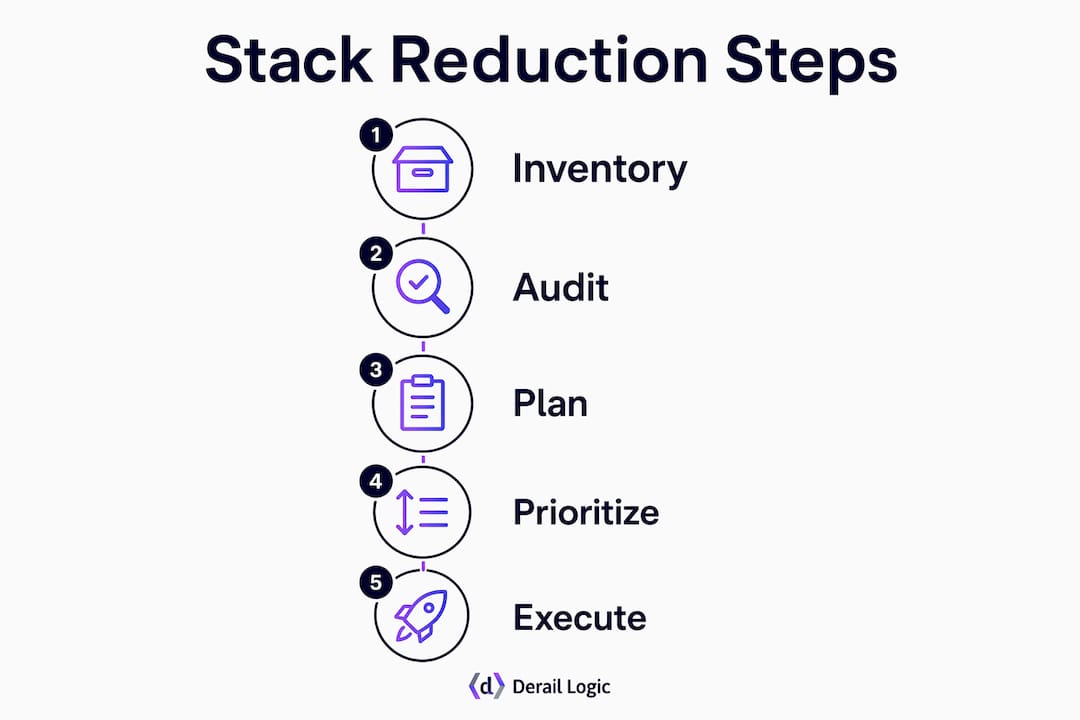
A thorough tool inventory includes contract dates, integrations, cost, and actual usage metrics for every tool in your stack. Without this data, you are making decisions based on assumptions rather than facts. Pull usage reports from each platform and cross-reference them with your billing records.
Gather stakeholder feedback alongside usage data. A tool with low login frequency might still be load-bearing if it runs a nightly data sync that nobody monitors directly. Usage data alone misses these cases. Stakeholder interviews surface the hidden dependencies that spreadsheets do not.
Set your non-negotiable capabilities before you touch anything. These are the functions your stack must perform after consolidation: lead capture, CRM sync, campaign analytics, email delivery, and whatever else your team depends on daily. Write them down. Every removal decision gets tested against this list.
- Tool inventory checklist:
- Tool name, vendor, and contract renewal date
- Monthly or annual cost
- Primary owner and secondary users
- Integration connections (what it sends data to and receives data from)
- Active usage metrics from the last 90 days
- Stakeholder-reported criticality score (1 to 5)
Pro Tip: Run a Data Layer Audit alongside your tool inventory. Map the unique data each tool holds, including custom fields, historical records, and event logs. This prevents silent data loss when you decommission a platform.
Industry playbooks recommend a 4–6 week audit and planning phase before any tool is touched, followed by a 90-day prioritized execution window. That timeline is not conservative. It reflects the real complexity of mapping integrations and validating data flows before you pull anything out.
How do you identify redundant or underutilized tools for removal?
Redundancy is the most common problem in bloated stacks. Teams accumulate tools over time, often adding a new platform without retiring the old one that served the same function. A tool-functionality matrix makes this visible fast.
Build a matrix with your tools as rows and core capabilities as columns: email sending, contact management, landing pages, analytics, social scheduling, and so on. Mark each cell where a tool provides that capability. Any column with three or more checkmarks signals redundancy worth investigating.
- Categorize each tool as load-bearing or shadow. Load-bearing tools run active automations, hold unique data, or connect to other platforms. Shadow tools are accessed infrequently and duplicate a function already covered elsewhere.
- Score integration complexity. Tools with five or more integrations carry higher removal risk. Prioritize removing tools with one or two connections first.
- Assess migration effort. Some tools can simply be turned off. Others require migrating contacts, historical data, or automation logic to a replacement platform before removal.
- Rank removals by risk. Low-risk removals come first: standalone tools with no integrations, tools with zero active users in 90 days, and tools whose functions are already covered by a platform you are keeping.
- Document the cutting versus migration decision for each tool. Cutting means the function is already covered. Migration means you need to move the capability to another platform before decommissioning.
Pro Tip: Watch for “integration debt” before you finalize your removal list. Replacing a tool with a platform that requires complex middleware adds a new layer of maintenance burden. Prefer platforms with native deep integrations to reduce long-term fragility.
The difference between cutting and migrating is where most consolidation projects go wrong. Teams cut a tool, discover three weeks later that a workflow depended on it, and scramble to rebuild. The matrix and the capability list you built in the audit phase prevent this.
What are the best practices for safe tool migration and consolidation?
Safe migration follows a phased approach. You do not retire tools the moment you find a replacement. You run both systems in parallel long enough to verify that the new setup works correctly under real conditions.
- Start with pilot migrations on low-risk tools. Pick a tool with minimal integrations and no unique data. Migrate its function, run it in parallel for two weeks, and validate that outputs match. This builds team confidence and surfaces process gaps before you tackle complex migrations.
- Set fidelity service-level objectives (SLOs) for critical metrics. Define what “working correctly” means in measurable terms: email delivery rate, lead sync latency, campaign attribution accuracy. Monitor these metrics daily during the transition period.
- Document event mapping and naming conventions before migration. If your analytics platform tracks events by name, a naming mismatch between old and new systems breaks historical comparisons. Agree on naming conventions before you move a single data point.
- Run a 30-day parallel operation period after migration before retiring the original tool. This window catches silent failures: automations that appear to run but produce wrong outputs, data that syncs partially, or reports that look correct but miss a segment.
- Validate with side-by-side testing. Pull the same report from both the old and new system. If the numbers match within an acceptable margin, the migration is clean. If they diverge, investigate before decommissioning.
Common pitfalls to avoid:
- Canceling contracts before data export is complete
- Failing to map all integration dependencies before removal
- Skipping the parallel run period to save money on overlapping subscriptions
- Assuming a tool is unused because logins are low (check API calls and scheduled jobs)
- Neglecting to update internal documentation after tools are removed
The 90-day execution window from the planning phase maps directly to this phased approach. Weeks 1 through 4 cover low-risk removals. Weeks 5 through 10 handle complex migrations. Weeks 11 through 13 cover validation, documentation, and final decommissioning.
How do native AI and converged workspaces improve your consolidated stack?
The 2026 shift in marketing technology favors converged workspaces with native AI over bolt-on AI tools added to fragmented stacks. This distinction matters more than most teams realize.
Native AI is embedded directly inside a platform and has full access to the data that platform manages: contacts, campaigns, analytics, and content. A bolt-on AI add-on connects via API and sees only what the integration exposes. That gap in data context produces weaker recommendations and more manual correction work.
“Marketing technology consolidation now focuses on integrated workspaces with native AI, not clunky all-in-one or bolt-on solutions. The platforms that win are the ones where AI has full context, not just a partial view through an API.”
The benefits of a converged workspace extend beyond AI quality. When your CRM, campaign studio, analytics, and content tools share a single data layer, your team stops copying data between platforms. That alone removes a category of invisible waste that compounds over time.
Derail Logic’s MartechAI platform is built on this principle. Its AI-powered marketing insights draw from live campaign data, CRM records, and analytics in one connected system, rather than stitching together signals from separate tools. Teams using connected workspaces report spending less time on data reconciliation and more time on campaign decisions.
The risk with converged platforms is choosing one based on breadth rather than capability depth. An all-in-one platform that covers ten functions poorly is worse than a focused stack of three platforms that each do their job well. Evaluate converged platforms against your non-negotiable capabilities list before committing.
For teams exploring how AI fits into a tighter stack, the key question is whether the AI has access to your full data context or just a slice of it.
What are the common challenges during stack reduction and how do you avoid them?
Stack reduction projects fail in predictable ways. Knowing the failure modes in advance lets you build safeguards before they become problems.
- Integration debt surfaces late. Teams discover mid-migration that a tool they planned to remove is the glue holding two other platforms together. The Data Layer Audit in the planning phase is the primary defense against this. Do not skip it.
- Silent workflow failures go undetected. An automation can appear to run while producing wrong outputs. Monitor your fidelity SLOs daily during the transition, not just at the end of the parallel run period.
- Rushed cancellations cause data loss. Finance teams sometimes push to cancel overlapping subscriptions early to save money. The cost of rebuilding lost data or broken automations far exceeds the savings from a few weeks of overlap.
- Team resistance slows execution. People build habits around specific tools. Change management is not optional. Brief your team on the consolidation rationale, give them time to adapt, and assign a point of contact for questions during the transition.
- Stack sprawl returns without governance. Consolidation is not a one-time project. Without a formal review process, new tools accumulate again within 12 months. Schedule a quarterly stack review and require a business case for any new tool addition.
Pro Tip: After consolidation is complete, run a connected systems check every quarter. Verify that integrations are still active, data flows are intact, and no shadow tools have crept back in.
The teams that sustain a lean stack treat it as an ongoing practice, not a project with a finish line. Governance is what separates a one-time cleanup from a permanent improvement.
Key Takeaways
Capability-led consolidation, not cost-cutting, is the correct frame for reducing your marketing software stack without breaking workflows or losing data.
| Point | Details |
|---|---|
| Audit before acting | A 4–6 week inventory covering cost, usage, and integrations is required before removing any tool. |
| Capability-led removal | Decide cut versus migrate for each tool; never remove a function without confirming it is covered elsewhere. |
| Parallel run period | Run old and new systems together for 30 days after migration to catch silent failures before decommissioning. |
| Native AI over bolt-ons | Choose platforms where AI has full data context, not add-ons that see only a partial API view. |
| Ongoing governance | Schedule quarterly stack reviews to prevent tool sprawl from returning after consolidation. |
The case for treating consolidation as a capability project, not a budget exercise
Most teams frame stack reduction as a cost-cutting exercise. That framing is the single biggest reason consolidation projects fail. When the primary goal is saving money, teams rush removals, skip parallel run periods, and cancel contracts before data migration is verified. The short-term savings disappear when a broken automation costs a week of engineering time to rebuild.
The teams I have seen execute this well treat consolidation as a capability project. They ask: “What does our stack need to do, and what is the cleanest set of tools that does it?” That question produces a different decision process. It slows down the removals that carry risk and accelerates the ones that do not.
The data integrity work is the part most teams underestimate. Mapping every unique data point held by every tool feels tedious. It is also the work that prevents the worst outcomes: lost contact histories, broken attribution models, and analytics gaps that take months to notice. The teams that do this rigorously come out of consolidation with a stack they trust. The teams that skip it spend the next year patching holes.
My honest recommendation is to run the Data Layer Audit before you build your removal list, not after. It changes which tools you prioritize and which migrations you treat as high-risk. The SMB all-in-one stack guide from Derail Logic covers this in practical detail for smaller teams working with limited resources.
Consolidation done right produces a stack that is faster to operate, easier to train new team members on, and far more reliable as a foundation for AI-powered marketing. That is worth the careful, phased approach.
— Zachary
How Derail Logic’s MartechAI platform supports stack consolidation
Derail Logic built MartechAI specifically for teams that are tired of stitching together disconnected tools. The platform connects a visual campaign studio, an intelligent CRM, email, analytics, and SEO into one workspace where data flows without manual export or middleware.
The Autopilot AI engine surfaces campaign opportunities and performance gaps using live data from across the platform, not a partial API view. That means your AI recommendations reflect your actual marketing context. For teams consolidating from a fragmented stack, MartechAI replaces multiple point solutions with one connected system that covers the core functions without adding integration debt. Explore the full platform features to see where it fits your consolidation plan.
FAQ
What is marketing software stack reduction?
Marketing software stack reduction is the process of removing redundant or underutilized tools from your martech stack while preserving all essential capabilities through migration or consolidation. The goal is a smaller, more connected set of tools that reduces cost and operational complexity.
How long does a stack consolidation project take?
A standard consolidation project requires a 4–6 week audit and planning phase, followed by a 90-day prioritized execution window. Rushing either phase increases the risk of data loss and broken workflows.
What is integration debt and why does it matter?
Integration debt occurs when replacing a tool requires complex middleware to connect the new platform to your existing stack. That middleware adds long-term maintenance burden and makes your stack more fragile over time.
How do I know which tools are safe to remove first?
Remove tools with no active integrations, zero usage in the past 90 days, and functions already covered by a platform you are keeping. Always verify through stakeholder interviews that low-usage tools are not running scheduled jobs or background syncs.
What is the difference between native AI and bolt-on AI in a marketing platform?
Native AI is embedded inside a platform and has full access to all data that platform manages. Bolt-on AI connects via API and sees only what the integration exposes, which limits the quality and context of its recommendations.