



Fix the title-and-H1 mismatch, add a 30-60 word intro above the product grid and get your faceted URLs under control. Those three moves consistently produce the fastest gains when you’re trying to improve category page search rankings, and none of them require a full site rebuild.
Most category pages fail for boring reasons. Not algorithm mysteries, not “Google hates my niche.” They fail because the title tag says one thing, the H1 says another, and Google rewrites the SERP title more than 61% of the time when there’s a mismatch. They fail because the only text above the product grid is a copy-pasted paragraph nobody reads. And they fail because faceted navigation quietly generates thousands of near-duplicate URLs that drain crawl budget from the pages you actually want ranked.
Here’s the priority sequence:
- Days 1-3: Rewrite title tags and match H1s exactly. Add a short intent-confirming intro above the grid.
- Week 1-2: Audit faceted navigation and pagination. Classify every facet combination as index, canonicalize, or block.
- Month 1-3: Fix site architecture, internal linking depth, and Core Web Vitals issues dragging down mobile rankings.
Title and meta fixes show up in Search Console within days, usually as a CTR bump before rankings move. Faceted navigation cleanup takes several weeks to register because Google needs to recrawl and drop the noise. Architecture and performance work is the slowest lever but often the most durable one.
Key Takeaways
Category pages rank better when title tags match H1s, faceted URLs are classified deliberately, and content sits in the right place around the product grid, not scattered through it.
| Point | Details |
|---|---|
| Fix title and H1 mismatches first | Matching them reduces the chance Google rewrites your SERP title. |
| Control faceted navigation | Classify every facet combination as index, canonicalize, or block to stop crawl budget waste. |
| Place content correctly | Keep the intro to 30-60 words above the grid and the buying guide below it. |
| Self-canonicalize paginated pages | Never canonicalize every page back to page 1, or deeper products disappear from Google’s view. |
| Use MartechAI to monitor at scale | Autopilot flags low-CTR titles and missing schema automatically across category pages. |
Table of Contents
- How Do You Improve Category Page Search Rankings With Title Tags and H1s?
- Where Should Buying Guides and FAQs Live on a Category Page?
- What Schema Should Category Pages Actually Use?
- How Do You Handle Faceted Navigation Without Killing Your Crawl Budget?
- Does Site Architecture Really Affect Category Rankings?
- Which Performance Fixes Move the Needle Fastest on Mobile?
- How Do You Verify That Your Changes Actually Worked?
- Who’s Behind This Checklist and How Does MartechAI Fit In?
- How Does URL Structure Affect Category Page Rankings?
- Should You Show Reviews and User Content on Category Pages?
- How Can Internal Search Data Improve Category Content?
- How Should Out-of-Stock Products Be Handled on Category Pages?
- What Mobile-Specific Factors Affect Category Page Rankings?
- What the Conventional Advice Gets Wrong
- Get Help Implementing the Checklist
- Sources
- FAQ
How Do You Improve Category Page Search Rankings With Title Tags and H1s?
Start with the mismatch problem, because it’s the cheapest fix on this entire list and the one most teams get wrong.
Your title tag should follow a consistent formula: Primary Category Keyword + Modifier (if relevant) + Brand, kept under 60 characters so Google doesn’t truncate it. For a category selling waterproof hiking boots, that’s “Waterproof Hiking Boots | [Brand]” rather than something padded with adjectives like “Best Premium Quality Waterproof Hiking Boots for Every Adventure.” Google doesn’t reward the padding, and shoppers scanning a results page don’t read past the first six or seven words anyway.

The H1 matters more than most SEOs give it credit for. It should closely mirror the title tag, exact-match the primary keyword once, and appear only one time on the page. Two H1s confuses the hierarchy signal you’re sending. According to Search Engine Journal’s analysis of title tag rewrites, pages where the H1 and title tag align closely get rewritten far less often than pages where they diverge. That matters because a rewritten title is a title you didn’t choose, targeting a query you didn’t optimize for.
Meta descriptions don’t directly move rankings, but they decide whether someone clicks the blue link. A generic meta description like “Shop our wide selection of hiking boots” wastes the opportunity. A better one states something concrete: “Browse 240+ waterproof hiking boots from Salomon, Merrell, and Keen. Free returns, sizes 6-13.” Include a product count if you have one, a real differentiator (free shipping, size range, brand roster), and stop before you hit 155 characters.
Then there’s the intro block above the product grid, which Practical Ecommerce’s category page framework treats as a core ranking element, not decoration. Keep it to 30-60 words. It needs to do three jobs at once: confirm you understand what the shopper searched for, hint at the range of options available, and link to one relevant subcategory. Something like:
“Our waterproof hiking boots hold up on wet trails and river crossings, with options from ultralight day-hikers to insulated four-season boots. Browse by brand or check out our women’s hiking boots if you need a narrower fit.”
That’s it. No keyword stuffing, no three-paragraph essay before the shopper sees a single product.
Pro Tip: Run your current category page title tags through Search Console’s Performance report filtered by page. If the “title” shown in the report doesn’t match what’s in your CMS, Google has already rewritten it, and that’s your signal to fix the H1 mismatch first.
Where Should Buying Guides and FAQs Live on a Category Page?
The placement of long-form content is where a lot of otherwise solid category pages sabotage their own conversion rate. Put too much text above the fold and you bury the products. Put none at all and you give Google nothing to understand the page’s intent beyond a list of SKUs.
The fix follows a simple structure:
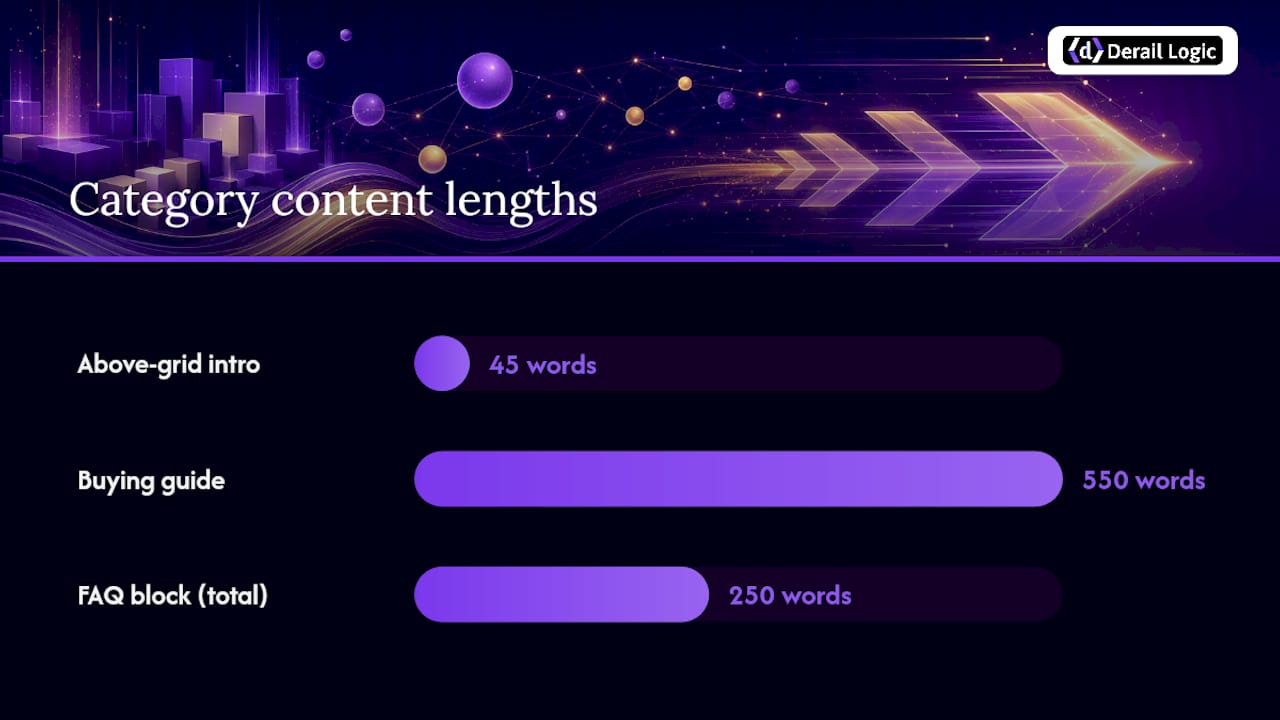
- Above the grid: the 30-60 word intro described above. Nothing longer.
- The product grid itself: untouched, front and center, no interruptions.
- Below the grid: a 300-800 word buying guide.
- Below the guide: an FAQ block with 4-6 questions, each answered in 40-60 words.
The buying guide is where you can go deeper without hurting the shopping experience, since anyone scrolling that far is past the “just show me the products” stage and into research mode. Structure it around decision criteria a real buyer weighs: material and weather resistance, sizing quirks specific to the category, price tiers and what separates them, and how this category compares to an adjacent one (why choose hiking boots over trail runners, for instance). Close with quick comparator links to two or three subcategories.
FAQs at the bottom aren’t filler. They’re increasingly how AI Overviews and featured snippets pull content, and short, direct answers to buyer-intent questions (“Are waterproof boots good for summer hiking?”) get pulled more reliably than dense paragraphs. Keep each answer tight enough to stand alone.
The mistake to avoid: dumping a 600-word keyword-stuffed block anywhere near the top of the page. Users skip it, and Google’s helpful content systems have gotten good at recognizing text written for crawlers instead of people. If a paragraph reads like it exists only to repeat “waterproof hiking boots” five times, delete it and start over.
What Schema Should Category Pages Actually Use?
Two schema types matter here, and one that people assume matters actually doesn’t.
BreadcrumbList is the schema.org standard for marking up your breadcrumb trail, and it’s worth implementing on every category page regardless of size. It requires a position, name, and item URL for each level of the trail. Get it right and Google often displays the breadcrumb path directly in the SERP snippet instead of the raw URL, which makes your listing look cleaner and more trustworthy at a glance. The Schema lays out the exact property structure if you’re handing this to a developer.
ItemList schema is for the product grid itself. It should include position, name, URL, and image for each product shown, and it helps search engines understand the grid as a structured list rather than a wall of unlabeled links.
Here’s where a lot of teams overreach: adding Product schema to the category page. Don’t. Per Google’s own guidance, Product schema belongs on individual product pages, not on a page listing dozens of them. Stacking Product schema across a grid creates conflicting signals about what the page actually is.
| Schema Type | Belongs On | Key Fields |
|---|---|---|
| BreadcrumbList | Category pages | position, name, item URL |
| ItemList | Category pages | position, name, URL, image |
| Product | Product pages only | price, availability, reviews |
| FAQPage | Category pages (below buying guide) | question, answer text |
FAQ schema deserves a mention of its own. Use it only on genuine buyer-intent questions, not manufactured ones stuffed with keywords. A category page for waterproof boots earns FAQ schema on “Do waterproof boots need to be broken in?” It doesn’t earn it on “What are waterproof hiking boots?” if that question exists purely to repeat the keyword.
How Do You Handle Faceted Navigation Without Killing Your Crawl Budget?
Faceted navigation is the single largest source of index bloat on most ecommerce sites, and almost nobody audits it until rankings start slipping. Every combination of size, color, brand, and price filter can spin off its own URL, and left unchecked, a category with 200 products can generate tens of thousands of indexable variations.
The fix is a three-bucket framework:
- Index it when the facet combination has real, measurable search demand. “Waterproof hiking boots size 10” doesn’t warrant its own indexed page. “Men’s waterproof hiking boots” probably does, if people actually search that phrase.
- Canonicalize it when the combination is a trivial variant of a page that already exists. Sort-order parameters, low-value color filters, and pagination noise should canonicalize to the primary version.
- Block it when the combination is complex, low-demand, and multiplies fast. Three or more facets stacked together (brand + size + color) rarely deserve a crawlable URL of their own.
Implementation options include robots directives on parameter patterns, noindex tags on low-value combinations, and, for facets with genuine demand, building a proper static landing page instead of leaving it as a dynamic filter URL. The SEOBRO framework on category pages treats this decision as non-negotiable groundwork before any other category SEO work pays off.
Pagination gets its own rule, and it’s one people still get backward: each paginated page should self-canonicalize, not canonicalize back to page 1. Canonicalizing every page 2, 3, and 4 to page 1 tells Google those deeper products don’t exist, which is exactly the opposite of what you want if your grid has 150 items and page 6 has your best-margin SKUs.
To audit index bloat, pull a full URL list from Search Console’s Coverage report and look for parameter patterns repeating at scale. If you see thousands of indexed URLs matching a ?color= or ?size= pattern, that’s your bloat source.
Pro Tip: Before blocking anything, check actual search volume for the facet combination in question. Blocking a facet with genuine demand (like “men’s” or a major brand filter) throws away real traffic. The three-bucket rule only works if you check demand data before deciding, not after.
Does Site Architecture Really Affect Category Rankings?
Yes, and it’s one of the more mechanical fixes on this list once you see the pattern. Google’s crawlers assign more weight to pages closer to the homepage, which is why a shallow pyramid structure consistently outperforms deep, nested navigation. Practitioners generally recommend keeping every category reachable within three clicks of the homepage, with product pages one click deeper than that.
The Founding Engine architecture framework frames this as hub-and-spoke: your highest-priority categories act as hubs, linked directly from the homepage and main navigation, while related subcategories and long-tail categories link back to the hub as spokes. This concentrates authority on the pages that matter for revenue instead of spreading it evenly across a flat, undifferentiated list.
Three practical moves make this work:
- Add 4-6 sibling category links directly on each category page (not buried in a footer).
- Use descriptive anchor text that matches the target category’s actual name, not “click here” or “shop now.”
- Link from relevant blog content back to the category it supports, using contextual anchors like “our range of insulated boots” rather than generic calls to action.
Prioritize which categories get this treatment by revenue contribution and search potential, not by how the catalog happens to be organized internally.
| Point | Details |
|---|---|
| Click depth target | Keep priority categories within 2-3 clicks of the homepage. |
| Sibling link count | Add 4-6 contextual sibling category links per page. |
| Anchor text | Use descriptive, keyword-relevant anchors instead of generic phrases. |
| Prioritization | Rank categories by revenue and search potential before assigning link weight. |
Which Performance Fixes Move the Needle Fastest on Mobile?
Core Web Vitals problems on category pages almost always trace back to the same handful of causes, and most are fixable without touching the backend.
Largest Contentful Paint (LCP) issues usually come from an unoptimized hero image or banner loading above the grid, render-blocking JavaScript, or a slow server response on a heavily filtered page. Fixes: compress and properly size the hero asset, preconnect to critical third-party origins (payment widgets, review platforms), and defer anything that isn’t needed for the initial paint.
Image handling deserves specific attention on a page showing dozens of products at once:
- Use
srcsetandsizesattributes so mobile devices don’t download desktop-resolution images. - Serve AVIF or WebP with a JPEG fallback for older browsers.
- Lazy-load everything below the fold, but never lazy-load the first two or three rows of products. Doing so delays LCP instead of improving it.
Mobile-first parity is worth testing on actual devices, not just Chrome DevTools’ emulator. Filters and pagination that depend entirely on JavaScript can break or lag on mid-range Android devices, and Google’s index is mobile-first, so a filter that works fine on your desktop test but stalls on a $200 phone is a ranking risk you might not see in your own testing.
Performance issues compound over time because Googlebot allocates less crawl budget to slow-responding sites, meaning a sluggish category page doesn’t just rank worse, it also gets recrawled less often, delaying every other fix you make from getting picked up.
How Do You Verify That Your Changes Actually Worked?
Every fix above needs a measurement plan, or you’re guessing whether it worked.
- Search Console Performance report: filter by the specific category page URL and watch impressions, average position, and CTR over a 2-4 week window after any title or meta change.
- Coverage report: confirm faceted URLs you’ve blocked or canonicalized are dropping out of the “Indexed” count over the following weeks, not staying flat.
- URL Inspection tool: spot-check individual facet URLs to confirm Google is reading your canonical tags and noindex directives correctly, since misconfigured tags fail silently.
- Crawl logs or a crawl analytics tool: confirm Googlebot is actually reducing requests to blocked parameter patterns, rather than continuing to hit them out of habit.
For meta and title testing, run changes on a batch of similar-tier category pages at once rather than one at a time, and give it a minimum of two to three weeks before drawing conclusions. CTR often moves before rankings do, so a bump in click-through with flat rankings usually means the change is working and needs more time.
If rankings drop after a change, don’t panic and reverse everything at once. Roll back the specific change most likely to be the cause, wait one full crawl cycle, and reintroduce fixes in stages so you can actually identify what caused the dip.
Who’s Behind This Checklist and How Does MartechAI Fit In?
This guide comes from Zachary, who covers marketing technology and ecommerce SEO operations for MartechAI, with a focus on the technical side of category and product page performance.
A few related deep dives worth reading if you’re tackling this project end to end:
- Product page optimization checklist for ecommerce marketers
- What is technical SEO for online stores?
Teams tackling this checklist manually tend to lean on a mix of tools for the audit work: a site crawler for facet bloat, Search Console for measurement, and a schema validator for structured data. MartechAI’s SEO audit and analytics features are built to cover that same ground inside one workflow rather than three separate logins, which matters most for lean teams juggling category fixes alongside everything else on the marketing calendar.
How Does URL Structure Affect Category Page Rankings?
A clean URL structure does two things: it tells users and Google exactly where they are in your catalog, and it reinforces the site architecture you’ve already built.
The pattern to aim for is /category/subcategory/ rather than parameter-heavy strings like /shop?cat=42&sub=17. Readable URLs get clicked more often in the SERP and are easier to audit at scale when you’re troubleshooting facet bloat later. Keep the primary keyword in the slug once, in lowercase, with hyphens separating words. Avoid stacking redundant terms already covered by the parent path (/boots/hiking-boots/waterproof-hiking-boots/ repeats itself unnecessarily).
Breadcrumb trails should mirror the URL path exactly. If your URL is /footwear/hiking-boots/waterproof/, the visible breadcrumb should read Home > Footwear > Hiking Boots > Waterproof, in that order, with each level clickable. This isn’t just a UX nicety. It reinforces the BreadcrumbList schema discussed earlier and gives Google a consistent, duplicate signal of your taxonomy from three different angles: the URL, the visible breadcrumb, and the structured data.
Keep the URL stable once it’s indexed. Renaming category slugs to chase minor keyword variations does more harm than good, since it resets accumulated authority and forces a redirect chain that dilutes ranking signals if not handled cleanly.
Should You Show Reviews and User Content on Category Pages?
Aggregated review signals on a category page do more work than most teams expect from them. A visible average rating and review count next to each product in the grid gives shoppers a reason to trust the page enough to click deeper, and it gives Google fresh, unique content that no competitor’s category page will have in exactly the same form.
Beyond star ratings, consider surfacing a handful of user-generated snippets: a “customers also asked” block pulled from real support tickets, or a short “most mentioned in reviews” tag cloud (comfort, durability, sizing runs small) generated from aggregate review text. This kind of content is naturally unique to your store, which matters on category pages that otherwise risk reading like every competitor’s near-identical product listing.
Avoid two common mistakes. First, don’t let review widgets load in a way that blocks the initial page render, since that directly hurts your Core Web Vitals scores discussed earlier. Load them asynchronously. Second, don’t manufacture review content or pad category pages with generic testimonials that aren’t tied to actual purchases. Thin or fabricated trust signals tend to get discounted by both shoppers and by Google’s spam systems over time.
If your platform supports it, surface a “Customers rated this category 4.6 average across 1,200 reviews” line near the top of the grid. It’s a small addition that adds genuine differentiation without touching your carefully sized 30-60 word intro.
How Can Internal Search Data Improve Category Content?
Your site’s internal search bar is one of the most underused SEO research tools you already own, and it’s sitting in your analytics platform right now, mostly ignored.
Every query a shopper types into your internal search that doesn’t match an existing category name is a signal. If “waterproof boots for wide feet” shows up repeatedly in your internal search logs but you have no corresponding subcategory or filter, that’s a content gap with built-in proof of demand, no external keyword tool required.
Cross-reference internal search terms against your existing category and facet structure quarterly. Terms that appear frequently and don’t map to an indexed page are candidates for a new subcategory landing page, following the same index/canonicalize/block logic covered earlier in the faceted navigation section. Terms that map to an existing page but return zero or poor results indicate either a catalog gap or a labeling mismatch between how you describe the category and how customers actually search for it.
This data also feeds your buying guide content directly. If shoppers searching your site repeatedly ask variations of “which boots are best for river crossings,” that’s a decision-criteria section your buying guide is probably missing. It’s also a stronger source for FAQ questions than guesswork, since it reflects what real visitors typed with their own words rather than what a keyword tool suggests they might type.
How Should Out-of-Stock Products Be Handled on Category Pages?
Out-of-stock inventory sitting untouched in a category grid creates two separate problems: it wastes crawl attention on pages that can’t convert, and it damages user trust when half the visible grid is unavailable.
The right handling depends on how long the item is expected to stay out of stock. For short-term restocks, keep the product visible in the grid but clearly labeled, and let shoppers sign up for a restock alert. This preserves the page’s existing ranking signals and review content while being transparent about availability.
For discontinued items, the fix is different. Remove the product from the grid so it stops occupying visible real estate, but don’t 404 the underlying product URL if it has earned backlinks or ranking history. A 301 redirect to the closest matching in-stock product, or to the parent category page if no close match exists, preserves whatever authority that URL accumulated instead of throwing it away.
Never let out-of-stock items silently drag down the category’s apparent freshness. A grid where 40% of products show “unavailable” signals staleness to both shoppers and to Google’s quality systems, and it directly undercuts the buying guide and intro content you’ve worked to get right. Sort in-stock items first by default, and consider a dedicated filter so shoppers who genuinely want to browse everything, including sold-out styles, still can.
What Mobile-Specific Factors Affect Category Page Rankings?
Google’s indexing is mobile-first, which means the mobile version of your category page, not the desktop one, is what actually gets evaluated for ranking purposes. Any content, schema, or internal link present on desktop but missing or hidden on mobile effectively does not exist to Google.
Check filter and facet functionality specifically on mobile. Many faceted navigation systems rely on JavaScript-heavy overlays that work fine on desktop but introduce lag or breakage on mid-range Android hardware, the kind most real shoppers actually carry. Test on a physical device, not just a browser emulator set to a phone viewport, since emulators don’t reproduce real-world processing constraints.
Tap targets matter more than they get credit for. Filter chips, “add to cart” buttons, and pagination controls need enough spacing to avoid mis-taps, which affects both conversion and the engagement signals Google’s systems increasingly factor into quality assessment. The AI search shift toward structured, well-organized pages makes clean, mobile-legible content structure more valuable, not less, since AI Overviews tend to pull from pages that are easy to parse cleanly on any device.
Finally, confirm your 30-60 word intro and BreadcrumbList markup render identically on mobile. It’s common for a responsive redesign to quietly truncate or hide the intro block on small screens, undoing the on-page work covered earlier in this guide without anyone noticing until rankings slip.
What the Conventional Advice Gets Wrong
Most category page advice treats these pages like an afterthought between the homepage and the “real” content, the product pages. That framing is backward, and it’s why so many category pages sit stuck on page two.
A category page is often the first page a search engine, and a shopper, sees for a given intent. It should be built like a landing page: clear intent match, real content underneath the grid, and a structure engineered to hold authority rather than leak it through faceted URL sprawl. Treating it as a product container instead of a landing page is why so much category SEO advice stops at “write a good meta description” and skips the harder, more valuable work of faceting and architecture.
The overrated fix, in my view, is content volume. Teams add a thousand words of buying guide text assuming more is better, when the actual leverage sits in the boring technical layer: title and H1 alignment, pagination canonicalization, and click depth. Those fixes require an engineer’s attention span, not a copywriter’s, and that’s exactly why they get skipped.
If you do one thing first, audit your faceted navigation. It’s the single most common source of wasted crawl budget, and fixing it clears the runway for everything else on this list to actually register.
— Zachary
Get Help Implementing the Checklist
Working through title tag audits, facet classification, and schema markup by hand across hundreds of category pages is exactly the kind of repetitive, high-stakes work that eats a lean team’s week. MartechAI’s Autopilot feature surfaces exactly this: pages with low click-through despite decent impressions, missing schema, and title/H1 mismatches, flagged automatically instead of found manually one URL at a time.

The platform’s AI Engine pulls from live search and site data to help prioritize which categories deserve attention first, based on actual revenue and search potential rather than a gut-feel guess about which pages matter most. For teams managing this alongside product page work, blog content, and everything else on the marketing calendar, having audit findings, content drafts, and monitoring in one workflow beats juggling a crawler tool, a spreadsheet, and a separate analytics login.
If your category pages haven’t been audited in the last quarter, that’s the place to start. Request a MartechAI trial and run an initial audit against your top-revenue categories to see exactly which of the fixes in this guide apply to your catalog first.
Sources
- Schema
- SEO for Product Category Pages in 7 Steps
- Ecommerce Category Pages That Rank — SEOBRO
- Ecommerce category page SEO: The architecture that scales — Founding Engine
- Google changes more than 61% of title tags — Search Engine Journal
FAQ
How Do You Improve Search Rankings for Category Pages?
Align title tags with H1s, add a short intro above the product grid, control faceted navigation with an index/canonicalize/block framework, and keep priority categories within two to three clicks of the homepage.
Is SEO Dead Now That AI Overviews Exist?
No. AI Overviews and AI search tools still pull from well-structured, clearly organized pages with proper schema, which means the fundamentals covered here, like BreadcrumbList markup and clear FAQ content, matter as much as ever, not less.
How Do You Improve Category Page SEO in 2026?
The core levers remain title/H1 matching, structured intro and buying guide placement, disciplined faceted navigation, shallow site architecture, and strong Core Web Vitals, all verified through Search Console reporting rather than assumptions.
Should Product Schema Be Added to Category Pages?
No. Product schema belongs on individual product pages; category pages should use BreadcrumbList and ItemList schema instead to correctly represent a listing rather than a single product.