



A creator content management system is a platform that manages the full lifecycle of digital content, from creation and versioning through repurposing and multi-channel publishing, with built-in support for monetization and audience management. Unlike a traditional CMS built for web teams publishing text pages, a creator CMS treats every asset, whether a video file, podcast episode, or long-form article, as a persistent, reusable object with its own version history and provenance.
Two needs separate creator-focused platforms from generic CMS tools:
- Multimedia asset versioning and repurposing: creators produce video, audio, and written content that must be stored, searchable, and remixed across platforms without starting from scratch each time.
- Monetization and membership support: creators need payment gating, subscriber management, and analytics tied directly to content performance, not bolted on through third-party workarounds.
According to Britannica, a CMS typically splits into two components: the content management application (CMA), where you author and organize content, and the content delivery application (CDA), which handles backend delivery to your audience. WordPress alone powers over 40% of all websites, which signals how central CMS infrastructure has become, even before creator-specific platforms entered the picture.
Key Takeaways
A creator CMS is most valuable when your asset volume and monetization complexity outgrow the tools you started with.
| Point | Details |
|---|---|
| Creator CMS definition | A platform managing the full content lifecycle, from creation and versioning to multi-channel publishing and monetization. |
| When to invest | Invest when manual reformatting, lost assets, or disconnected analytics cost you measurable weekly hours. |
| Three must-have features | Transcript search, asset versioning with provenance, and native monetization or membership support. |
| Red flags to avoid | Closed export formats, no native media handling, and membership features that require a separate paid subscription. |
| Derail Logic option | MartechAI unifies Content Studio, AI Engine, analytics, and CRM in one workspace with a free trial available. |
Table of Contents
- What is a creator content management system and how does it work?
- Which CMS architecture actually fits your creator workflow?
- Key features every creator should check before choosing a platform
- How to choose the right CMS for your creator business
- What do costs and learning curves actually look like?
- Three creator workflows that show how a CMS fits in practice
- How Derail Logic’s MartechAI platform supports creator content workflows
- When a creator CMS is worth the investment and when it is not
- MartechAI gives creators a unified content and marketing workspace
- Sources
- FAQ
What is a creator content management system and how does it work?
A creator CMS operates across two layers: the authoring environment you interact with daily, and the delivery infrastructure that gets your content to audiences. OpenStax describes the content management lifecycle as moving through organization, creation, storage, workflow, editing and versioning, publishing, and finally removal or archiving. For creators, that cycle repeats constantly and across multiple formats simultaneously.
Here is what that looks like in practice:
- Create: You draft a blog post, record a podcast episode, or upload a raw video file. The CMS stores it as a versioned asset, not a flat file.
- Review and version: Collaborators or editors leave comments, approve drafts, or request changes. Every revision is saved, so you can roll back without losing work.
- Publish: The CMS pushes content to your website, email list, or connected social channels on a schedule you set.
- Repurpose: A transcript of your podcast becomes a blog post. A long video gets clipped into Shorts. The original asset stays intact in the system.
- Archive: Older content is retired or redirected, keeping your library clean without deleting assets you may reuse later.
Integrations are where creator CMSs earn their keep. The platforms creators actually need to connect include social publishing APIs (YouTube, Instagram, LinkedIn), podcast hosts (Spotify for Podcasters, Buzzsprout), payment and membership tools (Stripe, Memberful), digital asset management (DAM) systems, and analytics dashboards. IBM notes that high-performance platforms are increasingly combining CMS, DAM, and CRM functions into unified workflows, precisely because siloed tools create invisible waste for small teams.
Pro Tip: Design your publishing workflow so that every asset gets tagged and transcribed at upload, not after. Fixing metadata retroactively is the single biggest time sink in creator operations.
Which CMS architecture actually fits your creator workflow?
Not every CMS is built the same way, and the architecture you choose shapes how freely you can publish, repurpose, and scale. Wikipedia’s CMS entry identifies three core publishing architectures, each with real trade-offs for creators.
- Traditional (coupled) CMS: The content repository and the front-end presentation are tightly linked. WordPress in its default configuration is the clearest example. Setup is fast, plugins are plentiful, and you can publish without a developer. The trade-off is that repurposing content to non-web channels (a mobile app, a smart TV app, a newsletter) requires extra work.
- Decoupled/hybrid CMS: The authoring environment is separated from the presentation layer, but the front end is still pre-built. You get more flexibility than a coupled CMS without the full complexity of headless. A good fit for creators who want a custom-looking site but do not want to manage API calls themselves.
- Headless CMS: Content is delivered via REST or GraphQL APIs, meaning you can push the same asset to a website, an app, a voice assistant, and a newsletter from one source. The overhead is real: you need developer support or a strong technical background to set it up. Best suited to creator businesses with a dedicated tech resource or a large enough audience to justify the investment.
- SaaS creator platforms: Purpose-built for creators, these bundle hosting, publishing, monetization, and basic analytics into a subscription. Lower technical overhead, faster time to first publish, but less flexibility for custom integrations.
- Knowledge/asset management hybrids (KMS/DAM): Contesimal describes these as a “second brain” for creators: the system ingests multimedia, transcribes it, builds taxonomies, and makes every moment of your content searchable and reusable. Not a replacement for a CMS, but a powerful complement for creators with large back catalogs.
Pro Tip: If you are a solo creator publishing fewer than three content types, a lightweight Notion-based Content OS or an all-in-one SaaS platform will outperform a headless CMS on ROI for at least your first two years. Add architectural complexity only when your asset volume or team size demands it.
Key features every creator should check before choosing a platform
Generic CMS marketing copy lists features that matter to enterprise web teams, not to creators. Here is what actually moves the needle for content production and monetization:
- Rich media editor and upload handling: Drag-and-drop video and audio upload, not just text. If the editor treats a video file as an attachment rather than a first-class asset, repurposing becomes manual labor.
- Version history and asset provenance: Every edit should be saved with a timestamp and author. LettsCore argues that traditional CMSs were built for text-first publishing and lack the asset-centric infrastructure creators need for versioning and provenance tracking.
- Transcript search: Automatic transcription of audio and video unlocks clip reuse. You can search your entire back catalog by keyword and pull the exact 30-second segment you need.
- Repurposing tools: Flockx demonstrates the “one upload, every platform” model: a single asset generates hooks, Shorts, Reels, threads, and newsletters automatically. Look for this as a native feature, not a third-party add-on.
- Scheduling and multi-channel publishing: Set publish times across your site, email list, and social channels from one interface.
- Monetization and membership: Gated content, subscription tiers, and payment processing should be native or deeply integrated, not a plugin that breaks on updates.
- Analytics tied to content: Page views are not enough. You need engagement depth, subscriber conversion rates, and revenue per piece.
- Role-based workflows and approval queues: Solo creators can skip this initially, but any team of two or more needs clear ownership of the review and publish steps.
- Asset tagging and taxonomy: Consistent tags make repurposing viable at scale. A video tagged with topic, format, and audience segment can be surfaced automatically when you need content for a specific channel.
- SEO tooling: Title optimization, meta descriptions, and internal linking suggestions built into the editor save time and reduce the need for a separate SEO tool.
Pro Tip: Build your taxonomy before you upload your first asset. A flat folder structure feels fine at 50 pieces of content and becomes a serious problem at 500. Decide on your tag categories (topic, format, audience, funnel stage) on day one.
How to choose the right CMS for your creator business
Start with your actual workflow, not a feature comparison chart. Work through this decision checklist before you open a single vendor trial:
- Content types: Do you produce video, audio, long-form text, or all three? Platforms optimized for text often handle media as an afterthought.
- Publishing channels: How many destinations does your content need to reach? A personal blog needs a coupled CMS. A creator publishing to web, email, YouTube, and a podcast feed needs multi-channel delivery.
- Team size: Solo creators prioritize speed and simplicity. Teams of two or more need role-based permissions and approval workflows.
- Monetization model: Sponsorships, memberships, digital products, and courses each require different payment and access-control features.
- Storage and rights: Who owns your assets if you cancel? Can you export everything in a portable format?
- AI and automation needs: Do you want the platform to suggest repurposing opportunities, generate drafts, or auto-tag uploads?
When you run a trial, ask these diagnostic questions:
- Can you export all content and assets in a standard format (JSON, CSV, ZIP)?
- Does the platform transcribe media natively, or do you need a third-party service?
- How granular is the analytics? Can you see revenue per piece of content?
- What happens to your membership data if you migrate away?
- Does pricing scale with traffic, storage, or seat count, and which of those will you hit first?
Red flags to walk away from: closed export formats that lock your assets in, no native media handling beyond basic file upload, no transcript or search capability, and membership or payment features that require a separate subscription on top of the base plan.
What do costs and learning curves actually look like?
Budget and ramp time vary significantly by architecture. Here is a realistic breakdown:
- Self-hosted open-source (e.g., WordPress with plugins): Software cost is low, but hosting, security, plugin licensing, and maintenance add up. A well-configured WordPress setup for a creator with memberships and video hosting typically runs $50–$200/month in infrastructure costs, plus developer time when things break.
- SaaS creator platforms: Predictable monthly subscriptions, usually $20–$100/month for solo creators, scaling with audience size or feature tier. Onboarding is faster, and support is included.
- Enterprise CMS: High license costs and significant integration overhead. Relevant only for creator businesses operating at media-company scale.
Learning curves follow a similar pattern. A solo creator can publish their first piece on a SaaS platform within a day. Fully adopting a repurposing workflow, including transcript search, asset tagging, and multi-channel scheduling, typically takes two to four weeks of consistent use. A headless CMS setup with custom front-end delivery can take months to configure before it is production-ready.
WordPress powers over 40% of all websites, which reflects how accessible the coupled CMS model has become. That accessibility comes with a ceiling: as your content operation grows, the plugin-heavy WordPress stack tends to accumulate technical debt faster than a purpose-built creator platform.
Pro Tip: Run your trial with a real project, not a test post. Upload an actual video, tag it, schedule it, and try to repurpose a clip. You will surface friction points in 30 minutes that a feature list would never reveal.
Three creator workflows that show how a CMS fits in practice
Solo video creator
A YouTuber uploads a raw video to their CMS, which auto-transcribes it and stores it as a versioned asset. The transcript feeds a blog post draft. Clips are pulled for Shorts using timestamp search. The finished video, blog post, and three Shorts all publish on a single schedule. The asset stays in the library, tagged by topic and format, ready for future repurposing.
- Source asset stored with version history and transcript
- Blog post generated from transcript with SEO metadata
- Shorts clipped from tagged timestamps
- All outputs scheduled from one dashboard
Pro Tip: Auto-transcribe every upload immediately. A 30-minute video becomes a searchable, clippable asset in minutes. Waiting until you need a clip means searching by memory instead of by keyword.
Podcast plus newsletter creator
A podcaster records an episode, uploads it to the CMS, and the system transcribes and tags it by guest, topic, and episode number. The transcript becomes a newsletter draft. Key quotes are pulled for social posts. The episode page on the creator’s site is published automatically with embedded audio, show notes, and a membership upsell.
- Episode transcribed and tagged at upload
- Newsletter drafted from transcript highlights
- Social quotes extracted from tagged segments
- Membership gate applied to premium episodes
Creator-run membership store
A creator selling courses and gated video content uses the CMS to manage access tiers. Free content is public. Paid tiers unlock video libraries and downloadable assets. The CMS tracks which content drives the most upgrades, so the creator knows where to invest production time next. Content marketing automation tools can extend this workflow further by triggering email sequences based on content consumption patterns.
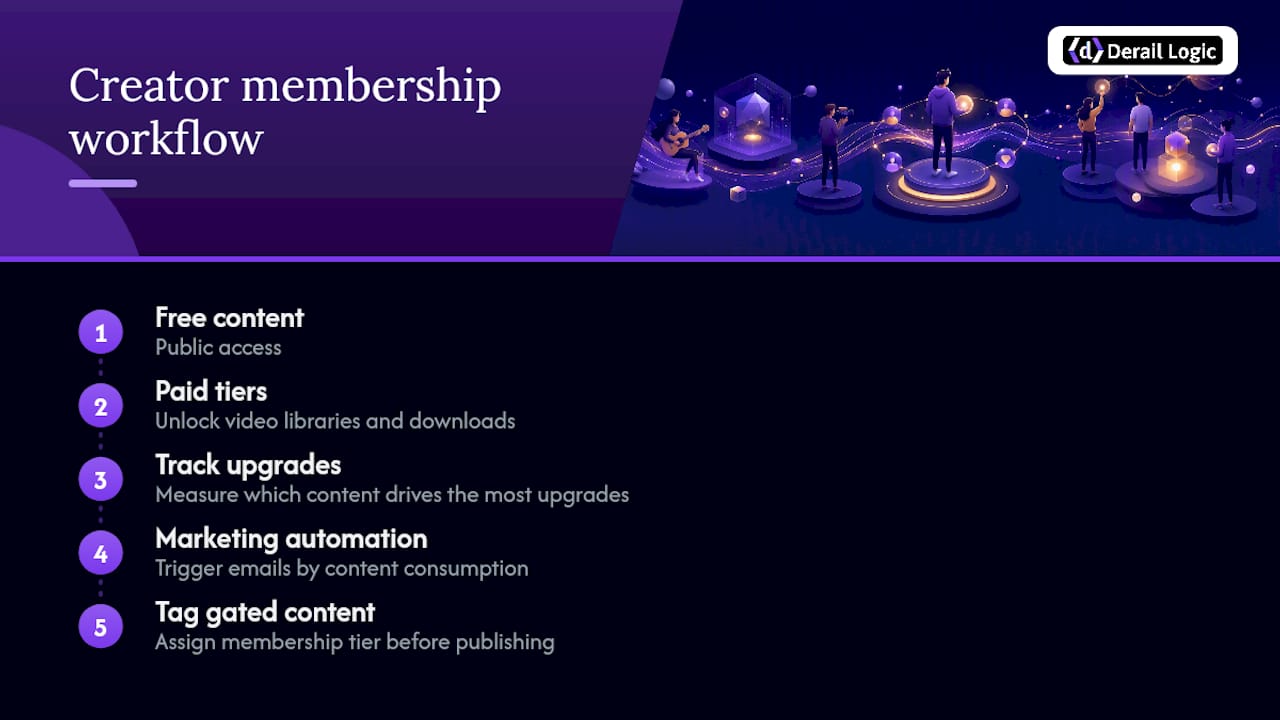
Pro Tip: Tag every piece of gated content with the membership tier it belongs to before you publish. Retroactively applying access controls to a large library is one of the most error-prone tasks in creator operations.
How Derail Logic’s MartechAI platform supports creator content workflows
Derail Logic’s MartechAI platform maps directly to the creator CMS feature checklist covered earlier. The Content Studio handles AI-assisted writing and publishing with built-in SEO intelligence, so creators can draft, optimize, and schedule blog and social content from a single interface. The AI Engine pulls from real business data using RAG-powered intelligence, meaning content suggestions are grounded in your actual audience and performance history, not generic prompts.
Key capabilities relevant to creators:
- Content Studio: AI writing, SEO optimization, and multi-channel publishing in one workspace
- AI Engine: Data-driven content insights and automated opportunity surfacing via the Autopilot feature
- Analytics: Campaign and content performance tracking tied to real business outcomes
- Integrations: CRM, email, and social scheduling connected to the same workflow, reducing the app-switching that costs small teams hours each week
Onboarding follows a structured path. Most creators can publish their first piece of content through MartechAI’s Content Studio within their first session. Full adoption of the analytics and AI Engine features, including connecting your CRM and configuring automated workflows, typically takes two to four weeks. The platform documentation walks through each step with practical setup guidance.
For creators evaluating whether an integrated platform fits better than a standalone CMS plus separate tools, the marketing platform integration overview explains how unified systems reduce the coordination overhead that siloed tools create.
When a creator CMS is worth the investment and when it is not
The honest answer is that most creators do not need a full CMS on day one. A Notion workspace, a simple newsletter tool, and a social scheduler will carry you further than you expect when your catalog is small and your team is one person.
The signal to invest in a proper creator CMS is not a follower count. It is asset volume and monetization complexity. When you find yourself manually reformatting the same content for three different platforms, when you cannot find a clip you recorded six months ago, or when your membership and analytics tools are not talking to each other, that is the friction that a creator CMS is built to remove. Invest in platform complexity when the cost of not having it shows up in your weekly hours, not before.

MartechAI gives creators a unified content and marketing workspace
Creators who have outgrown a patchwork of disconnected tools get a clear alternative with Derail Logic’s MartechAI marketing automation platform. The platform combines content creation, SEO intelligence, social scheduling, email marketing, CRM, and analytics into one workspace, eliminating the coordination overhead that comes from managing five separate subscriptions.

The practical benefit for creators is straightforward: you write, optimize, schedule, and measure from the same place, and the AI Engine connects your content performance to your audience data so you know what to produce next. MartechAI includes a free trial, so you can run a real project through the Content Studio and the analytics dashboard before committing. Start your trial at Derail-logic and see how the platform fits your current workflow.
Sources
- Content management system | Britannica
- Content management system (IBM Think)
- What are content management systems? | OpenStax
- The Shift from Tools to Infrastructure in the Creator Economy – LettsCore
- What is a knowledge management system for creators? | Contesimal
FAQ
What is a CMS with an example?
A CMS (content management system) is software that lets you create, organize, and publish digital content without writing code.
Can you give me an example of a creator-focused CMS platform?
Creator-focused platforms bundle publishing, monetization, and analytics in one place. Derail Logic’s MartechAI is one example, combining a Content Studio, AI Engine, social scheduling, and CRM for creators who want a unified workflow.
Is a CMS easy to learn?
SaaS creator platforms are generally accessible within a day for basic publishing. Fully adopting repurposing workflows, including asset tagging and multi-channel scheduling, typically takes two to four weeks of consistent use.
How much does a CMS cost?
Self-hosted open-source setups like WordPress can run $50–$200/month in infrastructure costs for a creator with memberships and video hosting. SaaS creator platforms typically range from $20–$100/month for solo creators, scaling with features or audience size.
What makes a CMS “creator-focused” versus a standard CMS?
A creator CMS treats multimedia as persistent, versioned assets with built-in repurposing, transcript search, and monetization support. Standard CMSs were designed for text-first web publishing and typically lack native tools for audio, video, and membership management.


