



A content marketing video is a purpose-built video asset designed to move a specific audience through a defined stage of the buyer journey, whether that’s building awareness, handling objections, or converting a warm lead. The single best first step: pick one business objective, then build one primary video to serve it.
Video is not a content type — it’s a distribution system. A single well-planned video generates a primary asset plus multiple derivatives that feed every channel in your stack. Build the primary asset first; everything else follows from it.
TL;DR priorities:
- Objective first: Define whether the video serves awareness, consideration, or decision before scripting a single line.
- Funnel stage: Match the format (short-form, demo, testimonial) to the job-to-be-done at that stage.
- One KPI per video: Track watch-through rate for awareness, CTR for consideration, and conversion rate for decision-stage assets.
- Primary asset first: Produce the long-form anchor video, then derive clips, blog posts, emails, and ads from it.
A full-funnel video strategy with single-objective videos leads to 3.4x higher lead quality and 28% lower customer acquisition cost, while videos optimized for SEO can rank 53% higher on SERPs. Those numbers make the case for treating video as a revenue asset, not a brand decoration.
Table of Contents
- What types of content marketing videos actually work?
- How do you build a video content strategy from scratch?
- What does a practical video production workflow look like?
- How do you distribute and repurpose one video across channels?
- Which KPIs actually tell you if your video is working?
- What does video production actually cost, and how do you scale it?
- Fill-in-the-blank video templates for every funnel stage
- How does Derail Logic help you run video marketing at scale?
- Legal and ethical considerations in video content marketing
- Key Takeaways
- The part most video strategies get wrong
- What Derail Logic’s MartechAI platform does for video-first teams
- Useful sources and tools
- FAQ
What types of content marketing videos actually work?
Every video format has a job. Mismatching format to funnel stage is the most common reason video programs underperform. Here’s how the main types break down:
- Short-form vertical (under 60 seconds): Discovery and top-of-funnel awareness on TikTok, Reels, and YouTube Shorts. Videos under 60 seconds generate 2.5x more engagement per impression than longer formats.
- Long-form explainer (5–15 minutes): Education and SEO on YouTube. Treats complex topics with depth; acts as the primary asset in a derivation workflow.
- Product demo (2–5 minutes): Objection handling at the consideration stage. Shows the product in action rather than describing it.
- Customer testimonial (60–120 seconds): Trust-building at the consideration and decision stages. Peer validation reduces purchase anxiety faster than any brand claim.
- User-generated content (UGC): Social proof and authenticity at scale. Particularly effective for DTC brands where community signals drive purchase decisions.
- Brand storytelling (2–4 minutes): Awareness and differentiation. Works when the “why” behind a company is genuinely compelling, not just decorative.
- Onboarding and tutorial videos: Post-purchase retention and activation. Reduces churn by helping customers realize value faster.
Format-to-funnel mapping
| Format | Funnel Stage | Primary Job | Best Channel |
|---|---|---|---|
| Short-form vertical | Awareness | Discovery, reach | TikTok, Reels, Shorts |
| Long-form explainer | Awareness / Consideration | Education, SEO | YouTube |
| Product demo | Consideration | Objection handling | Landing page, YouTube |
| Testimonial | Consideration / Decision | Trust, social proof | Landing page, email |
| UGC | Awareness / Consideration | Authenticity, reach | Social feeds |
| Brand story | Awareness | Differentiation | YouTube, paid social |
| Onboarding / tutorial | Retention | Activation, churn reduction | Email, in-app, YouTube |
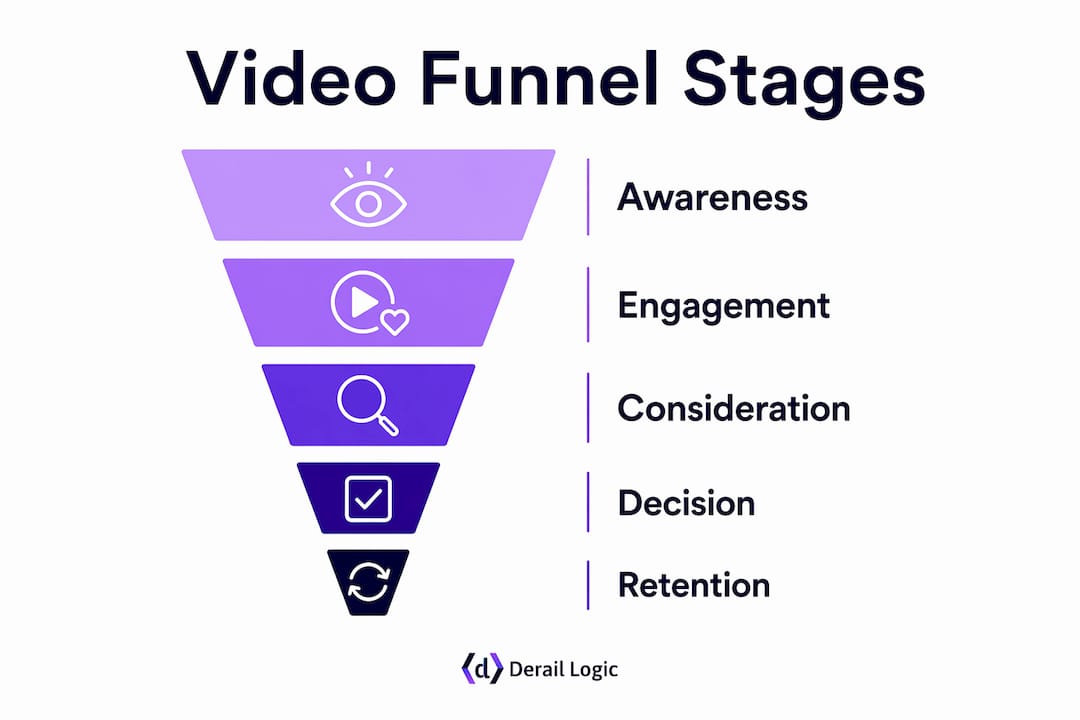
Engagement is about signaling value immediately — map each format to a specific buyer-journey job and resist the temptation to cram multiple objectives into one asset.
How do you build a video content strategy from scratch?
Planning is where most video programs break down. Teams jump to production before they’ve answered the three questions that determine whether a video will perform: Who is it for? What do they need to do next? How will we know it worked?
The planning sequence
- Set one business objective. Revenue, pipeline, retention, or awareness — pick one per campaign. Vague goals produce vague videos.
- Define the audience segment. A B2B marketing director and a DTC first-time buyer need completely different formats, runtimes, and tones.
- Map to a funnel stage. Awareness videos educate; consideration videos differentiate; decision videos convert. Each stage has a different success metric.
- Choose one measurable KPI. Watch-through rate for awareness, CTR or demo requests for consideration, conversion rate or cost-per-acquisition for decision.
- Select the primary format. Let the job-to-be-done dictate the format, not the other way around.
- Plan derivatives upfront. Before you shoot, identify which clips, social cards, and blog sections will come from the primary asset. One 15-minute video can become 8–12 pieces of content — clips, blog posts, email sequences, and ads.
- Define the distribution channel and CTA. Where will the primary video live? What action do you want viewers to take?
Campaign planning checklist
Before any production begins, confirm you have answers to:
- Audience segment and persona
- Job-to-be-done at this funnel stage
- Primary channel and hosting decision
- Format and target runtime
- Hook concept (first 3 seconds)
- CTA and destination URL
- KPI and measurement setup (UTMs, pixels, CRM event)
B2B vs. DTC differences: B2B teams typically need longer consideration cycles, so explainers and demos carry more weight. DTC brands see faster returns from short-form UGC and testimonials. Neither model benefits from mixing objectives in a single video.
91% of businesses now use video, and teams adopting AI video tools report an average 4.2x ROI within six months. The competitive gap is no longer between companies that use video and those that don’t — it’s between teams with a repeatable system and those producing one-off assets.

Pro Tip: For your first test video, pick the one question your sales team answers on every call. That question is your script. It already has a proven audience and a clear job-to-be-done.
What does a practical video production workflow look like?
Production doesn’t need to be expensive to be effective. It needs to be consistent. Here’s the operational sequence that keeps quality up and chaos down.
Step-by-step production checklist
- Pre-production brief: Document the objective, audience, format, runtime target, key message, and CTA before anyone picks up a camera.
- Script: Open with the hook (the payoff or the problem), deliver one core idea, close with a clear CTA. Avoid multi-topic scripts.
- Shot list and storyboard: Even a simple three-column shot list (shot type, action, audio note) prevents wasted takes.
- Permissions and releases: Collect signed model releases for any on-camera talent. Confirm music licensing — royalty-free libraries like Epidemic Sound or Artlist are standard for commercial use.
- Shoot: Prioritize audio over visual polish. A crisp lavalier mic on a smartphone outperforms a 4K camera with poor sound every time.
- Edit: Cut to the hook within 3 seconds. 85% of social video is watched without sound, so captions are non-negotiable, not optional.
- Accessibility pass: Add closed captions, check text contrast ratios (WCAG 2.1 AA minimum), and include audio descriptions for any visual-only information.
- Export and spec check: Match specs to the destination platform before upload.
Platform technical specs
| Platform | Recommended Resolution | Aspect Ratio | Max File Size | Codec |
|---|---|---|---|---|
| YouTube | — | 16:9 | — | MP4 |
| TikTok / Reels | — | 9:16 | — | MP4 |
| — | 16:9 or 1:1 | 5 GB | MP4 | |
| Landing page | — | 16:9 | Compress to under 10 MB | MP4 |
Hosting via third-party embeds can slow page load and leak traffic to competitor recommendations. For landing pages where conversion matters, dedicated video hosting preserves page performance and keeps viewers inside your funnel.
AI tools like those built into platforms such as Vmake can accelerate caption generation, clip cutting, and script prototyping — useful for lean teams managing high content velocity.
How do you distribute and repurpose one video across channels?
The production is done. Now the real leverage begins. A single long-form video, published strategically, can fuel weeks of content across every channel in your mix.
Channel checklist
- YouTube: Home base for the primary long-form asset. Optimized titles, descriptions, chapters, and transcripts make it an SEO asset that compounds over time. A YouTube video can continue generating qualified leads for years, while typical blog posts decay in 90 days.
- TikTok / Reels / Shorts: Short clips cut from the primary video. Publish within 48 hours of the primary release to capture momentum.
- LinkedIn: Works best for B2B. Native video uploads outperform links; square or vertical formats perform better in the feed than 16:9.
- Email: Embed a thumbnail with a play button linking to the hosted video. The word “video” in a subject line consistently lifts open rates.
- Landing pages: Place the primary video above the fold on product or lead-gen pages. Pair with a video landing page built for conversion, not just playback.
- Blog posts: Embed the video and publish a written version of the transcript as the post body. One production, two indexable assets.
Repurposing flow: one video, 8–12 assets
- Publish the full video on YouTube (primary asset, day 1).
- Cut 3–5 short clips (15–60 seconds) for TikTok, Reels, and Shorts (within 48 hours).
- Write a blog post using the transcript as the draft (day 2–3).
- Pull 3–5 quote cards or stat graphics for organic social (day 3–4).
- Build a 3-email nurture sequence using the video’s key points (week 2).
- Create a paid social ad from the strongest 15-second clip (week 2).
- Add the video to a relevant landing page or resource hub (ongoing).
Stagger the publishing schedule so each derivative gets its own promotion window. Cross-channel CTAs (“watch the full breakdown on YouTube”) drive viewers between platforms and extend total reach without additional production cost.

Which KPIs actually tell you if your video is working?
Vanity metrics are easy to collect and hard to act on. The KPIs that matter connect video engagement to business outcomes.
Video KPI reference
| KPI | Definition | What It Tells You |
|---|---|---|
| Views | Total play count | Reach; useful for awareness benchmarking |
| Watch-through rate | % of video watched to completion | Content quality and audience relevance |
| CTR (click-through rate) | Clicks on CTA / total impressions | Offer relevance and CTA effectiveness |
| Assisted conversions | Conversions where video was in the path | Pipeline influence, not last-touch credit |
| Conversion rate | Conversions / total video viewers | Bottom-funnel effectiveness |
| Cost per view (paid) | Ad spend / views | Paid efficiency benchmark |
Measurement setup checklist
- Tag every video destination URL with UTM parameters (source, medium, campaign, content).
- Fire a custom event in Google Analytics 4 (GA4) at 25%, 50%, 75%, and 100% watch milestones.
- Place retargeting pixels on video landing pages to build warm audiences for paid campaigns.
- Connect CRM contact records to video engagement events — especially for B2B, where pipeline influence and long sales cycles require multi-touch attribution.
- Review watch-through rate by video segment to identify where viewers drop off.
Testing priorities
Run one variable at a time. Start with hooks (first 3 seconds), then thumbnails, then CTAs, then runtime. Hook testing alone often produces the largest performance lift because the first 3 seconds determine whether viewers keep watching at all. After hooks, test caption styles — animated captions versus static text can meaningfully affect retention on short-form platforms.
For B2B teams, map video engagement scores (watch time + CTA clicks) to CRM pipeline stages. For DTC, measure purchase lift among viewers versus non-viewers in the same cohort.
What does video production actually cost, and how do you scale it?
Budget anxiety is one of the main reasons video programs stall. The honest answer: you can start for almost nothing and scale methodically.
Budget tiers
- Low-cost (in-house / mobile): $0–$2,000 per video. Smartphone camera, a $50–$100 lavalier mic, natural light or a basic ring light, and free editing software like DaVinci Resolve. Best for social clips, talking-head explainers, and UGC-style content.
- Mid-range (small production): $2,000–$10,000 per video. A freelance videographer or small crew, basic studio rental or dressed location, professional editing, and motion graphics. Suitable for product demos, brand stories, and testimonials.
- High-fidelity (studio / agency): $10,000–$50,000+ per video. Full crew, professional talent, color grading, original music, and multi-platform delivery. Reserved for hero brand films, major campaign launches, or high-stakes sales assets.
Timeline benchmarks
| Production Tier | Pre-Production | Shoot | Post-Production | Total |
|---|---|---|---|---|
| Low-cost (in-house) | 1–2 days | 1 day | 1–2 days | 3–5 days |
| Mid-range | 1–2 weeks | 1–2 days | 1–2 weeks | 3–4 weeks |
| High-fidelity | 3–6 weeks | 2–5 days | 3–6 weeks | 8–16 weeks |
Scaling efficiently means reducing the marginal cost per asset, not the quality of the primary video. Batch shoots (filming multiple videos in a single day), template-based editing, and the derivation workflow described earlier are the three levers that make a weekly cadence sustainable for small teams. For teams with limited resources, enterprise-grade marketing workflows are increasingly accessible without agency-level budgets.
Fill-in-the-blank video templates for every funnel stage
Templates reduce planning friction. Adapt these to your product, audience, and channel.
Template scripts by funnel stage
-
30-second awareness hook (short-form vertical)
- Hook (0–3s): “[Surprising stat or bold claim about your audience’s problem]”
- Problem (3–10s): “Most [audience] struggle with [specific pain point].”
- Tease (10–25s): “Here’s the one thing that changes it: [core idea, no full reveal].”
- CTA (25–30s): “Follow for the full breakdown” or “Link in bio.”
-
90-second product demo (consideration)
- Hook (0–5s): “Here’s exactly how [product] solves [specific problem] in under 2 minutes.”
- Setup (5–20s): Show the problem state — what does it look like before?
- Demo (20–75s): Walk through the key feature or workflow step by step.
- CTA (75–90s): “Try it free at [URL]” or “Book a demo.”
-
3–5 minute explainer (awareness / SEO)
- Hook (0–15s): State the question the video answers and why it matters.
- Context (15–60s): Frame the problem with one concrete example or stat.
- Core content (60s–4:00): Cover 3–5 key points, one per segment.
- Summary (4:00–4:30): Recap the main takeaway in one sentence.
- CTA (4:30–5:00): Subscribe, download, or visit a resource page.
-
60-second onboarding clip (retention)
- Hook (0–5s): “You just [completed action]. Here’s the fastest way to [next value milestone].”
- Steps (5–50s): Walk through 2–3 specific actions with screen recording or close-up shots.
- Encouragement + CTA (50–60s): “You’re set. If you get stuck, [support resource].”
Metadata and SEO title suggestions
- Include the primary keyword in the first 60 characters of the YouTube title.
- Write descriptions of 150–300 words with the keyword in the first two sentences.
- Add 3–5 relevant tags; prioritize specificity over volume.
- Use chapters (timestamps) in descriptions for long-form videos — they improve both UX and SERP visibility.
Pro Tip: For each template, write the CTA before you write the hook. Knowing exactly what action you want viewers to take makes every other scripting decision easier.
How does Derail Logic help you run video marketing at scale?
Running a video content program across multiple channels creates a coordination problem fast. Briefs live in one tool, assets in another, analytics in a third. That fragmentation is where execution breaks down.
Derail Logic’s MartechAI platform addresses this directly. The campaign studio connects brief creation, asset management, and distribution scheduling in a single workflow. The content studio supports AI-driven content generation from real business data, so derivative assets — social captions, email copy, blog drafts — can be produced from the same source as the primary video brief.
The platform’s CRM integration means video engagement events (watch milestones, CTA clicks) can be tied directly to contact records, giving B2B teams the multi-touch attribution data they need to connect video performance to pipeline. Analytics and attribution run inside the same environment, so there’s no manual stitching between platforms.
For teams using a data-driven content strategy, MartechAI’s AI engine uses actual business data rather than generic templates, which keeps content relevant to specific audience segments rather than producing generic output.
Pro Tip: Use MartechAI’s campaign studio to map your primary video asset and all planned derivatives before production begins. Seeing the full derivation tree upfront prevents the common mistake of shooting footage that doesn’t translate to short-form clips.
Legal and ethical considerations in video content marketing
Video production creates legal exposure that written content typically doesn’t. Three areas require consistent attention.
Copyright is the most common issue. Background music, stock footage, and even ambient audio in a shoot location can trigger copyright claims on YouTube or result in takedowns on other platforms. Use royalty-free music from licensed libraries, confirm the licensing tier covers commercial use, and document every license. For stock footage, verify that the license covers the distribution channels you plan to use.
Permissions and releases apply to any person appearing on camera. A signed model release is standard practice for talent, employees, and customers featured in testimonials. For user-generated content, obtain explicit written permission before repurposing any content a customer created independently. Verbal consent is not sufficient for commercial use.
Privacy matters most when video is used in retargeting or personalization workflows. If you’re collecting viewer data through embedded players or tracking pixels, your privacy policy must disclose this. For any video featuring minors, additional consent requirements apply under both federal guidelines and state-level laws like the California Consumer Privacy Act (CCPA). When in doubt, consult a qualified attorney before publishing.
This article provides general information, not legal advice. Confirm current requirements with a qualified legal professional for your specific situation.
Key Takeaways
A video-first content program built around one primary asset and a clear derivation workflow consistently outperforms ad hoc video production on both reach and ROI.
| Point | Details |
|---|---|
| One objective per video | Define awareness, consideration, or decision before scripting; mixed-objective videos underperform. |
| Primary asset first | Produce one long-form anchor video, then derive 8–12 assets (clips, emails, ads, blog posts) from it. |
| Hook in 3 seconds | The first 3 seconds determine retention; test hooks before thumbnails or CTAs. |
| Measure what moves pipeline | Track watch-through rate, CTR, and assisted conversions — not just views. |
| Derail Logic centralizes the workflow | MartechAI connects brief, derivation, CRM attribution, and analytics in one platform. |
The part most video strategies get wrong
Most teams treat video as a campaign deliverable rather than a content system. They produce a hero video for a product launch, publish it once, and move on. The video gets 800 views, the team concludes “video doesn’t work for us,” and the program stalls.
The problem isn’t the video. It’s the absence of a derivation and distribution plan. A single well-produced explainer, published once with no follow-on clips, no email integration, and no paid amplification, will almost always underperform. The same video, treated as a primary asset with 8–12 derivatives and a staggered release schedule, can drive measurable pipeline for months.
There’s also an organizational issue that rarely gets discussed. Video programs fail when measurement ownership is unclear. If the content team produces the video but the analytics team owns the KPIs and the paid team controls distribution, no one is accountable for the full-funnel result. The teams that consistently get ROI from video have one person or function that owns the brief-to-measurement loop, even if execution is distributed.
The other underrated factor: consistency beats quality at the early stages. A team publishing one polished video per quarter will almost always be outpaced by a team publishing four imperfect videos per month. Frequency builds algorithmic momentum on YouTube and social platforms, generates more data for optimization, and compounds audience trust over time. Polish matters more as the program matures and the audience grows.
Video is one of the few content types where the asset can genuinely appreciate in value. A well-optimized YouTube video continues generating search traffic and leads long after a blog post has faded from page one. That’s not a reason to abandon written content — it’s a reason to treat video production with the same long-term investment mindset you’d apply to any durable business asset.
What Derail Logic’s MartechAI platform does for video-first teams
Managing a video content program across planning, production, distribution, and measurement is operationally complex. Most teams end up with a patchwork of disconnected tools, and the “invisible waste” of manual handoffs between them quietly erodes the ROI of every video they produce.

Derail Logic’s MartechAI platform gives marketing teams and business owners a single environment to run the entire workflow. The campaign studio handles brief creation and asset planning. The content studio generates derivative copy — social captions, email sequences, blog drafts — from the same brief as the primary video. CRM integration ties video engagement events directly to contact records, so B2B teams can see exactly how video touches influence pipeline without manual data stitching. Analytics and attribution run natively, which means no separate reporting layer to maintain.
For teams ready to move from ad hoc video production to a repeatable, measurable system, marketing automation through MartechAI is the practical next step. Start a free trial at derail-logic.com and connect your first video campaign to a full attribution workflow.
Useful sources and tools
The following resources support deeper learning across production, strategy, measurement, and accessibility.
| Resource | Why It’s Useful |
|---|---|
| MDS: What Is Video Content Marketing? | Founder-focused breakdown of full-funnel video strategy and ROI framing |
| Lychee: Video-First Content Strategy | Practical guide to AI-assisted video-first workflows and engagement benchmarks |
| CO Consulting: Video-First Playbook | Detailed derivation workflow and release schedule guidance |
| Swarmify: Video Hosting and Marketing Strategy | Covers hosting decisions, page speed, and data ownership considerations |
| Zawa: Creating Engaging Video Content | Hook strategy, caption best practices, and retention guidance |
| Vmake: Beginner’s Guide to Engaging Video | AI-assisted production tools for script generation, clip cutting, and captions |
| IFVP: Why Our Brain Loves Pictures | Cognitive science behind visual communication — useful for storytelling decisions |
| Derail Logic Blog | Marketing strategy, campaign planning, and platform best practices |
FAQ
What is video content marketing?
Video content marketing is the practice of using purpose-built video assets to attract, educate, and convert a defined audience at specific stages of the buyer journey. Unlike traditional video advertising, it prioritizes delivering genuine value to the viewer rather than interrupting them with a brand message.
What are the 5 C’s of content marketing?
Definitions vary across sources, but a widely used version covers: Content (what you create), Context (where and when it appears), Connection (how it resonates with the audience), Community (the audience you build), and Conversion (the action you drive). These apply directly to video planning when you map each element to a specific funnel stage.
How do you measure whether a video content program is working?
Track watch-through rate for awareness videos, CTR and demo requests for consideration assets, and conversion rate or assisted conversions for decision-stage content. Connect video engagement events to your CRM to measure pipeline influence, not just last-touch attribution.
How many assets can you realistically get from one video production?
One 15-minute long-form video can become 8–12 pieces of derivative content: short social clips, a blog post, an email sequence, paid ad cuts, and social graphics, if the derivation workflow is planned before the shoot.
What is the 3-3-3 rule in marketing?
The 3-3-3 rule is not a single standardized framework — the term appears in several different contexts with varying definitions. In video specifically, a common version refers to the first 3 seconds (hook), the first 30 seconds (core value delivery), and the first 3 minutes (full engagement window) as the three critical retention checkpoints to optimize.


